Chapter 5: Amazon VPC, Your Private Network in the Cloud
It is your second week as a data engineer, and you have been asked to build a small pipeline: a Python job on an EC2 instance pulls orders from a Postgres database on RDS and writes them to S3.
You launch the instance, launch the database, and run the job. It hangs. The script can't reach the database. You open the database to 0.0.0.0/0 to "just get it working", and now it connects, but so could anyone on the internet. A week later a teammate moves the job into a private subnet "for security" and it fails again, this time because pip install can't download anything. When it finally works, the monthly bill shows a line called NAT Gateway that nobody can explain.
Every one of those problems is a networking problem, and every one of them lives inside an Amazon VPC. By the end of this chapter you will know what each piece of a VPC does, why the order you build them in matters, and how to design a network that keeps your data private without breaking your pipelines. You will finish by building one yourself.
5.1 What a VPC Is
A Virtual Private Cloud (VPC) is a virtual network inside AWS that closely resembles a traditional network you would run in your own data centre, with the benefit of AWS's scalable infrastructure.
The important word is private. Your VPC is logically isolated from every other virtual network in AWS, including other customers' VPCs and your own other VPCs. Nothing gets in or out unless you deliberately build a way for it to.
The easiest way to picture it is as a gated estate inside a city.
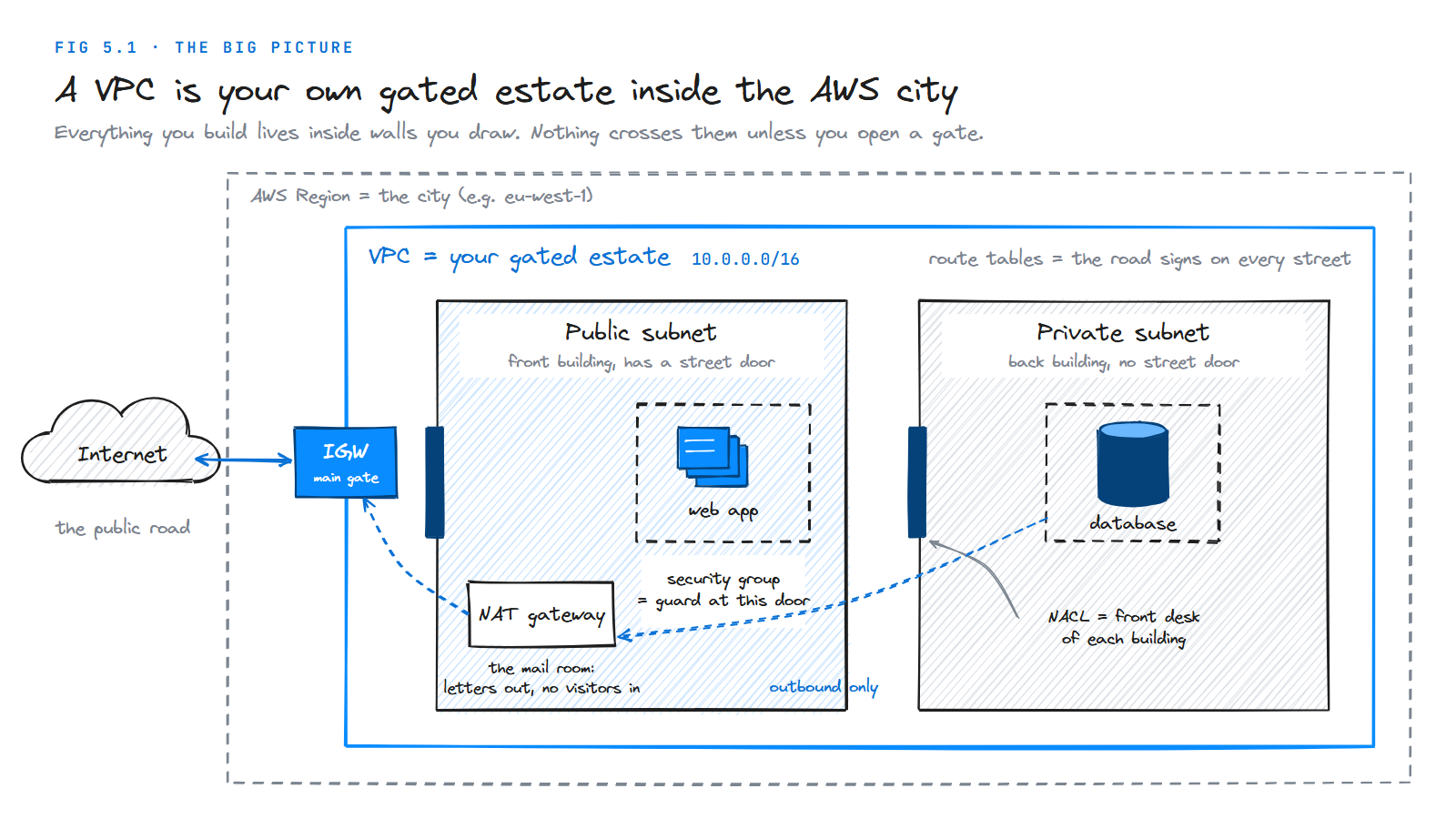
| In the picture | In AWS | What it does |
|---|---|---|
| The city | Region (e.g. eu-west-1) | A geographic area of AWS data centres |
| The gated estate | VPC | Your private, walled-off network |
| The estate's address range | CIDR block | The pool of private IP addresses the VPC can use |
| Buildings | Subnets | Smaller sections of the VPC, each in one Availability Zone |
| Road signs | Route tables | Rules that say where traffic may go next |
| The main gate | Internet gateway | The connection between your VPC and the internet |
| The mail room | NAT gateway | Lets private resources send traffic out, never lets strangers in |
| A building's front desk | Network ACL | Checks everything entering or leaving a subnet |
| A guard at each door | Security group | Checks everything entering or leaving one resource |
Keep this picture in mind. Every section below zooms into one part of it.
Where a VPC lives
A VPC belongs to one Region and never extends into another one. Inside that Region it spans all the Availability Zones (AZs). Subnets are different: each subnet lives in exactly one AZ.
| Resource | Scope | What that means |
|---|---|---|
| VPC | Region | You create it in a Region, not in an AZ |
| Subnet | Availability Zone | Each subnet sits in one AZ; to use two AZs you need at least two subnets |
| Security group | VPC | Usable by any resource in that VPC |
| Internet gateway | VPC | One per VPC, attached to the whole VPC |
That last row of facts drives most high-availability designs: to survive one AZ failing, you put a copy of each subnet in a second AZ.
What you get the moment you create one
When you create a VPC, AWS also creates or attaches a few things for you automatically: a main route table, a default network ACL, a default security group, and a DHCP options set (which tells instances which DNS server to use). You can change them, but you can't have a VPC without them.
Now that you know what a VPC is, the natural next question is when a data engineer actually has to care about one.
5.2 Where You'll Meet a VPC as a Data Engineer
You might think networking belongs to "the infrastructure team". In practice, almost every AWS data service either runs inside a VPC or has to reach into one.
| Scenario | Why the VPC matters |
|---|---|
| A pipeline reads from RDS or Aurora | The database sits in private subnets; your job must be in the same VPC (or connected to it) and allowed by the database's security group |
| AWS Glue connects to a JDBC source | Glue creates network interfaces inside your subnets, and its security group needs a self-referencing rule so Glue workers can talk to each other |
| Amazon MWAA (managed Airflow) | Requires a VPC with two private subnets in different AZs |
| Amazon EMR or Redshift | Clusters launch into subnets you choose; their placement decides who can query them |
| Lambda functions that query a database | A VPC-attached Lambda gets no internet access unless the subnet routes through a NAT gateway |
| Amazon MSK (Kafka) | Brokers live in your subnets, one per AZ |
| On-premises sources | A VPN or Direct Connect link lands in your VPC, so the VPC is the bridge between the old world and the new |
Your data is only as private as the network it sits in. Encryption and IAM protect who can read data; the VPC decides who can even reach it.
There are a lot of parts involved, so before taking them one at a time, here is the whole picture on one page.
5.3 The Building Blocks at a Glance
Figure 5.2 shows a typical two-AZ VPC. The numbers are the order you build things in, which is also the order this chapter explains them.
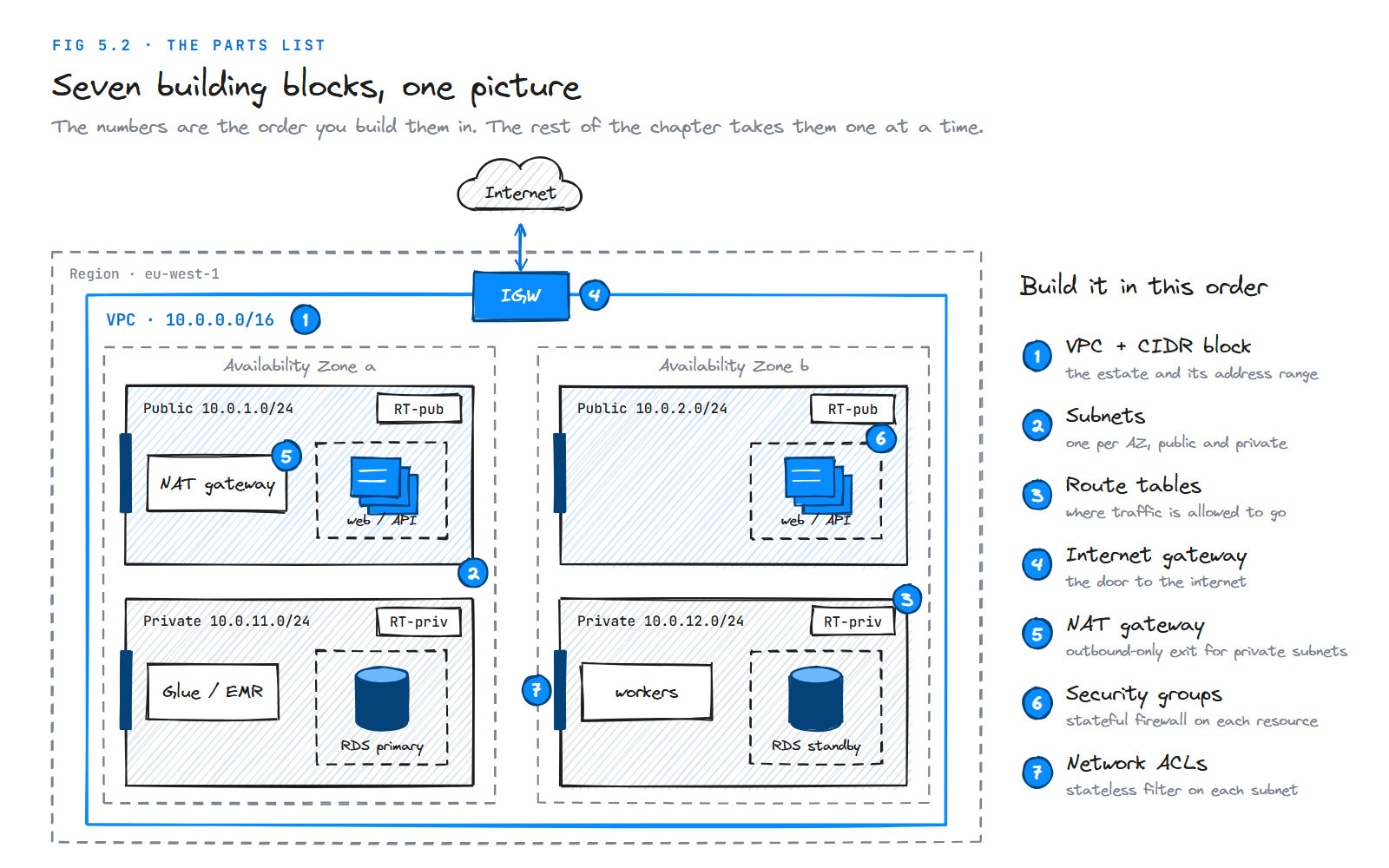
| # | Component | One-line job |
|---|---|---|
| 1 | VPC + CIDR block | Defines the network and its private address range |
| 2 | Subnets | Divide the range into pieces, each in one AZ |
| 3 | Route tables | Decide where traffic from each subnet goes |
| 4 | Internet gateway (IGW) | Connects the VPC to the internet |
| 5 | NAT gateway | Gives private subnets outbound-only internet access |
| 6 | Security groups | Stateful firewall around each resource |
| 7 | Network ACLs | Stateless firewall around each subnet |
Everything starts with addresses, so that's where we begin.
5.4 CIDR: Addresses for Your Network
Every resource in a VPC gets a private IP address. When you create a VPC, you must give it a block of addresses to hand out, written in CIDR notation (Classless Inter-Domain Routing). It looks like 10.0.0.0/16.
Reading CIDR notation
An IPv4 address is 32 bits, written as four numbers from 0 to 255. The number after the slash, the prefix, says how many of those 32 bits are fixed. The remaining bits are free, and every combination of them is one address.
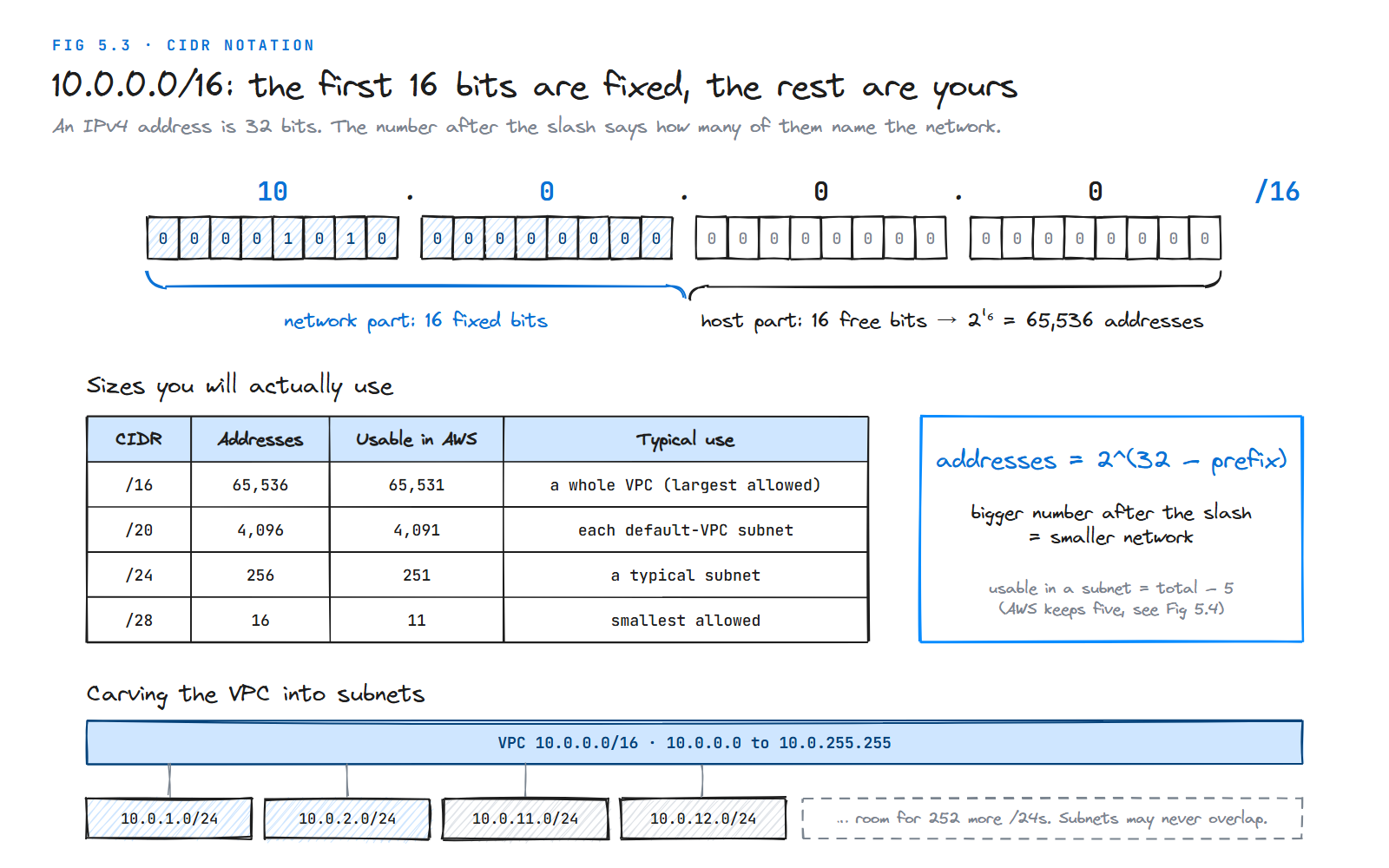
The rule is a single formula:
addresses = 2^(32 − prefix)
| CIDR | Addresses | Usable in an AWS subnet | Typical use |
|---|---|---|---|
/16 | 65,536 | 65,531 | A whole VPC (the largest AWS allows) |
/20 | 4,096 | 4,091 | Each subnet of the default VPC |
/24 | 256 | 251 | A typical subnet |
/28 | 16 | 11 | The smallest subnet AWS allows |
The thing that trips beginners up: a bigger number after the slash means a smaller network. A /28 is tiny; a /16 is huge.
Rules AWS enforces
Size limits. A VPC's IPv4 CIDR block must be between /16 and /28. Subnets have the same limits.
Private ranges. Use the private ranges from RFC 1918, which are never routed on the public internet: 10.0.0.0/8, 172.16.0.0/12 and 192.168.0.0/16.
Subnets can't overlap. Every subnet takes its own slice of the VPC's range. 10.0.1.0/24 and 10.0.1.128/25 can't both exist, because the second is inside the first.
The primary CIDR is permanent. Once the VPC exists you can't change its first CIDR block. You can add secondary CIDR blocks later (five per VPC by default, adjustable up to 50), so running out of space is fixable, but awkward. Plan generously.
Don't overlap with networks you'll connect to. If you might ever peer this VPC with another one, or connect it to your office network, their ranges must not overlap with yours. Two VPCs that both use 10.0.0.0/16 can never be peered. This is the mistake that's hardest to undo, so pick distinct ranges per VPC from day one (10.10.0.0/16 for dev, 10.20.0.0/16 for prod, and so on).
With the VPC's range chosen, the next step is to cut it into subnets.
5.5 Subnets
A subnet is a range of IP addresses inside your VPC, placed in one Availability Zone. You launch resources (EC2 instances, RDS databases, Glue network interfaces) into a subnet, never directly into a VPC.
Public and private subnets
AWS doesn't have a "public" checkbox. Whether a subnet is public or private depends entirely on its route table:
Public subnet. The subnet's traffic is routed to an internet gateway. A resource in it can talk to the internet over IPv4 only if it also has a public IPv4 address or an Elastic IP address.
Private subnet. The subnet has no route to an internet gateway. Nothing on the internet can reach resources in it directly.
For a data platform, almost everything belongs in private subnets: databases, ETL workers, Airflow, Spark clusters. Public subnets hold only the things that must face the internet, such as load balancers and NAT gateways.
The five reserved addresses
AWS keeps the first four and the last IP address of every subnet. You can't assign them to anything.
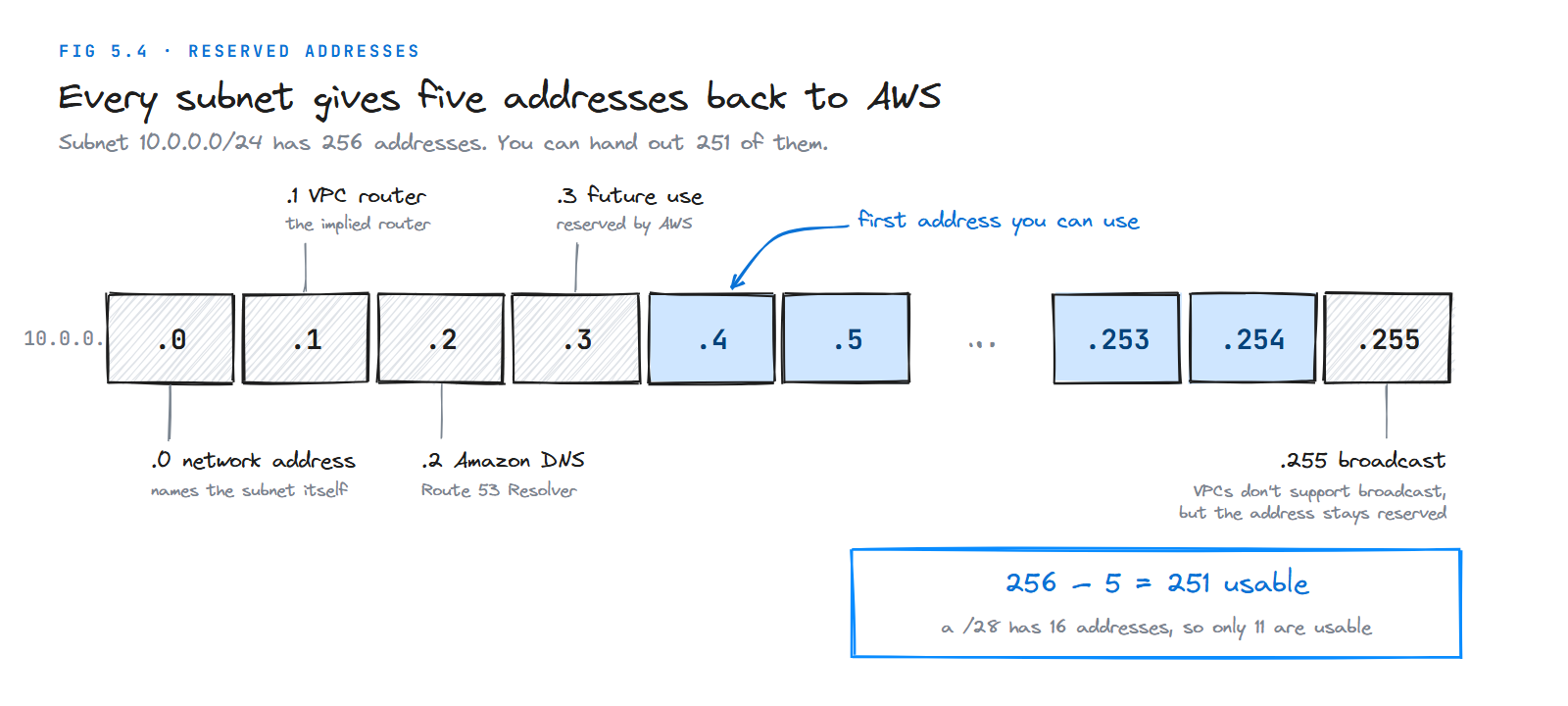
Address in 10.0.0.0/24 | Reserved for |
|---|---|
10.0.0.0 | Network address |
10.0.0.1 | The VPC router |
10.0.0.2 | The Amazon-provided DNS server (Route 53 Resolver) |
10.0.0.3 | Future use by AWS |
10.0.0.255 | Network broadcast address. VPCs don't support broadcast, but AWS reserves it anyway |
So a /24 gives you 256 − 5 = 251 usable addresses, and a /28 only 11. This matters more than it sounds: Glue, EMR and Lambda each consume IP addresses as they scale out, and a too-small subnet makes jobs fail with "insufficient IP addresses" errors.
A sensible layout
For a 10.0.0.0/16 VPC across two AZs:
| Subnet | AZ | CIDR | Holds |
|---|---|---|---|
| public-a | a | 10.0.1.0/24 | NAT gateway, load balancer |
| public-b | b | 10.0.2.0/24 | Load balancer |
| private-a | a | 10.0.11.0/24 | ETL workers, databases |
| private-b | b | 10.0.12.0/24 | ETL workers, database standby |
That uses 4 of the 256 possible /24s, leaving plenty of room to grow. A subnet now exists, but traffic doesn't yet know where to go. That's the route table's job.
5.6 Route Tables
Every VPC has an implied router. You never create it or see it as a resource; it's always there, and it's the central routing function that connects the subnets to each other and to gateways like the internet gateway.
A route table is the set of rules that router follows. Each rule, or route, says: "traffic for this destination goes to this target."
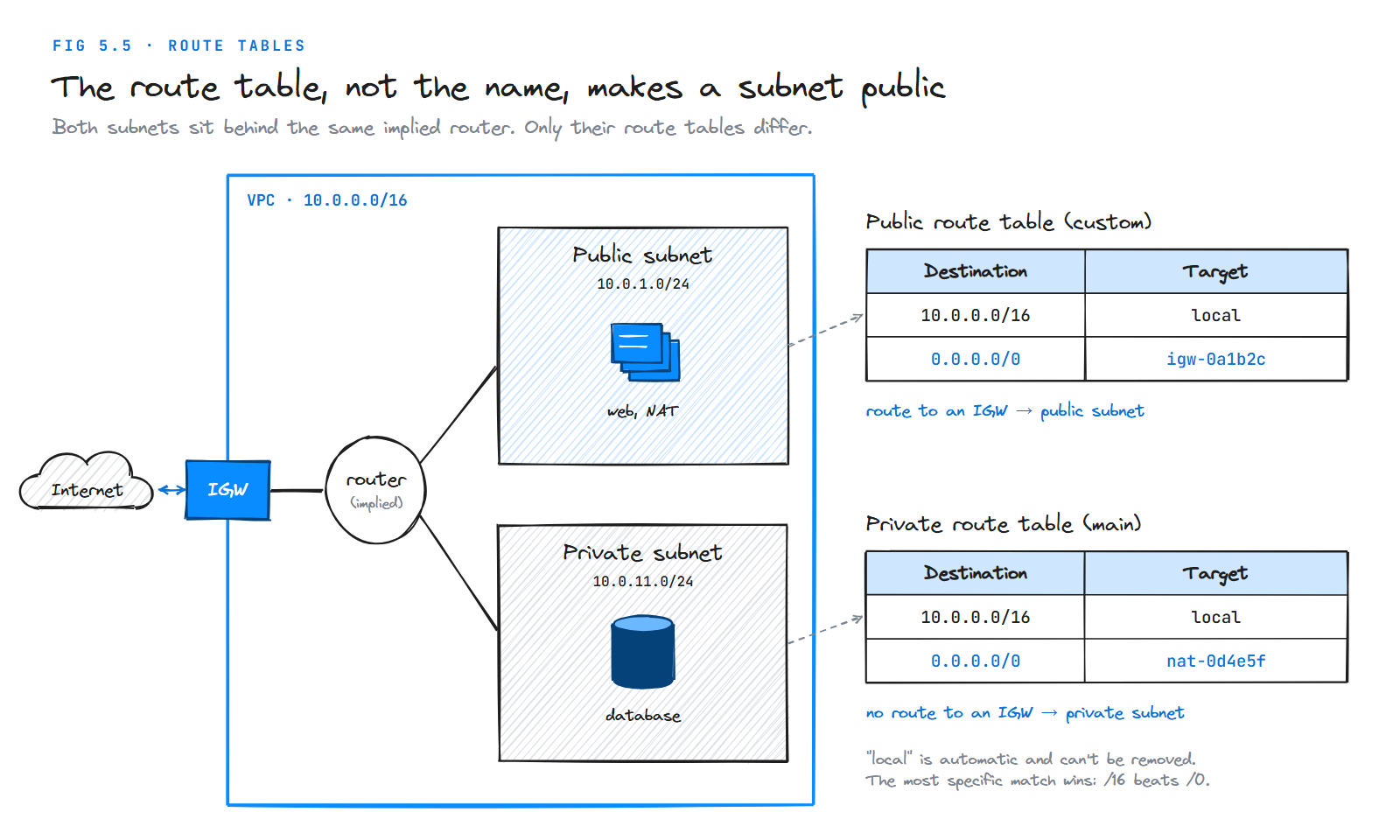
| Destination | Target | Meaning |
|---|---|---|
10.0.0.0/16 | local | Traffic for anywhere inside the VPC stays inside |
0.0.0.0/0 | igw-0a1b2c | Everything else goes to the internet gateway |
0.0.0.0/0 means "any IPv4 address". When more than one route matches, the router picks the most specific one (the longest prefix), so a packet for 10.0.5.9 matches 10.0.0.0/16 before it ever considers 0.0.0.0/0.
Rules of the road
Every VPC has a local route. It's created automatically and can't be removed. It's why every subnet in a VPC can reach every other subnet by default.
One subnet, one route table. Each subnet is associated with exactly one route table at any time. One route table can serve many subnets.
The main route table is the fallback. If you don't explicitly associate a subnet with a route table, it uses the VPC's main route table. You can edit the main route table, but you can't delete it.
You can swap which table is main. If you make a custom route table the new main one, the former main table becomes an ordinary custom table, and then you can delete it.
Keep the main table private. Since any new subnet silently inherits the main table, best practice is to leave the main table with no internet route and give public subnets an explicit custom table. A forgotten subnet then fails safe.
Limits. By default you can have 200 route tables per VPC and 500 non-propagated routes per route table (adjustable up to 1,000). Older course notes often say 50 routes; the default has since been raised.
The route 0.0.0.0/0 → igw needs something to point at. Let's build it.
5.7 Internet Gateway
An internet gateway (IGW) is a horizontally scaled, highly available virtual router that connects a VPC to the internet. It has no bandwidth limit to manage and no hourly charge of its own.
It does two jobs:
- It's a target in route tables for internet-bound traffic.
- It performs network address translation between a resource's private IPv4 address and its public IPv4 address. Your instance only ever knows its private address,
10.0.1.5; the IGW swaps that for the public one on the way out and back on the way in.
It supports both IPv4 and IPv6. (For IPv6 traffic that should only go out, AWS has a separate egress-only internet gateway.)
Making a subnet reach the internet
A default VPC already has an internet gateway attached. A custom VPC does not, and you need all of these:
| Step | Why |
|---|---|
| 1. Create an internet gateway | It's a separate resource |
| 2. Attach it to the VPC | One IGW per VPC, one VPC per IGW |
3. Add 0.0.0.0/0 → igw-… to the subnet's route table | Without the route, the gateway is unreachable |
| 4. Give the resource a public IPv4 or Elastic IP | The IGW needs a public address to translate to |
| 5. Allow the traffic in the security group and NACL | Routing gets packets there; firewalls decide if they're accepted |
Missing any one of these is the most common reason an instance "has internet but doesn't". Step 4 mentions Elastic IPs, which are worth a short detour.
5.8 Elastic IP Addresses
A normal public IPv4 address is temporary: stop and start an instance and it gets a new one. An Elastic IP address (EIP) is a static public IPv4 address that belongs to your account until you release it. You can move it from one instance or network interface to another.
You need EIPs for anything whose public address must not change: a NAT gateway (it requires one), or a server whose IP a partner has allow-listed.
| Fact | Detail |
|---|---|
| Default quota | 5 Elastic IPs per Region (adjustable) |
| Cost | Since February 2024, AWS charges for every public IPv4 address, in use or idle: $0.005 per hour, about $3.60 a month |
| Lifecycle | An EIP stays in your account, and keeps costing, until you release it |
The last row matters in the next section, where NAT gateways use EIPs.
5.9 NAT Gateway
Back to the opening story. Your ETL job sits in a private subnet, where it belongs. But it needs to pip install packages and call a SaaS API. It needs to reach the internet, while the internet must never be able to reach it.
A NAT (Network Address Translation) gateway lets resources in a private subnet connect to the internet or other AWS services, but prevents the internet from initiating a connection with those resources.
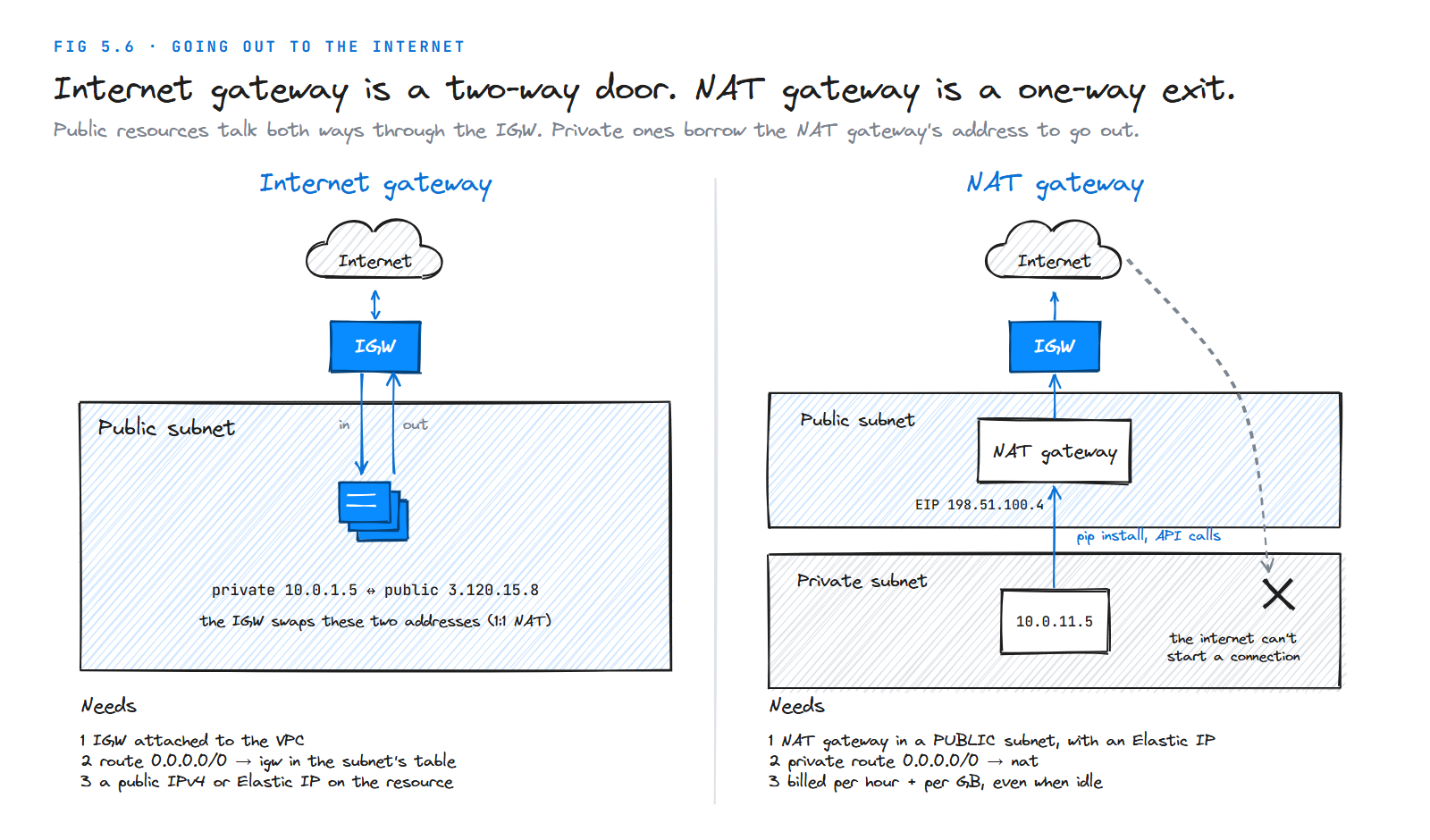
The private instance sends its request to the NAT gateway. The NAT gateway replaces the instance's private address with its own, sends the request out through the internet gateway, and passes the reply back. To the outside world, every request appears to come from the NAT gateway's Elastic IP. A connection that starts outside simply has nowhere to go.
So instances in a private subnet need no public IP addresses of their own.
Setting one up
Place it in a public subnet. You must specify the public subnet in which a (public) NAT gateway resides, because the NAT gateway itself needs to reach the internet gateway.
Give it an Elastic IP. You must associate an Elastic IP address with a public NAT gateway when you create it.
Point the private route table at it. After creating the NAT gateway, update the route table of your private subnets so internet-bound traffic (0.0.0.0/0) goes to the NAT gateway. This is the step people forget.
| Route table | Destination | Target |
|---|---|---|
| Public subnet's table | 0.0.0.0/0 | igw-… |
| Private subnet's table | 0.0.0.0/0 | nat-… |
What it costs
You're charged for creating and using a NAT gateway: an hourly charge plus a per-GB data processing charge, and normal EC2 data transfer charges apply on top. In us-east-1 that's $0.045 per hour (about $33 a month just for existing) plus $0.045 for every GB that passes through.
For a data engineer, that per-GB charge is the trap. A Spark job that reads 2 TB from S3 through a NAT gateway pays about $90 in processing fees for traffic that never needed to leave AWS. Section 5.14 shows how a free S3 gateway endpoint removes that cost entirely.
Deleting a NAT gateway does not release its Elastic IP. The EIP is disassociated but stays in your account, still billed, until you release it yourself.
High availability and newer options
A standard NAT gateway lives in one AZ (it's zonal). If that AZ fails, private subnets in other AZs that route through it lose internet access. The traditional fix is one NAT gateway per AZ, each AZ's private route table pointing at its own.
| Option | When to use it |
|---|---|
| Zonal public NAT gateway | The classic setup: one per AZ, in a public subnet, with an EIP |
| Regional NAT gateway | A newer mode that spans AZs automatically, needs no public subnet, and uses one ID in every route table. Good default for new builds |
| Private NAT gateway | Translates addresses to reach other VPCs or on-premises networks, not the internet. No EIP |
| NAT instance | An EC2 instance doing NAT by hand. Cheaper, but you patch and scale it. Legacy |
Routing is now complete: traffic knows how to get in and out. The remaining question is what traffic should be allowed, which is where the two firewalls come in.
5.10 Security Groups
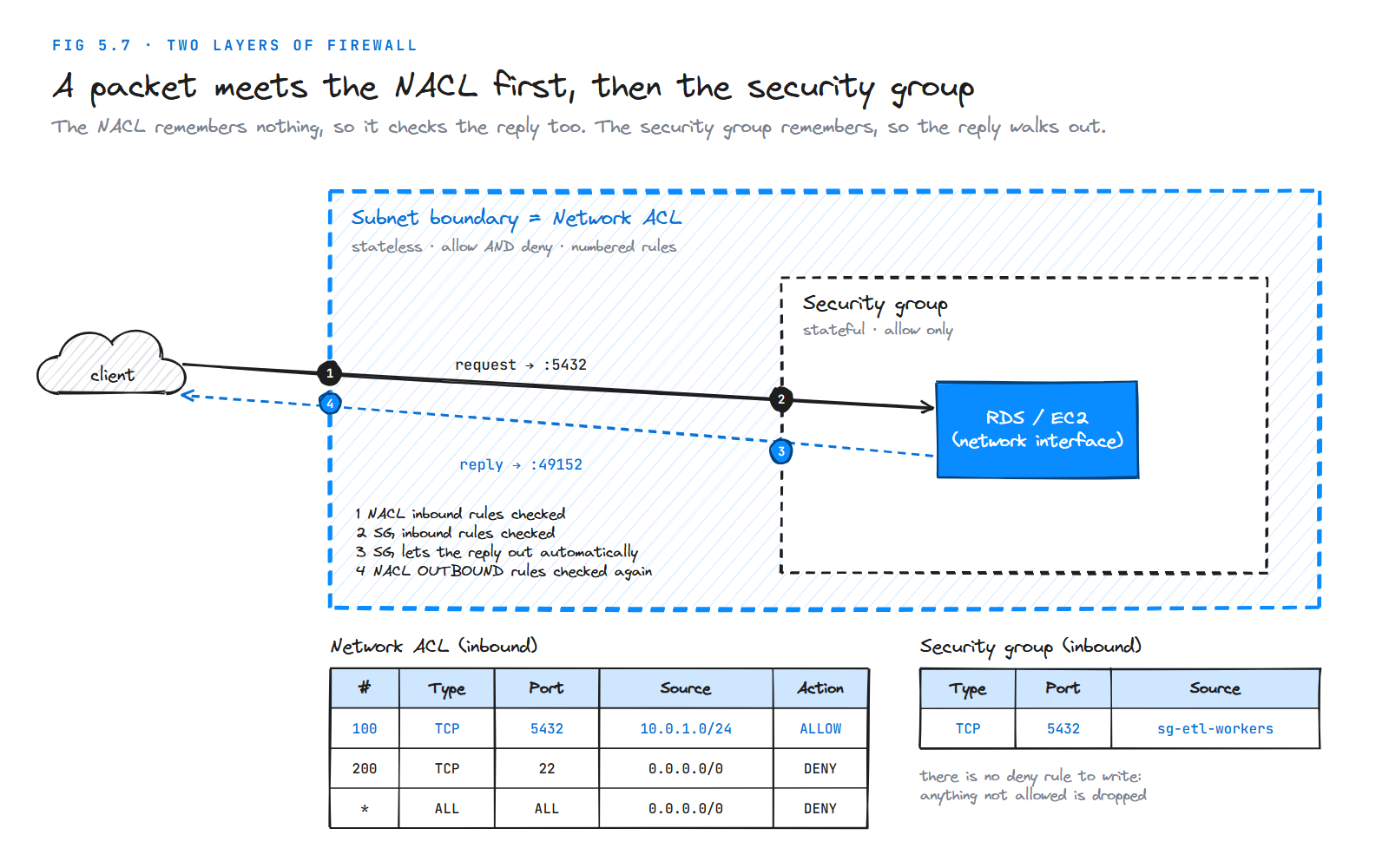
A security group is a virtual firewall that works at the network interface (ENI) level. It controls the traffic allowed to reach and leave the resource it's attached to, whether that's an EC2 instance, an RDS database, a Lambda function or a Glue job.
Four facts define how it behaves.
It only has allow rules. There is no "deny" rule in a security group. Anything you don't explicitly allow is dropped.
It's stateful. If an inbound request is allowed, the response is automatically allowed back out, even if no outbound rule mentions it. The same is true the other way: replies to your outbound requests always get back in.
It's attached to resources, not subnets. Two instances in the same subnet can have completely different security groups.
You can stack them. Up to 5 security groups can be applied to each network interface by default (adjustable up to 16). The rules from all of them are combined.
Default behaviour
| Security group | Inbound | Outbound |
|---|---|---|
| A new security group you create | Nothing allowed | All traffic allowed |
| The VPC's default security group | Allowed only from other members of the same group | All traffic allowed |
The pattern that makes data platforms safe
A security group rule's source doesn't have to be an IP range. It can be another security group. That's the most useful idea in this section:
| Security group | Inbound rule | Means |
|---|---|---|
sg-etl-workers | (none needed) | ETL workers accept no inbound traffic |
sg-postgres | TCP 5432 from sg-etl-workers | Only things wearing the ETL badge can reach the database |
Now it doesn't matter how many workers you scale to or what IPs they get; membership in the group is what grants access. Compare that with the opening story, where the database was opened to 0.0.0.0/0.
Security groups guard each resource. A second, coarser layer guards each subnet.
5.11 Network ACLs
A network access control list (NACL) allows or denies traffic at the subnet level. Every packet entering or leaving a subnet is checked against it. Traffic moving between resources inside the same subnet is not.
Where security groups are stateful and allow-only, NACLs are the opposite on both counts.
Stateless. A NACL remembers nothing. If you allow a request in, the response is not automatically allowed out; it must match an outbound rule too.
Allow and deny. Each rule says ALLOW or DENY. That makes NACLs the right tool for blocking a specific bad IP range, which a security group can't do.
Numbered rules, lowest first. Rules are numbered from 1 to 32766 and evaluated in order, starting from the lowest. The first rule that matches wins, and nothing after it is checked. Number them in steps of 10 or 100 so you can insert rules later.
A catch-all at the end. Every NACL ends with a rule numbered * that denies anything not matched above it. You can't remove it.
| NACL | Default rules |
|---|---|
| The VPC's default NACL | Allows all inbound and all outbound traffic |
| A custom NACL you create | Denies everything until you add rules |
One NACL per subnet. Each subnet is associated with exactly one NACL (the default one, if you don't choose). One NACL can cover many subnets.
The ephemeral port trap
When a client connects to your database on port 5432, the reply goes back to a random high port on the client, called an ephemeral port. Because NACLs are stateless, the outbound rules must allow that reply. If your NACL only allows outbound 5432, the connection hangs.
AWS's recommendation is to allow outbound TCP 1024 to 65535 for return traffic. This is the single most common NACL mistake.
5.12 Security Groups vs NACLs
A packet coming into your database meets both layers: first the NACL at the subnet's edge, then the security group at the resource.
| Security group | Network ACL | |
|---|---|---|
| Works at | Network interface (resource) | Subnet |
| State | Stateful: replies allowed automatically | Stateless: replies need their own rule |
| Rule types | Allow only | Allow and deny |
| Evaluation | All rules considered together | In number order; first match wins |
| Default (custom one) | Deny all in, allow all out | Deny all in and out |
| Can reference other groups | Yes | No, IP ranges only |
| Typical use | Your main, fine-grained access control | A coarse backstop, or blocking a known bad range |
In practice, do almost all of your access control with security groups. Leave the default NACL in place (it allows everything) unless you have a specific reason, such as a compliance rule or a range to block. Debugging a connection problem through two firewalls, one of which forgets state, is much harder than through one.
You now know every component. The next question is whether you have to build them at all, because AWS already gave you a VPC.
5.13 Default VPC vs Custom VPC
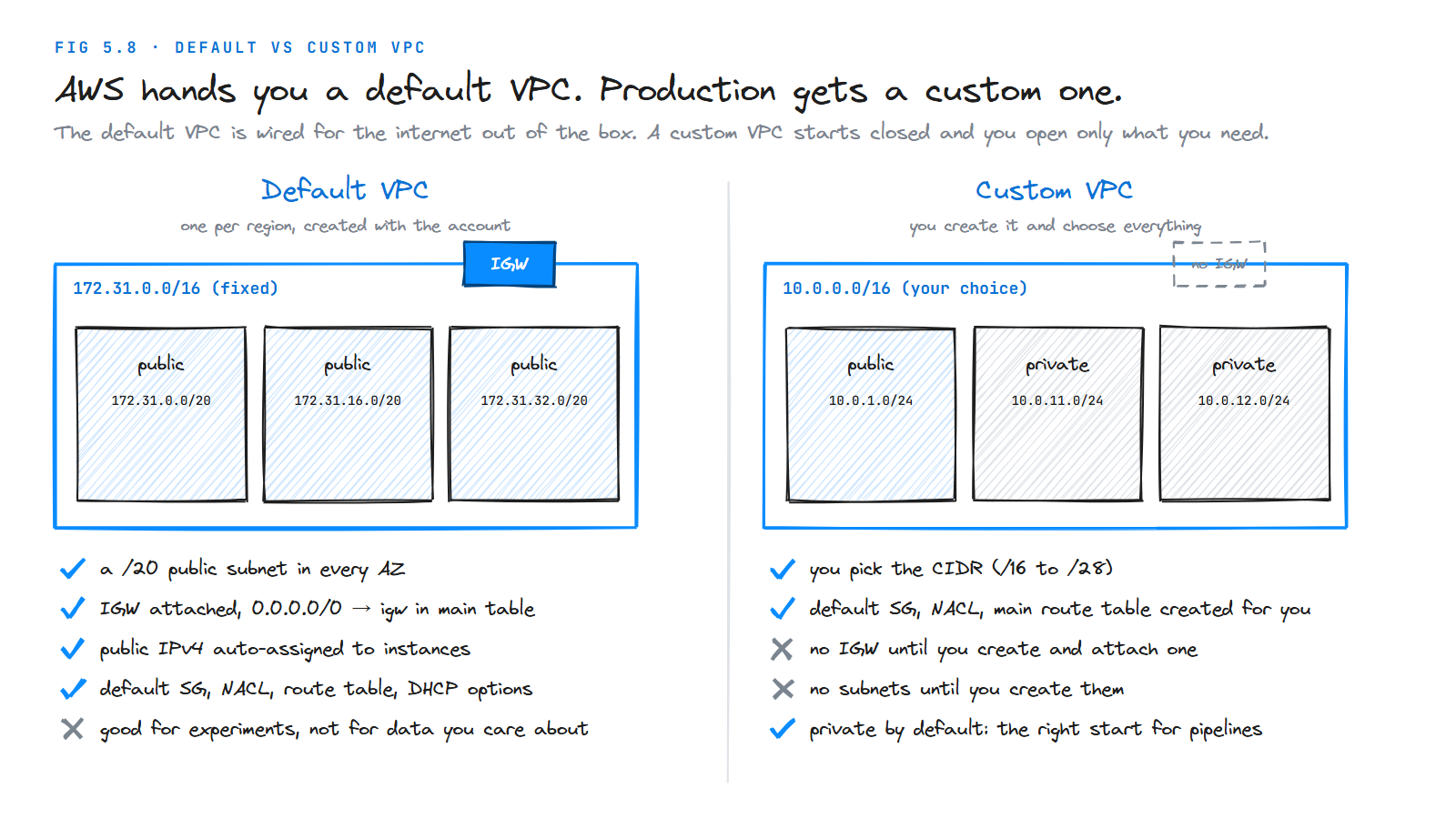
| Default VPC | Custom VPC | |
|---|---|---|
| Who creates it | AWS, in every Region, when the account is created | You |
| CIDR | Fixed: 172.31.0.0/16 | Your choice, /16 to /28 |
| Subnets | A /20 public subnet in every AZ | None until you create them |
| Internet gateway | Already attached, with 0.0.0.0/0 → igw in the main table | None until you create and attach one |
| Public IPs | Assigned to instances automatically | Off unless you turn it on |
| Security group, NACL, route table | Default ones created | Default ones created |
| Good for | Quick experiments and tutorials | Anything holding real data |
The default VPC is convenient precisely because everything in it is public. That's the wrong starting point for a database or a pipeline. A custom VPC starts closed, and you open only what you need.
Creating a custom VPC: the order that works
- Create the VPC with its CIDR block.
- Create subnets, public and private, in at least two AZs.
- Create an internet gateway and attach it to the VPC.
- Create route tables: a public one with
0.0.0.0/0 → igw, associated with the public subnets. - Create a NAT gateway in a public subnet (with an EIP) and add
0.0.0.0/0 → natto the private route table. - Create security groups for each tier.
- Adjust NACLs only if you need to.
The AWS console's "VPC and more" wizard does steps 1 to 5 in one screen, and is a good way to check your understanding once you've built one by hand.
5.14 Beyond One VPC
A single VPC with public and private subnets covers most learning projects. Real data platforms need a few more pieces, mostly to reach things outside the VPC without going through the internet.
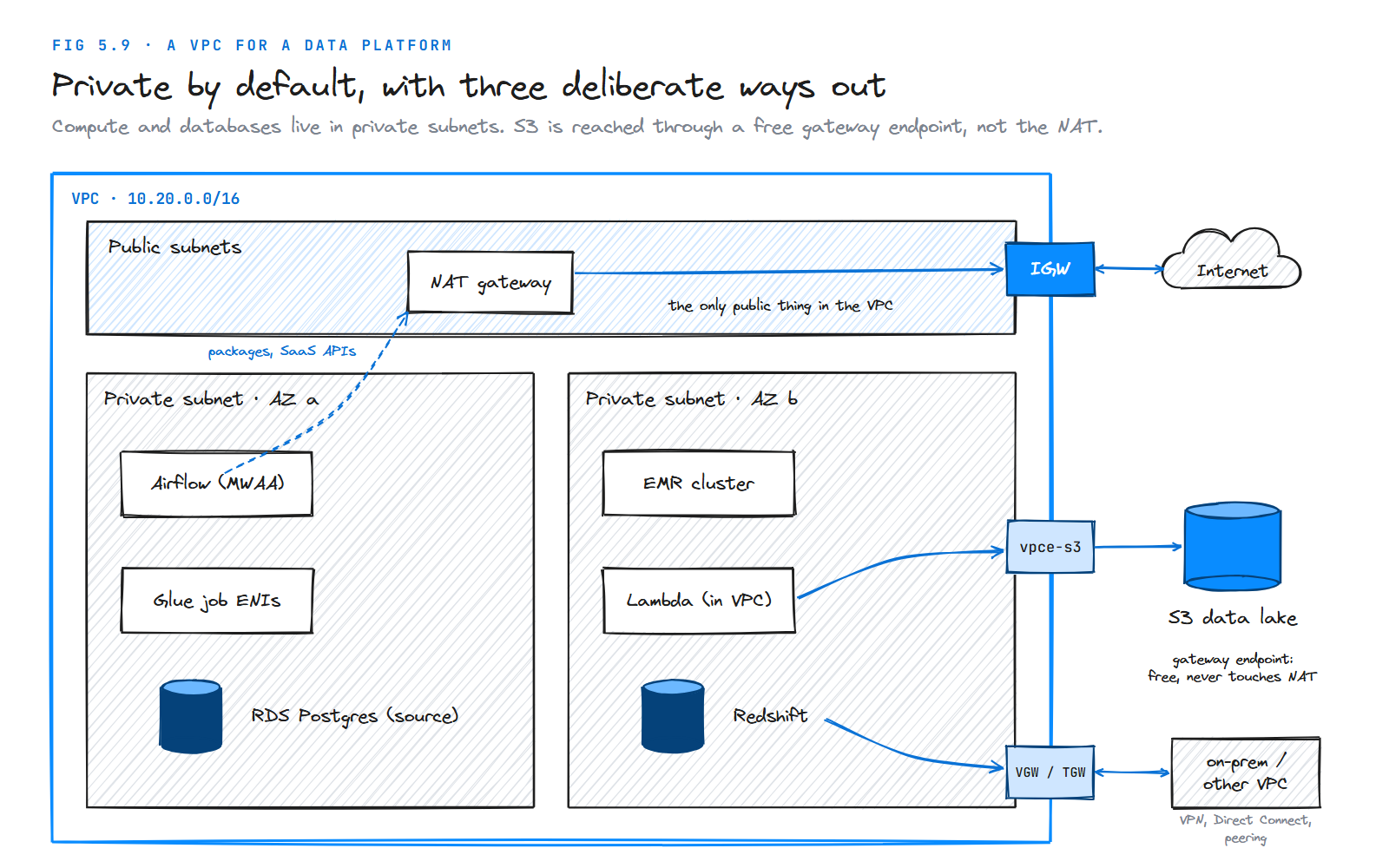
VPC endpoints
A VPC endpoint lets resources in a private subnet reach an AWS service without a NAT gateway, an internet gateway or a public IP. Traffic stays on the AWS network.
| Type | Services | Cost | How it works |
|---|---|---|---|
| Gateway endpoint | S3 and DynamoDB only | Free | Adds a route for the service to the route tables you pick |
| Interface endpoint (AWS PrivateLink) | Most other AWS services (Glue, Secrets Manager, STS, Kinesis…) | Hourly per AZ + per GB | Puts a network interface with a private IP in your subnet |
Every data platform VPC should have an S3 gateway endpoint. It's free, it takes two minutes, and it stops your S3 traffic from paying NAT processing fees. It also lets you write bucket policies that only accept requests from your VPC (aws:sourceVpc) or endpoint (aws:sourceVpce).
Connecting networks
| Option | What it connects | Know this |
|---|---|---|
| VPC peering | Two VPCs (any account, any Region) | Not transitive: if A peers with B and B with C, A still can't reach C. CIDRs must not overlap |
| Transit Gateway | Many VPCs and on-premises networks through one hub | The answer once you have more than a handful of VPCs |
| Site-to-Site VPN | Your office or data centre, over the internet, encrypted | Quick to set up |
| Direct Connect | Your data centre, over a private physical link | Consistent bandwidth for large, steady data transfers |
Seeing what's happening
VPC Flow Logs record metadata about the IP traffic going to and from network interfaces (source, destination, port, accepted or rejected), and send it to CloudWatch Logs, S3 or Firehose. When a connection mysteriously fails, a REJECT in the flow logs tells you a firewall dropped it, which narrows the search to security groups and NACLs.
5.15 Quotas Worth Knowing
These are the default per-account limits that come up most often. Most are soft limits you can raise through the Service Quotas console.
| Resource | Default | Adjustable |
|---|---|---|
| VPCs per Region | 5 | Yes, into the hundreds |
| Subnets per VPC | 200 | Yes |
| IPv4 CIDR blocks per VPC | 5 | Yes, up to 50 |
| Elastic IPs per Region | 5 | Yes |
| Internet gateways per VPC | 1 | No |
| NAT gateways per AZ | 5 | Yes |
| Route tables per VPC | 200 | Yes |
| Routes per route table | 500 | Yes, up to 1,000 |
| Security groups per network interface | 5 | Yes, up to 16 |
| Inbound or outbound rules per security group | 60 each | Yes |
| Network ACLs per VPC | 200 | Yes |
| Rules per network ACL | 20 each way | Yes, up to 40 |
Quotas change over time, so check the Amazon VPC quotas page before designing around a number.
5.16 Practice Lab: Build a Two-Tier VPC
Time to build the network from Figure 5.10 yourself: a VPC with a public subnet for web servers and a NAT gateway, and a private subnet for database servers, in one Availability Zone.
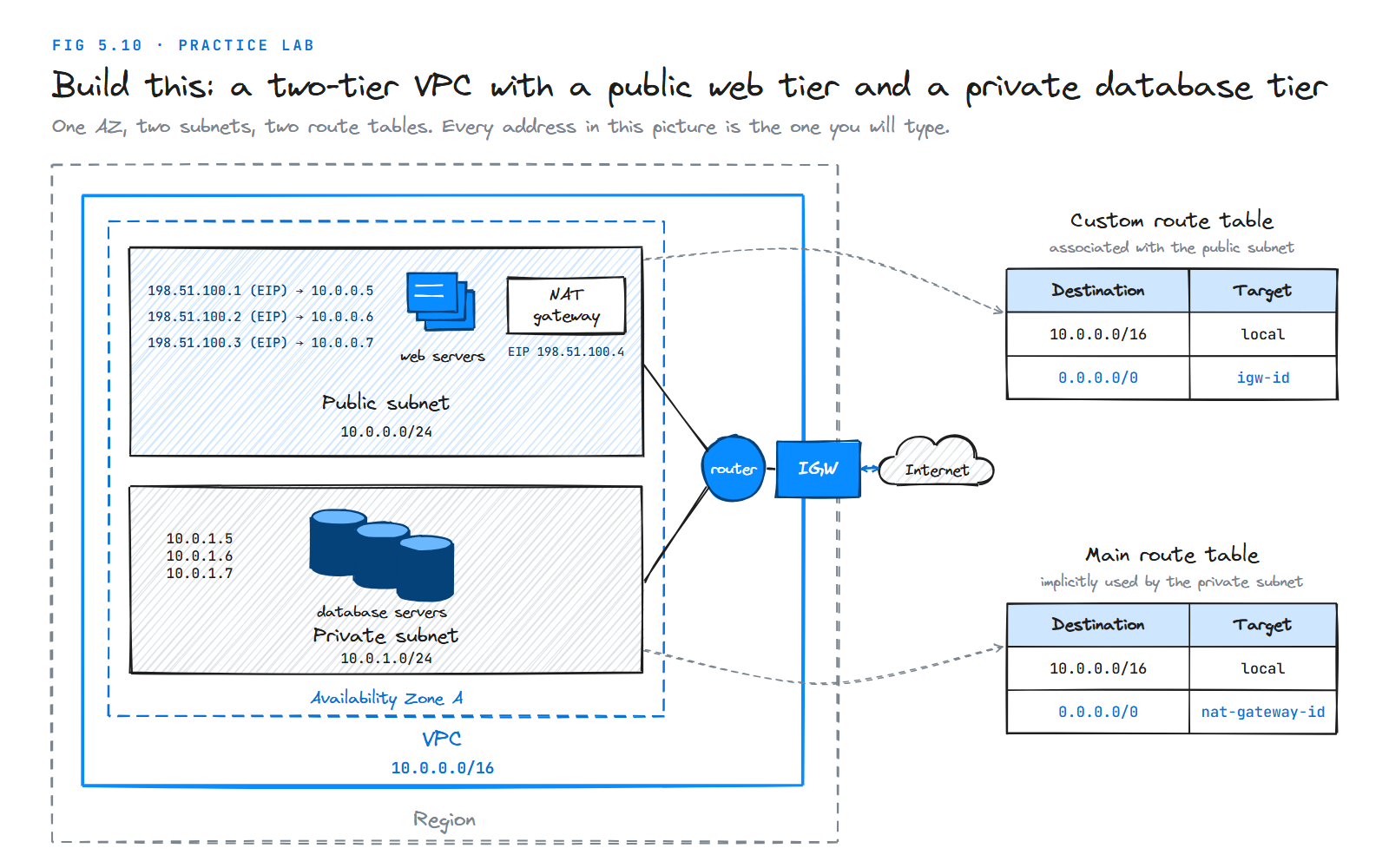
What you'll prove at the end: a web server is reachable from the internet; a database server is not; and the database server can still reach the internet, appearing to the world as the NAT gateway's Elastic IP.
Cost warning. Instances on the free tier are free, but the NAT gateway and Elastic IPs are not. The lab costs well under a dollar if you finish it and clean up in one sitting. Don't skip the cleanup step.
Step 1: Create the VPC
VPC console → Your VPCs → Create VPC → choose VPC only.
| Setting | Value |
|---|---|
| Name | lab-vpc |
| IPv4 CIDR | 10.0.0.0/16 |
Look at Route tables, Network ACLs and Security groups in the left menu, filtered to lab-vpc. One of each was created for you. That's the main route table, the default NACL and the default security group from Section 5.1.
Step 2: Create the subnets
Subnets → Create subnet → VPC lab-vpc. Put both in the same AZ (for example us-east-1a).
| Name | CIDR |
|---|---|
lab-public | 10.0.0.0/24 |
lab-private | 10.0.1.0/24 |
Notice that both show 251 available IPs, not 256.
Step 3: Create and attach the internet gateway
Internet gateways → Create → name lab-igw → Actions → Attach to VPC → lab-vpc.
Step 4: Make the public subnet public
Route tables → Create route table → name lab-public-rt, VPC lab-vpc. Then:
- Routes → Edit routes → Add route: destination
0.0.0.0/0, target the internet gatewaylab-igw. - Subnet associations → Edit: tick
lab-public.
This is the custom route table in the diagram. lab-private has no explicit association, so it keeps using the main route table.
Step 5: Create the NAT gateway
NAT gateways → Create NAT gateway.
| Setting | Value |
|---|---|
| Name | lab-nat |
| Subnet | lab-public (it must be the public one) |
| Connectivity type | Public |
| Elastic IP | Allocate Elastic IP |
Wait until its state is Available.
Step 6: Route the private subnet through the NAT
Open the VPC's main route table → Edit routes → add 0.0.0.0/0 with target lab-nat. Your two tables now match the diagram exactly:
| Table | 10.0.0.0/16 | 0.0.0.0/0 |
|---|---|---|
| Custom (public subnet) | local | igw-… |
| Main (private subnet) | local | nat-… |
Step 7: Create security groups
| Name | Inbound rule |
|---|---|
lab-web-sg | SSH (22) from My IP; HTTP (80) from 0.0.0.0/0 |
lab-db-sg | SSH (22) from source lab-web-sg; MySQL/Aurora (3306) from source lab-web-sg |
The database group trusts the web group, not an IP range, just like the pattern in Section 5.10.
Step 8: Launch the instances
Create a key pair lab-key, then launch two Amazon Linux t3.micro (or t2.micro) instances in lab-vpc:
| Name | Subnet | Auto-assign public IP | Security group |
|---|---|---|---|
lab-web | lab-public | Enable | lab-web-sg |
lab-db | lab-private | Disable | lab-db-sg |
To match the diagram, allocate a new Elastic IP and associate it with lab-web so its public address never changes.
Step 9: Prove it works
From your laptop, connect to the web server, forwarding your key so you can hop on to the private one:
ssh-add lab-key.pem
ssh -A ec2-user@<lab-web-elastic-ip>
From lab-web, connect to the database server by its private IP:
ssh ec2-user@10.0.1.x
On lab-db, check how the internet sees you:
curl https://checkip.amazonaws.com
The address printed is the NAT gateway's Elastic IP, not anything belonging to lab-db. That's NAT working.
Finally, from your laptop, try ssh ec2-user@10.0.1.x directly. It can't work: a private address isn't reachable from the internet, and lab-db has no public address at all.
| Check | Expected result | If it fails, look at |
|---|---|---|
Laptop → lab-web | Connects | IGW attached? Public route table associated? Public IP? lab-web-sg allows your IP? |
lab-web → lab-db | Connects | lab-db-sg allows SSH from lab-web-sg? |
lab-db → internet | Prints NAT's EIP | Main route table has 0.0.0.0/0 → nat? NAT in the public subnet? |
Laptop → lab-db | Fails | It should fail. If it doesn't, something is public that shouldn't be |
Step 10: Clean up (in this order)
- Terminate both instances.
- Delete the NAT gateway, and wait until it shows Deleted.
- Release both Elastic IPs. Deleting the NAT gateway does not release its EIP, and an idle EIP keeps billing.
- Detach and delete the internet gateway.
- Delete the subnets, the custom route table, the security groups and the key pair.
- Delete the VPC.
The same lab with the AWS CLI
# 1. VPC and subnets
VPC=$(aws ec2 create-vpc --cidr-block 10.0.0.0/16 --query Vpc.VpcId --output text)
AZ=$(aws ec2 describe-availability-zones --query 'AvailabilityZones[0].ZoneName' --output text)
PUB=$(aws ec2 create-subnet --vpc-id $VPC --cidr-block 10.0.0.0/24 --availability-zone $AZ --query Subnet.SubnetId --output text)
PRIV=$(aws ec2 create-subnet --vpc-id $VPC --cidr-block 10.0.1.0/24 --availability-zone $AZ --query Subnet.SubnetId --output text)

# 2. Internet gateway
IGW=$(aws ec2 create-internet-gateway --query InternetGateway.InternetGatewayId --output text)
aws ec2 attach-internet-gateway --internet-gateway-id $IGW --vpc-id $VPC

# 3. Custom (public) route table
PUBRT=$(aws ec2 create-route-table --vpc-id $VPC --query RouteTable.RouteTableId --output text)
aws ec2 create-route --route-table-id $PUBRT --destination-cidr-block 0.0.0.0/0 --gateway-id $IGW
aws ec2 associate-route-table --route-table-id $PUBRT --subnet-id $PUB

# 4. NAT gateway with an Elastic IP, in the public subnet
EIP=$(aws ec2 allocate-address --domain vpc --query AllocationId --output text)
NAT=$(aws ec2 create-nat-gateway --subnet-id $PUB --allocation-id $EIP --query NatGateway.NatGatewayId --output text)
aws ec2 wait nat-gateway-available --nat-gateway-ids $NAT

# 5. Main route table sends the private subnet's internet traffic to the NAT
MAINRT=$(aws ec2 describe-route-tables --filters Name=vpc-id,Values=$VPC Name=association.main,Values=true \
  --query 'RouteTables[0].RouteTableId' --output text)
aws ec2 create-route --route-table-id $MAINRT --destination-cidr-block 0.0.0.0/0 --nat-gateway-id $NAT
Security groups and instances follow the same pattern (create-security-group, authorize-security-group-ingress, run-instances). Cleanup runs in reverse: delete-nat-gateway, release-address, detach-internet-gateway, delete-internet-gateway, delete-subnet, delete-route-table, delete-vpc.
Summary
A VPC is your own logically isolated network inside one AWS Region. It spans every Availability Zone in that Region, and nothing crosses its boundary unless you build a way.
CIDR blocks define its private address range, between /16 and /28. The primary block can't be changed later and shouldn't overlap with any network you'll connect to.
Subnets divide that range, one AZ each. AWS reserves five addresses in every subnet. A subnet is public if its route table sends traffic to an internet gateway, and private if it doesn't.
Route tables tell the implied router where traffic goes. Every subnet uses exactly one; subnets without an explicit one use the main route table.
The internet gateway is the two-way door to the internet. The NAT gateway is a one-way exit: it sits in a public subnet with an Elastic IP and lets private resources reach out without letting anything in. It costs money per hour and per GB.
Security groups are stateful, allow-only firewalls on each resource and can reference each other. Network ACLs are stateless, numbered allow-and-deny filters on each subnet.
The default VPC is public out of the box; real data belongs in a custom VPC with private subnets, an S3 gateway endpoint, and as few public resources as possible.
Exercises
5.1 How many usable IP addresses does each of these subnets give you in AWS: /20, /24, /26, /28? Why can't you create a /29 subnet?
5.2 Your VPC is 10.0.0.0/16. A teammate asks for subnets 10.0.0.0/22 and 10.0.2.0/24. Will AWS accept both? Explain using the address ranges each one covers.
5.3 An EC2 instance is in a subnet named public-subnet-a, has a public IP, and its security group allows SSH from your IP. You still can't connect. List four things you would check, in order.
5.4 A Glue job in a private subnet loads 500 GB from S3 every night through a NAT gateway in us-east-1. Roughly what does that cost per month in NAT data processing alone? What one change brings it to zero?
5.5 You add a custom NACL to the database subnet that allows inbound TCP 5432 from the app subnet and outbound TCP 5432 to the app subnet. Connections now time out. What's wrong, and what rule fixes it?
5.6 Write the security group rules for a three-tier pipeline: an Airflow worker, a Spark cluster, and a Postgres database. Only Airflow may submit jobs to Spark (port 8998), and only Spark may read from Postgres (port 5432). Use security group references, not IP ranges.
5.7 Think About It: Your company has three VPCs, all created with the console's default 10.0.0.0/16, and now wants them to share data through VPC peering. What goes wrong, and what would you have done differently on day one?
What's Next
Your network is ready, but it's still empty. Chapter 6 fills it with managed databases, RDS, Aurora and DynamoDB, and shows how DB subnet groups and the security group patterns from this chapter decide who can reach them.