Chapter 2: Building with Kafka
Imagine you've just joined an online shop as its first data engineer.
The checkout app writes every order to its database. The warehouse team wants those orders so they can pack boxes. Finance wants them for billing. Someone's building a fraud check, and marketing would like a "customers who bought this also bought" feature. Each team asks the checkout developers for a feed of orders, in a slightly different format, over a slightly different connection.
Six months later, the checkout app is sending data to five places. When the fraud check goes down for an hour, nobody can say which orders it missed. And when the warehouse team asks for last Tuesday's orders again because of a bug, the answer is "sorry, we already sent those".
This is the mess Kafka was built to clean up. By the end of this chapter you'll understand how it does that, and you'll have run it on your own machine: created a topic, written events into it from Python, read them back, and watched several readers share the work.
2.1 What Kafka Actually Is
Here's the one-sentence version:
Apache Kafka is a distributed event streaming platform. It takes in events from the programs that produce them, stores them safely in the order they arrived, and lets any number of other programs read them, each at its own pace.
Those three jobs have names you'll see everywhere:
| Job | The Kafka word for it | In plain terms |
|---|---|---|
| Accept events | Producers write to Kafka | Any app can send events in |
| Store events | Kafka keeps an ordered, append-only log | New events go on the end; old ones aren't changed or removed when read |
| Hand out events | Consumers read from Kafka | Any app can read, whenever it likes, without affecting anyone else |
"Append-only log" sounds technical, but you've seen one before. Think of a ship's logbook. Every entry goes at the bottom, in order. Nobody tears out a page once it's been read, and anyone can open the book and start reading from any page.
The problem it solves
Go back to the online shop. Figure 2.1 shows what happens when every app that has data connects directly to every app that needs it.
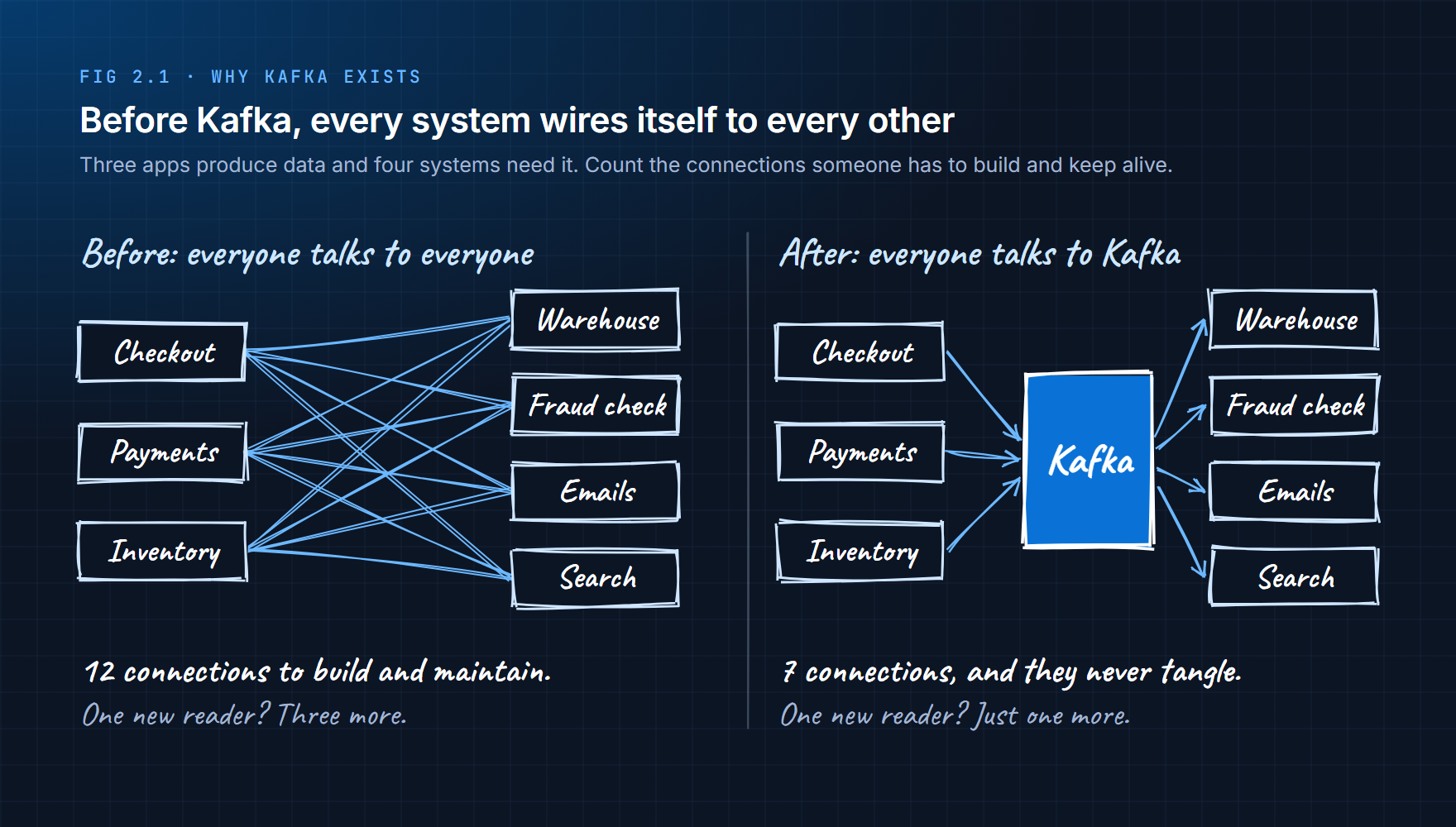
On the left, three producers and four consumers need twelve separate connections. Every new consumer means more work for every producer. If a consumer is slow or down, the producer has to decide what to do about it.
On the right, everyone talks to Kafka instead of to each other. Producers send each event once. Consumers read what they need. A new consumer is one new connection, and the producers never even find out it exists.
That idea has a name: decoupling. The producer and consumer no longer depend on each other. They only depend on Kafka.
Why older tools weren't enough
Kafka didn't appear out of nowhere. It was built at LinkedIn around 2010 because the tools that existed each did part of the job, but not all of it.
| Earlier tool | What it did well | What it couldn't do |
|---|---|---|
| Message queues | Moved messages between apps quickly | Deleted each message once it was read, so nothing could be replayed |
| Databases and data lakes | Stored data safely for a long time | Didn't push new data to anyone as it arrived; you had to keep asking |
| Direct API calls | Simple for one sender and one receiver | Every extra receiver added load to the sender |
Kafka combines the first two. It moves data like a messaging system and keeps it like a storage system, and because it keeps the data, any number of readers can use it without the producer doing extra work.
When Kafka is the right tool
Kafka is serious infrastructure. It earns its place when events are worth something after the first time they're read.
| Use Kafka when... | Example |
|---|---|
| Lots of events arrive all the time | Clicks, app logs, metrics from thousands of servers |
| The data has to survive failures | Payments, orders |
| Several systems need the same events | One order feeding billing, analytics and fraud |
| You might need to re-read old events | Fixing a bug and reprocessing last week's data |
And it's the wrong tool when:
| Don't use Kafka when... | Use this instead |
|---|---|
| You need an immediate answer back ("is this username taken?") | A normal API call |
| You're handing out jobs to workers (send this email, resize this image) | A task queue such as RabbitMQ or Amazon SQS |
| There are only a handful of events a day | A database table or a simple script |
| Nobody on the team can look after it | A managed service, or a simpler design |
One thing to be clear about: Kafka moves and stores events. It doesn't decide what an order means or whether a payment looks like fraud. That logic lives in the programs that read from Kafka.
2.2 Kafka vs a Traditional Message Queue
If you've used a message queue before, Kafka will look familiar at first. That's a trap. The two behave very differently, and treating Kafka like a queue is one of the most common beginner mistakes.
A message queue hands each message to one reader and then deletes it. The message is like a parcel: once it's delivered, it's gone from the depot.
Kafka keeps every event for a set period of time (seven days by default), whether anyone has read it or not. Readers don't take events away. They just remember how far they've got.
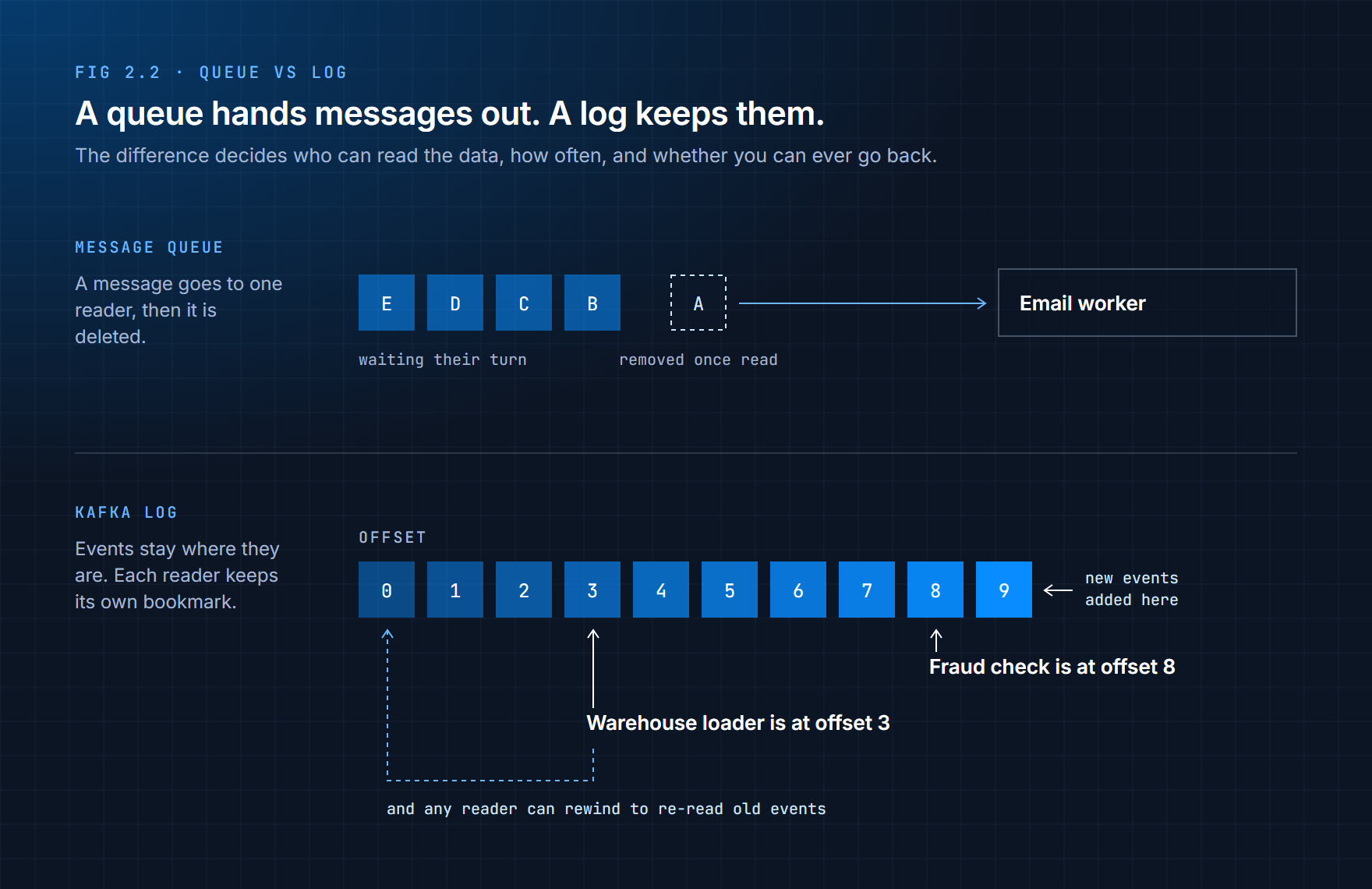
That position a reader has reached is called its offset. You'll meet offsets properly in section 2.6. For now, think of it as a bookmark.
Three things a log can do that a queue can't
Many readers get the same data. In a queue, one message goes to one consumer. If billing and analytics both need every order, you have to copy each message into two queues. In Kafka, both simply read the same events.
You can go back. Say the warehouse loader had a bug and saved last Tuesday's orders wrong. With a queue, those messages are long gone. With Kafka, you fix the bug, move the loader's bookmark back to Tuesday, and let it read them again. This is called replaying the data.
Readers go at their own speed. A fast reader and a slow reader don't affect each other. The slow one simply falls behind, and it can catch up later, because the events are still there.
A thought experiment
Four events go into Kafka: E1, E2, E3, E4.
A consumer reads E1 and E2, so its bookmark now points at E3. Then it crashes.
When it restarts, it carries on from E3. And E1 and E2? They're still sitting in Kafka. Any other reader can still read them, and this one could go back to them if it wanted.
Kafka never tracked "who has read E1". It only tracked "where is this reader up to". That small difference is what makes everything else in this chapter possible.
Which tool for which job
| Tool | What it really is | Typical use |
|---|---|---|
| RabbitMQ | A message and task queue | Handing jobs to a pool of workers |
| Amazon SQS | A managed queue service from AWS | The same, without running the servers yourself |
| Apache Kafka | A distributed event log | Recording facts that many systems need, possibly more than once |
None of these replaces the others. A simple way to tell them apart: a queue holds jobs to be done. Kafka holds things that happened.
Kafka stores events as history, not as jobs waiting to be done. Treat it like a queue and your design will fight it at every step.
2.3 Get Kafka Running on Your Machine
Enough theory for a moment. Let's get Kafka running so you can try every idea in this chapter as you read about it.
We'll run it with Docker, which packages Kafka and everything it needs into a single container. That way Kafka runs the same way on Windows, macOS and Linux, it doesn't clutter up your computer, and if you break something you can delete it and start fresh in seconds. You met Docker in Part 4. If it isn't installed yet, install Docker Desktop before going on.
A quick word on KRaft
Older guides tell you to install two things: Kafka, and a separate coordination service called ZooKeeper. You don't need ZooKeeper anymore. Modern Kafka manages its own cluster information using a built-in system called KRaft, and since Kafka 4.0, ZooKeeper isn't supported at all. If a tutorial asks you to install ZooKeeper, it's out of date.
Try It 2.1: Start a single-node Kafka
Create an empty folder called kafka-lab, and inside it a file called docker-compose.yml with the contents below. It's adapted from the example that ships with the official Apache Kafka Docker image.
services:
  kafka:
    image: apache/kafka:4.0.0
    hostname: kafka
    container_name: kafka
    ports:
      - "9092:9092"
    environment:
      KAFKA_NODE_ID: 1
      KAFKA_PROCESS_ROLES: broker,controller
      KAFKA_LISTENERS: PLAINTEXT://kafka:29092,CONTROLLER://kafka:29093,PLAINTEXT_HOST://0.0.0.0:9092
      KAFKA_ADVERTISED_LISTENERS: PLAINTEXT://kafka:29092,PLAINTEXT_HOST://localhost:9092
      KAFKA_LISTENER_SECURITY_PROTOCOL_MAP: CONTROLLER:PLAINTEXT,PLAINTEXT:PLAINTEXT,PLAINTEXT_HOST:PLAINTEXT
      KAFKA_INTER_BROKER_LISTENER_NAME: PLAINTEXT
      KAFKA_CONTROLLER_LISTENER_NAMES: CONTROLLER
      KAFKA_CONTROLLER_QUORUM_VOTERS: 1@kafka:29093
      KAFKA_OFFSETS_TOPIC_REPLICATION_FACTOR: 1
      KAFKA_TRANSACTION_STATE_LOG_REPLICATION_FACTOR: 1
      KAFKA_TRANSACTION_STATE_LOG_MIN_ISR: 1
      KAFKA_GROUP_INITIAL_REBALANCE_DELAY_MS: 0
      KAFKA_LOG_DIRS: /tmp/kraft-combined-logs
      CLUSTER_ID: MkU3OEVBNTcwNTJENDM2Qk
You don't need to understand every line yet, but three are worth knowing now:
| Setting | What it means |
|---|---|
KAFKA_PROCESS_ROLES: broker,controller | This one container does both jobs: storing data (broker) and managing the cluster (controller). Fine for learning; production clusters usually separate them. |
PLAINTEXT_HOST://localhost:9092 | The address your own programs use to reach Kafka. Everything in this chapter connects to localhost:9092. |
CONTROLLER://kafka:29093 | Kafka's internal management traffic. Your programs never connect to this port. |
The ...REPLICATION_FACTOR: 1 lines are there because we have only one server, so Kafka can't keep extra copies of anything. You'll see why that matters in section 2.10.
Now open a terminal in the kafka-lab folder and start it:
docker compose up -d
Check that the container is running:
docker ps
You should see a container named kafka with status Up. Now look at its startup log:
docker logs kafka
Scroll to the bottom. You're looking for a line that ends with Kafka Server started. Before that line, Kafka works through a fixed sequence:
| Step | What's happening |
|---|---|
| 1. Load configuration | Reads the settings from your compose file |
| 2. Prepare storage | Sets up the folder where it keeps cluster information and data |
| 3. Elect a controller | Decides which node manages the cluster (here, the only one) |
| 4. Register the broker | The broker tells the controller it's ready to store data |
| 5. Accept connections | Programs can now connect on port 9092 |
If you see errors or warnings instead of that final line, stop and fix them before going further. A Kafka that didn't start cleanly will produce confusing problems later, and they're far harder to trace back than a warning you can read right now.
When you're finished for the day, docker compose stop pauses Kafka and keeps your data. docker compose down removes the container, and with it every topic and event you created.
2.4 Topics
Kafka is running, but it has nowhere to put anything yet. Events live in topics.
A topic is a named stream of events of one kind. An online shop might have topics called orders, payments, user_activity and inventory_updates. Producers write to a topic by name, and consumers read from a topic by name.
If Kafka were a library, topics would be the shelves. You don't throw every book into one pile and make readers dig through it. You put cookery books on one shelf and history on another, so people can go straight to what they want.
Topics also give each kind of data its own settings. The payments topic might keep events for a year while user_activity keeps them for three days. Each topic can have different access rules and a different number of partitions (the subject of the next section).
Designing good topics
A topic is more than a pipe. It's an agreement between the team that writes to it and the teams that read from it: this is what an order event looks like, and this is where you'll find it. A few habits keep that agreement healthy:
One kind of fact per topic. orders holds orders. Don't let it slowly fill up with refunds and address changes too.
Name it after the business thing, not the action. orders or order_created, not send_to_billing. The producer shouldn't know or care who reads it.
Give every topic an owner. Someone should be responsible for what goes into it and for changing its format carefully.
Don't create topics "just in case". Hundreds of tiny, ownerless topics are hard to manage and harder to understand. More topics doesn't mean a better design.
Kafka can create a topic automatically the first time something writes to it. That's handy for experiments, but most production teams switch it off so that topics are created on purpose, with the right settings. We'll create ours on purpose too.
Try It 2.2: Create your first topic
Kafka comes with command-line tools inside the container. Open a shell in it:
docker exec -it kafka bash
cd /opt/kafka/bin
Now create a topic called orders with three partitions:
./kafka-topics.sh --create \
  --topic orders \
  --partitions 3 \
  --replication-factor 1 \
  --bootstrap-server localhost:9092
You should see Created topic orders. Now list every topic Kafka knows about:
./kafka-topics.sh --list --bootstrap-server localhost:9092
The output is just orders. Nothing exists until someone creates it, which is exactly what you want from a system holding your company's data.
A quick note on --bootstrap-server: it's the address of any Kafka server a tool can connect to first. From there, Kafka tells the tool about everything else in the cluster. Every Kafka command and every Kafka program needs one.
Stay inside the container for the next exercise.
2.5 Partitions
You just created orders with three partitions without being told what a partition is. Here it is.
A partition is a slice of a topic. Each partition is its own separate, ordered, append-only log. The topic is really just a name for a group of partitions.
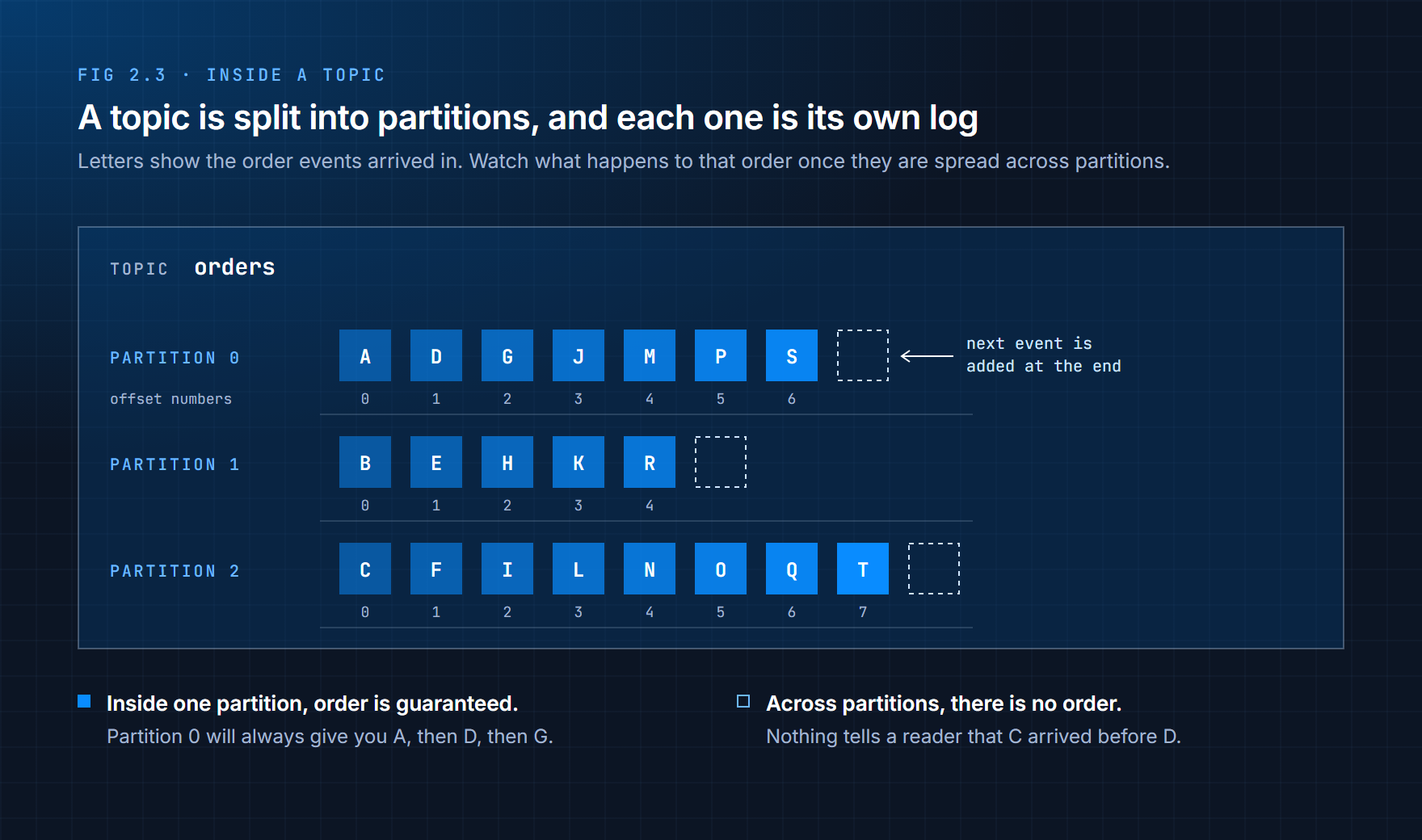
Look at the letters in Figure 2.3. They show the order events arrived in: A first, then B, then C. Kafka spread them across three partitions. Now look at what that does to the order:
Inside one partition, order is guaranteed. Read partition 0 and you'll always get A, then D, then G, exactly as they were written.
Across partitions, there is no order. A reader that pulls from all three might see C before A, or D before B. Kafka makes no promise about how events in different partitions line up.
This is the detail Chapter 1 hinted at. When people say "Kafka keeps events in order", they mean within a partition.
Why split a topic at all?
Because one log can only go so fast. A single partition has to be written by one server and read one event after another. At some point it becomes the bottleneck.
Partitions fix that in three ways:
| Problem with one big log | What partitions give you |
|---|---|
| Only one server can accept writes | Different partitions can live on different servers, so writes happen in parallel |
| Only one reader can usefully read it | Each partition can have its own reader, so reading happens in parallel too |
| If that server fails, the whole topic stops | Each partition is copied and recovered on its own, so one failure doesn't stop everything |
That's why people say Kafka scales by partitions, not by topics. If you need more throughput, the answer is almost always more partitions.
How an event picks its partition
If there's no order across partitions, how do you keep related events together? For example, a customer's "order placed" must come before their "order cancelled", or the cancellation makes no sense.
The answer is the key. Every event can carry a key alongside its value, and the producer uses the key to choose a partition. It runs the key through a hash function (a calculation that always turns the same input into the same number) and uses the result to pick one of the partitions.
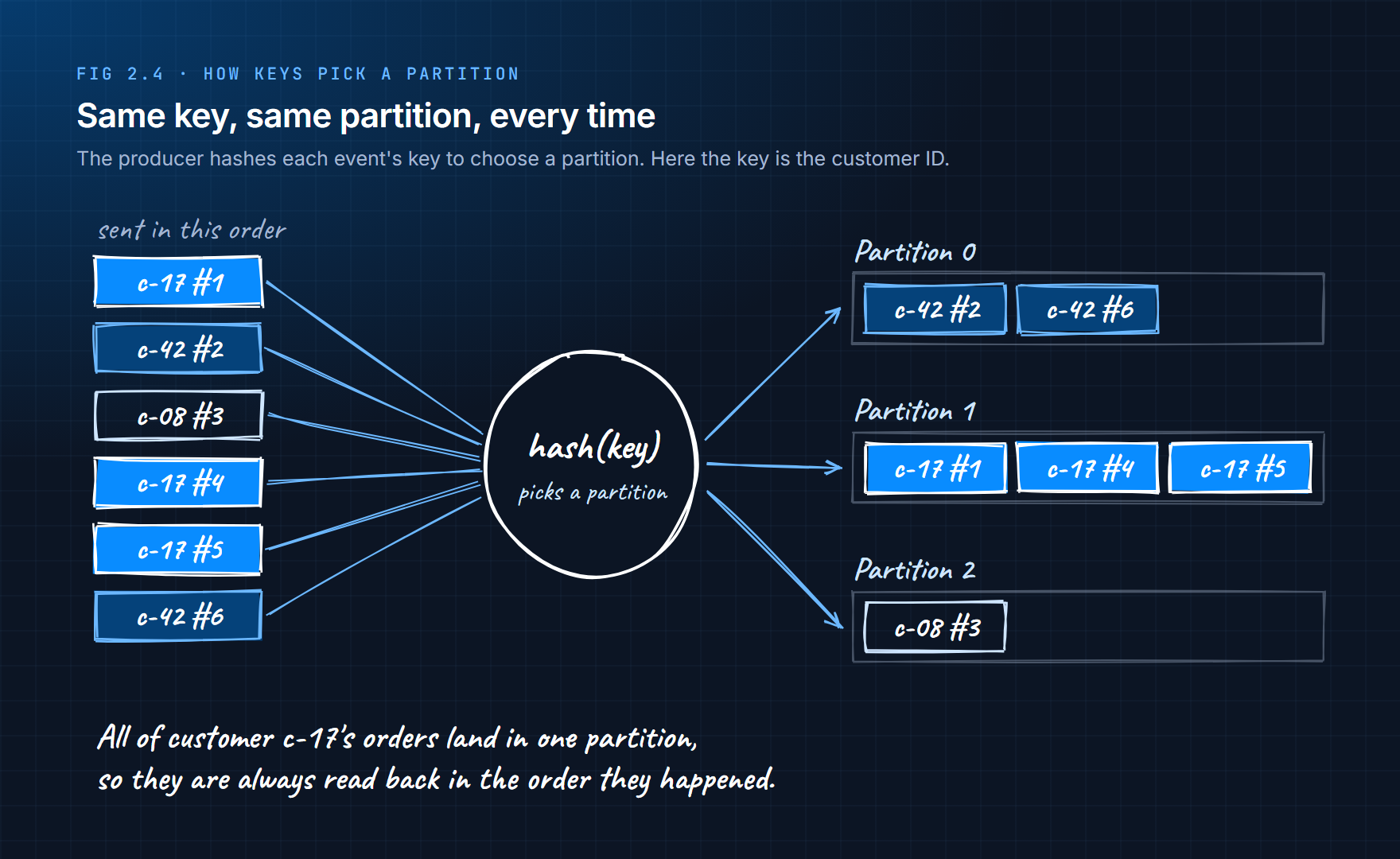
Same key, same partition, every time. So if you use the customer ID as the key, all of one customer's events land in one partition, in order, even though different customers are spread across all three.
Events without a key are simply spread across partitions to balance the load, and you get no ordering between them at all.
Choosing the key is one of the most important decisions you'll make with Kafka. Pick the thing whose events must stay in order: a customer ID, an account number, a device ID.
How many partitions?
| More partitions give you... | ...but also cost you |
|---|---|
| More write throughput | More files and connections for Kafka to manage |
| More consumers working in parallel | Longer recovery when a server fails |
| Room to grow | More to monitor and reason about |
The partition count is a capacity decision, so think about it up front. You can add partitions later, but doing so changes which partition each key maps to, so events for one customer can end up split across two partitions and lose their ordering. You can never reduce the number of partitions.
If your business truly needs every single event in one strict global order, you only have two choices: use a single partition and accept its speed limit, or question whether you really need global order at all. Usually you don't; you need order per customer or per account, which keys give you for free.
Try It 2.3: Look inside your topic
Still inside the container, ask Kafka to describe orders:
./kafka-topics.sh --describe --topic orders --bootstrap-server localhost:9092
You'll see something like this:
Topic: orders  TopicId: pRy3...  PartitionCount: 3  ReplicationFactor: 1  Configs:
    Topic: orders  Partition: 0  Leader: 1  Replicas: 1  Isr: 1  Elr:  LastKnownElr:
    Topic: orders  Partition: 1  Leader: 1  Replicas: 1  Isr: 1  Elr:  LastKnownElr:
    Topic: orders  Partition: 2  Leader: 1  Replicas: 1  Isr: 1  Elr:  LastKnownElr:
Notice that each partition gets its own line. Kafka manages them as separate units. Here's what the columns mean:
| Column | Meaning |
|---|---|
Leader | The server (by ID) in charge of this partition. We only have server 1. |
Replicas | Every server holding a copy of this partition |
Isr | "In-sync replicas": the copies that are fully up to date |
Elr / LastKnownElr | Extra safety information used when choosing a new leader. You can ignore these for now. |
Leaders, replicas and in-sync copies are how Kafka survives failures. You'll see how in section 2.10. For now, notice that we haven't sent a single event yet. This exercise was about the structure; next we'll put data through it.
2.6 Offsets
Every event in a partition gets a number called its offset: 0 for the first event, 1 for the next, and so on. Offsets only ever go up, and they're never reused.
The same word describes where a reader has got to. When a consumer has finished with events 0 to 9 in a partition, its committed offset is 10: the next event it will read. Kafka stores that number for it.
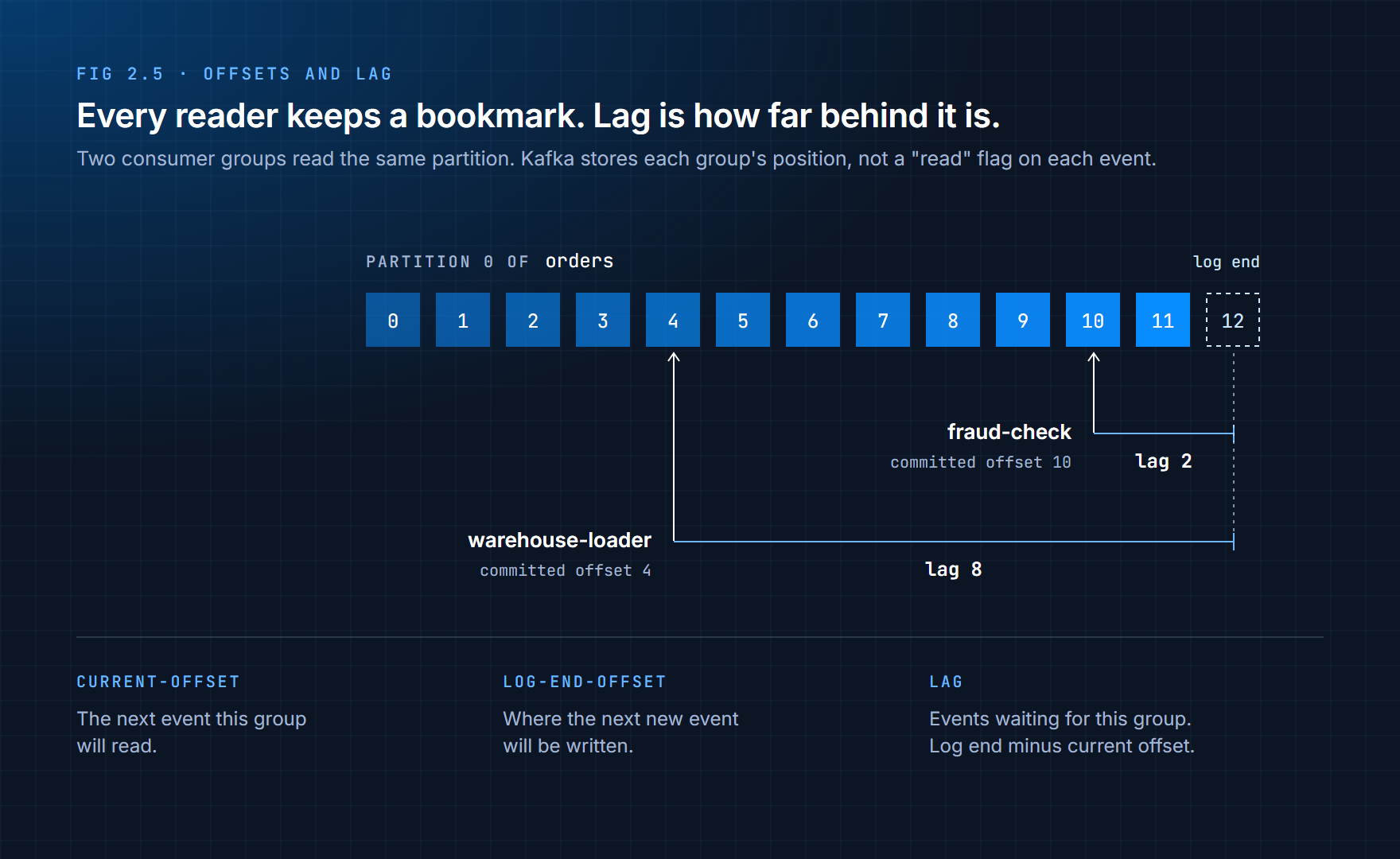
This is the bookmark idea from section 2.2, made precise. A few facts follow from it:
Kafka tracks positions, not "read" flags. It never marks an event as read. It just remembers, for each group of readers and each partition, which offset they've reached. (It keeps these in a special internal topic called __consumer_offsets.)
Reading doesn't delete anything. Events are removed only when the topic's retention rules say so: after a certain time (seven days by default) or once the topic grows past a certain size. Your bookmark controls where you read, not whether the data exists.
Every reader has its own bookmark. In Figure 2.5, the fraud check is almost caught up while the warehouse loader is well behind. Neither affects the other.
The gap between the newest event and a reader's bookmark is called lag. Lag is one of the most important numbers in any Kafka system. A lag that stays small means the reader is keeping up. A lag that keeps growing means it's falling behind and will eventually be reading very old data.
What offsets make possible
| Situation | What you do |
|---|---|
| A consumer crashes | It restarts from its committed offset and carries on |
| You find a bug in last week's processing | Fix it, move the bookmark back, and reprocess |
| You build a new system that needs history | Start it from the earliest offset and let it read everything |
| Something looks wrong and you need to investigate | Read the exact events from that time again |
People sometimes describe this as time travel. It's a fair description, as long as you remember the limit: you can only travel back as far as the retention period allows.
Try It 2.4: Watch offsets and lag
You're still inside the container. First, write a few events using the console producer:
./kafka-console-producer.sh --topic orders --bootstrap-server localhost:9092
You'll get a > prompt. Type each line and press Enter after it:
order-1
order-2
order-3
order-4
Press Ctrl+C to stop the producer.
Now read them back with the console consumer. The --group option gives this reader a name so Kafka can store its bookmark:
./kafka-console-consumer.sh --topic orders \
  --group orders-console \
  --from-beginning \
  --bootstrap-server localhost:9092
Your four orders appear. The consumer then waits for more. Press Ctrl+C to stop it.
Now ask Kafka where this group has got to:
./kafka-consumer-groups.sh --describe --group orders-console --bootstrap-server localhost:9092
You'll see one row per partition, something like this. It's trimmed to the columns that matter here, and your numbers depend on which partitions your events landed in:
GROUP           TOPIC   PARTITION  CURRENT-OFFSET  LOG-END-OFFSET  LAG
orders-console  orders  0          0               0               0
orders-console  orders  1          4               4               0
orders-console  orders  2          0               0               0
Don't be surprised if all four events went to the same partition. Events without a key are sent in small batches, and a batch goes to one partition at a time.
The three numbers are the same ones as in Figure 2.5: CURRENT-OFFSET is where the group will read next, LOG-END-OFFSET is where the next new event will be written, and LAG is the difference. Lag is 0 because the group has read everything.
Now make it fall behind. Start the console producer again, type three more orders, and stop it. Run the describe command again without starting the consumer. The lag goes up by three. The events are waiting, and Kafka knows exactly how far behind this group is.
That's three facts proved in one exercise: Kafka tracks positions rather than deleting messages, it knows exactly how far behind each reader is, and the events you already read are still there.
Type exit to leave the container.
2.7 Producers
A producer is any program that writes events to Kafka. So far you've used the console producer. Real systems use a client library inside their own code.
A producer does three things:
It chooses the partition. Usually by hashing the key, as you saw in section 2.5.
It doesn't wait for consumers. It has no idea who will read the event, or when. It hands the event to Kafka and moves on.
It decides how safe the write is. This is the part beginners miss. Kafka can only keep what actually reached it, and the producer's settings decide what "reached it" means.
Settings that decide how safe your data is
Every write raises the same questions. Did the event arrive? Was it saved on one server or several? Would it survive that server dying? The producer answers them with a few settings.
acks controls who has to confirm a write before the producer treats it as saved.
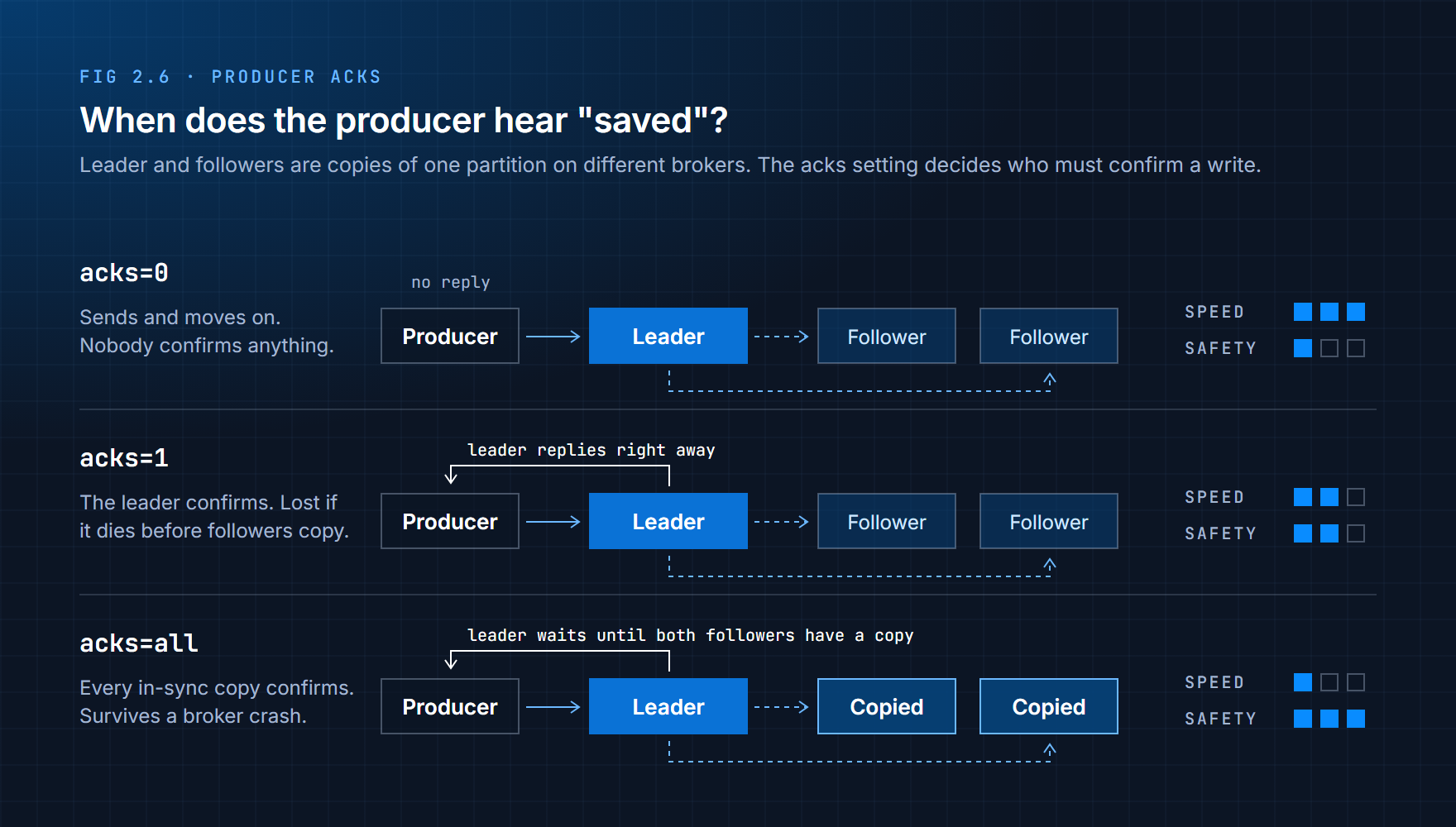
| Setting | What happens | When to use it |
|---|---|---|
acks=0 | The producer doesn't wait for any reply | Only when losing some events genuinely doesn't matter, like rough metrics |
acks=1 | The partition's leader confirms it has the event | Faster, but an event can be lost if the leader fails before copying it |
acks=all | The leader confirms only after every in-sync copy has the event | Anything that matters. This is the default in modern clients. |
In production, acks=all is paired with a topic setting called min.insync.replicas, usually set to 2. It means "refuse the write if fewer than two up-to-date copies exist", so an acknowledged event always lives on at least two servers.
Retries handle the short hiccups that happen all the time in real networks: a dropped connection, a server restarting, a leader changing. Without retries, a two-second blip becomes permanently lost data. Modern clients retry automatically.
Idempotence fixes a nasty side effect of retries. Suppose the producer sends an event, the broker saves it, but the reply gets lost on the way back. The producer thinks the write failed and sends it again, and now the event is stored twice. With enable.idempotence switched on, the producer numbers its messages so the broker can spot and drop the duplicate. ("Idempotent" just means doing something twice has the same effect as doing it once.) Turn it on for anything that matters.
There's no free lunch here. Waiting for more confirmations makes each write slower. Kafka makes you choose deliberately instead of hiding the trade-off.
Try It 2.5: Write events from Python
Now you'll write a real producer. You'll need Python 3.10 or newer. Check with:
python --version
On some macOS and Linux systems the command is python3. Use whichever works for every command below.
Create a virtual environment in your kafka-lab folder, so this project's libraries stay separate from everything else:
python -m venv kafka-env
Activate it:
# macOS / Linux
source kafka-env/bin/activate

# Windows
kafka-env\Scripts\activate
Your prompt now starts with (kafka-env). Install the Kafka client library:
pip install confluent-kafka
confluent-kafka is the most widely used Python client for Kafka. It's maintained by Confluent, the company founded by Kafka's original creators, and it supports every setting in this section.
Create a file called producer.py:
import json
from confluent_kafka import Producer

producer = Producer({
    "bootstrap.servers": "localhost:9092",
    "acks": "all",                # wait until every in-sync copy has the event
    "enable.idempotence": True,   # retries never create duplicates
})


def report(err, msg):
    """Called once for every event, when Kafka confirms or rejects it."""
    if err is not None:
        print(f"Delivery failed: {err}")
    else:
        print(f"key {msg.key().decode():<5} -> partition {msg.partition()}, offset {msg.offset()}")


orders = [
    {"order_id": 1001, "customer_id": "c-17", "amount": 49.90},
    {"order_id": 1002, "customer_id": "c-42", "amount": 12.50},
    {"order_id": 1003, "customer_id": "c-08", "amount": 230.00},
    {"order_id": 1004, "customer_id": "c-17", "amount": 5.25},
    {"order_id": 1005, "customer_id": "c-17", "amount": 18.00},
    {"order_id": 1006, "customer_id": "c-42", "amount": 64.10},
]

for order in orders:
    producer.produce(
        "orders",
        key=order["customer_id"],   # the customer ID decides the partition
        value=json.dumps(order),
        on_delivery=report,
    )

# produce() only queues events. flush() waits until they are all confirmed.
producer.flush()
Make sure Kafka is still running, then run it:
python producer.py
You'll see one line per order, something like:
key c-17  -> partition 2, offset 0
key c-17  -> partition 2, offset 1
key c-17  -> partition 2, offset 2
key c-42  -> partition 0, offset 0
key c-42  -> partition 0, offset 1
key c-08  -> partition 1, offset 7
Your partition and offset numbers will differ, and the lines may come back grouped by partition rather than in the order you sent them. What matters is the pattern: every c-17 order lands in the same partition, and so does every c-42. Run the script again and each key goes to exactly the same partition as before. That's Figure 2.4, running on your machine.
One practical warning for later: different client libraries don't always use the same hash function. If a Java service and a Python service write the same keys to one topic, check that they're configured with the same partitioner, or the same customer could end up in two partitions.
Notice what the producer did not do. It didn't track who reads these orders, manage anyone's offsets, or check that the orders were processed correctly downstream. That's all someone else's job, and the next two sections are about that someone else.
2.8 Consumers
A consumer is a program that reads events from Kafka. Unlike a web server waiting for requests, a consumer goes and asks for data. Kafka never pushes events to anyone. The consumer pulls them, in a loop that runs for as long as the program does:
- Ask Kafka for any new events (this is called polling)
- Process them
- Record progress by committing its offset
- Go back to step 1
Because the consumer controls that loop, it decides how fast to read, when to pause, and when an event counts as finished. Kafka makes no assumptions about any of it. That's what lets the same event stream feed a real-time fraud check, an hourly analytics job and a search index without any of them knowing about the others.
It also explains what a consumer is not. It isn't a webhook that gets called when something happens, and it isn't a script that runs once and exits. A Kafka consumer is a long-running program that remembers where it is. If you need "run this job once and forget about it", you want a task queue, not Kafka.
Try It 2.6: Read events from Python
In your kafka-lab folder, with the virtual environment still active, create consumer.py:
import sys
from confluent_kafka import Consumer

# The group name comes from the command line, so you can reuse this file in the next exercise.
group = sys.argv[1] if len(sys.argv) > 1 else "order-printer"

consumer = Consumer({
    "bootstrap.servers": "localhost:9092",
    "group.id": group,
    "auto.offset.reset": "earliest",   # a brand-new group starts at the oldest event
})
consumer.subscribe(["orders"])
print(f"Reading 'orders' as group '{group}'. Press Ctrl+C to stop.")

try:
    while True:
        msg = consumer.poll(1.0)        # wait up to 1 second for new events
        if msg is None:
            continue                    # nothing new yet, ask again
        if msg.error():
            print(f"Error: {msg.error()}")
            continue
        key = msg.key().decode() if msg.key() else "-"
        print(f"partition {msg.partition()}  offset {msg.offset():>2}  key {key:<5}  {msg.value().decode()}")
except KeyboardInterrupt:
    pass
finally:
    consumer.close()                    # commits the final position and leaves cleanly
Two settings to understand:
| Setting | What it does |
|---|---|
group.id | The name Kafka stores this reader's bookmark under |
auto.offset.reset: earliest | What to do when the group has no bookmark yet: start from the oldest event. It's ignored once a bookmark exists. |
By default this client also commits offsets automatically every few seconds, and once more when close() runs.
Run it:
python consumer.py
You'll see every event in the topic: the four console orders from Try It 2.4 (shown with key -, since they had no key), the three extra ones, and the six from your Python producer. Then it sits and waits.
Leave it running. Open a second terminal, activate the virtual environment there too, and run the producer again:
python producer.py
Switch back to the first terminal. The six new orders appeared within a moment of being sent. That's streaming.
Now stop the consumer with Ctrl+C and start it again with the same command. This time it prints nothing from before. It carries on from its committed offset and waits for new events.
Think about what that proves. Kafka didn't remember which messages were read. The consumer group remembered its position.
2.9 Consumer Groups
One consumer can only go so fast. When orders pour in faster than a single program can process them, you run more copies of it. But now there's a problem: if three copies each read every event, every order gets processed three times.
Consumer groups solve that. A consumer group is a set of consumers that share one name (the group.id) and split a topic's work between them. The rule is simple:
Within a group, each partition is read by exactly one consumer.
Kafka hands out the partitions, and the consumers in the group never step on each other's toes. From the outside, the group behaves like one logical reader that happens to run as several processes.
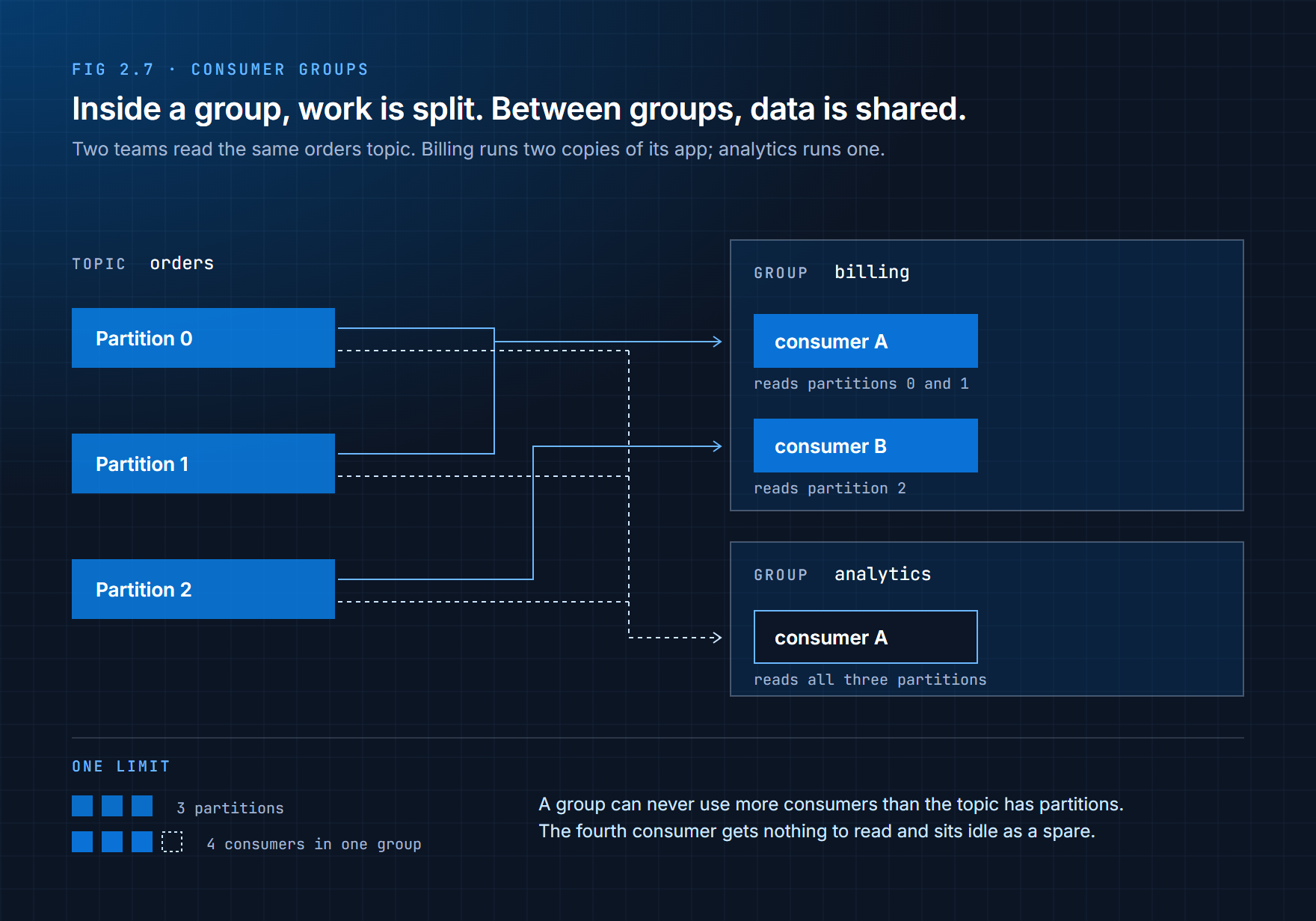
Figure 2.7 shows the two ways groups get used:
To go faster, add consumers to a group. The billing group runs two copies of the same app. Kafka gives one of them two partitions and the other one partition. Each order is billed once.
To give another system the same data, create another group. The analytics team needs every order too, so it uses its own group name. It gets its own bookmark and reads all three partitions, completely independently of billing.
A simple way to remember it: consumers within a group share the work; different groups each get all the data.
When a consumer stops
Consumers crash, get restarted and get redeployed all the time. When one leaves a group, Kafka notices and hands its partitions to the consumers that are left. This is called a rebalance. Processing pauses briefly while partitions are reassigned, then carries on from the last committed offsets. Nobody has to step in, and no data is lost.
Limits to remember
| Rule | Why it matters |
|---|---|
| A group's maximum parallelism equals the number of partitions | With 3 partitions, at most 3 consumers in one group can be busy |
| Extra consumers sit idle | A fourth consumer in a 3-partition group gets nothing; it only takes over if another one stops |
| Rebalances cause a short pause | Constantly starting and stopping consumers keeps the whole group pausing |
| Bookmarks belong to the group | Change the group.id and you get a brand-new reader starting from scratch |
This is another reason the partition count matters so much. It sets the ceiling on how many consumers can ever work on a topic at once.
Try It 2.7: Split the work, then share the data
This exercise needs three terminals, each with the virtual environment activated, in your kafka-lab folder.
In terminal 1 and terminal 2, start a consumer in the same group:
python consumer.py billing
Both catch up on existing events between them, then wait. In terminal 3, send new orders:
python producer.py
Look at terminals 1 and 2. The orders are split between them. Each terminal only ever shows certain partition numbers, and no order appears in both. That's one group sharing the work.
Now stop the consumer in terminal 2 with Ctrl+C, and run the producer in terminal 3 again. After a brief pause for the rebalance, terminal 1 receives everything, from all three partitions. It took over the partitions of the consumer that left.
Finally, start a consumer with a different group name in terminal 2:
python consumer.py analytics
It prints every event in the topic from the very beginning, including the ones billing already processed. A new group gets its own bookmark and its own full copy of the data, without affecting billing at all.
Press Ctrl+C in each terminal when you're done.
2.10 Inside the Cluster
So far you've run Kafka on one machine. Real Kafka runs as a cluster of several servers working together, and this is where its reliability comes from. You don't need to operate a cluster yet, but you do need a picture of how one works, because it explains the settings you've already met.
There are only a few moving parts.
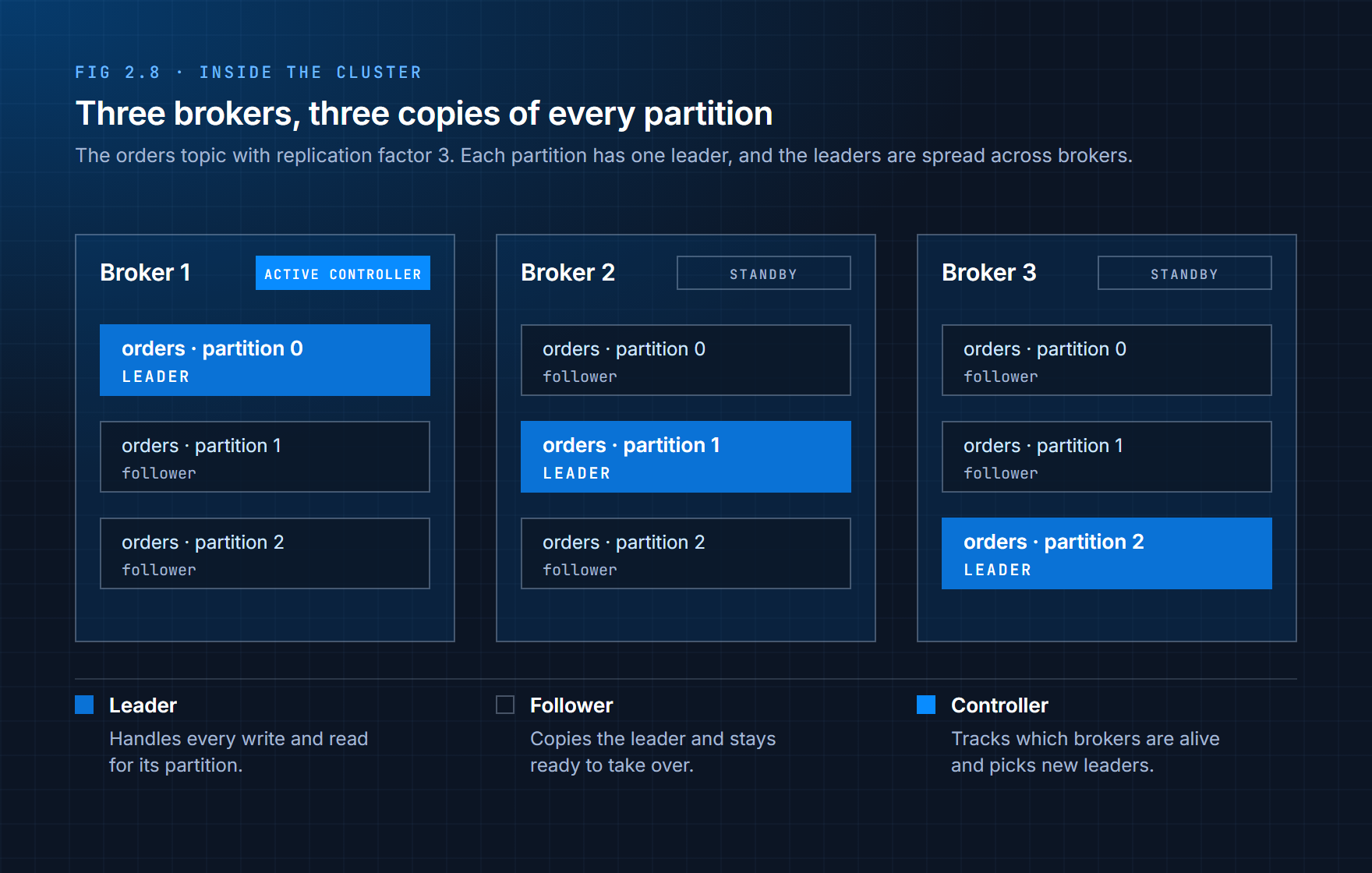
Brokers are the Kafka servers. Each one stores some partitions on disk, accepts writes from producers, serves reads to consumers, and copies data to and from other brokers. A cluster is simply several brokers working together. Brokers store and move bytes; they don't run your business logic or care what's inside the events.
Replicas are copies of a partition. The topic in Figure 2.8 has a replication factor of 3, so every partition exists on three different brokers. Kafka doesn't rely on backups for safety: replication is the backup.
Leaders and followers. For each partition, exactly one replica is the leader. Producers write to the leader, and by default consumers read from it too. The other replicas are followers: they keep copying new events from the leader so they're ready to take over. Notice in the figure that the leaders are spread across the brokers, so no single server does all the work.
In-sync replicas (ISR) are the followers that are fully caught up with the leader. This is the Isr column you saw in Try It 2.3. When a producer uses acks=all, the leader waits for every replica in this set before confirming the write. Only an in-sync replica is allowed to become the new leader, which is what stops an out-of-date copy from taking over.
The controller manages the cluster as a whole. It keeps track of which brokers are alive, stores the list of topics and partitions, and decides which replica leads each partition. In KRaft mode, a few nodes are able to act as controller; exactly one is active at a time and the others are standbys, kept up to date and ready to take over. In your one-container lab, the same process is both broker and controller.
How a write travels
Take a topic with a replication factor of 3 and a producer using acks=all:
- The producer sends the event to the partition's leader.
- The leader writes it to its own log.
- The followers fetch the new event and write it to their logs.
- Once every in-sync replica has it, the event counts as committed, and the leader confirms to the producer.
Consumers only ever see committed events, so they never read something that might disappear if the leader fails a moment later.
When a broker fails
Now the part that makes all of this worth it. Suppose broker 1 crashes. It was leading partition 0.
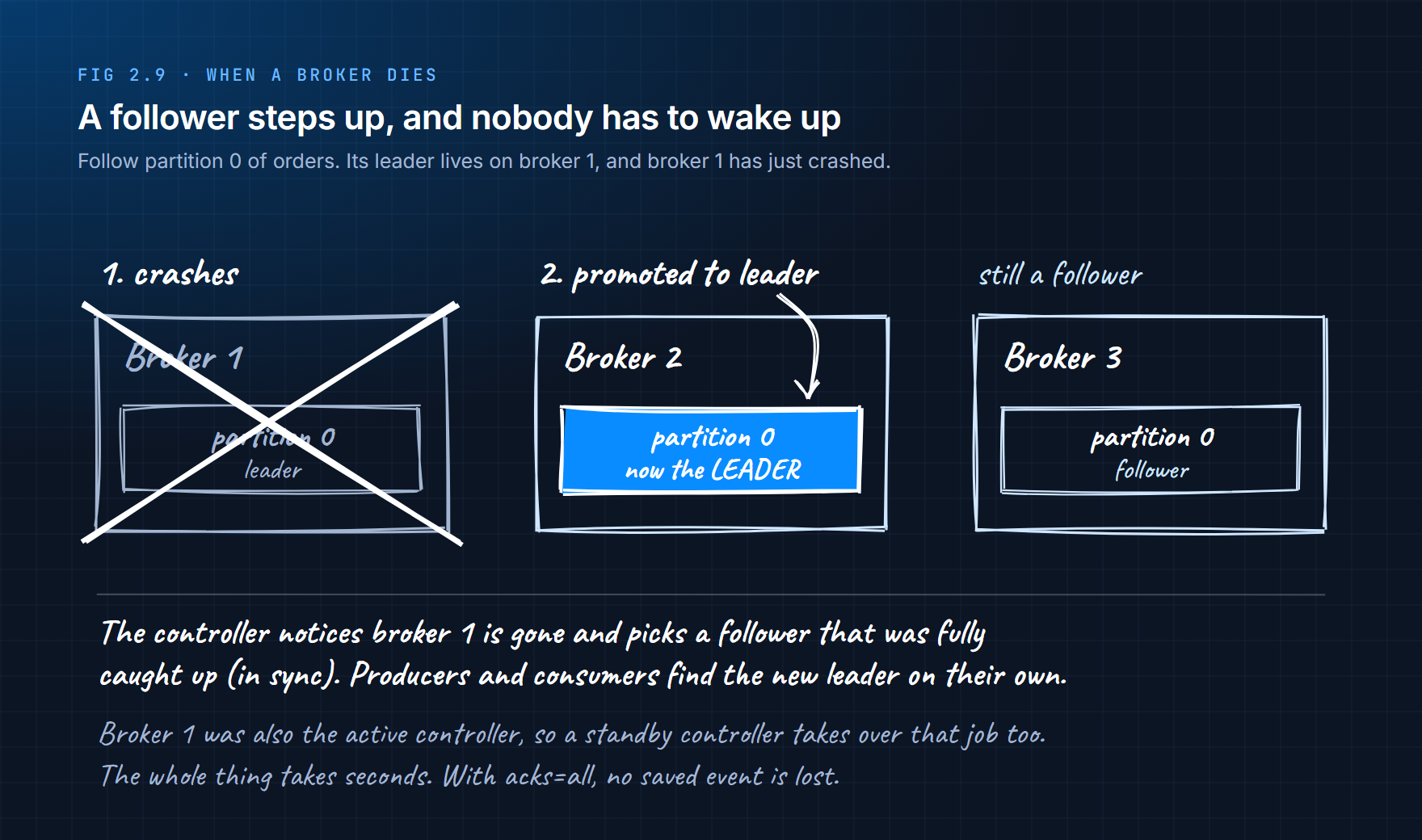
- The controller notices broker 1 has stopped responding.
- It picks a new leader for partition 0 from the in-sync replicas: here, the copy on broker 2.
- It updates the cluster's information so everyone knows where the new leader is.
- Producers and consumers discover the new leader and reconnect on their own.
There's a short pause of a few seconds, then everything carries on. Because the new leader was in sync, any event that had been acknowledged with acks=all is still there. Nobody has to be woken up at 3am.
If the failed broker was also the active controller, a standby controller takes over that job the same way.
Kafka's whole internal design comes down to four lines:
| Rule | Why |
|---|---|
| One leader per partition | so there's always a single source of truth |
| Several followers per partition | so a failure doesn't lose data |
| One active controller | so cluster decisions are made in one place |
| Many brokers | so the load and the risk are spread out |
2.11 Delivery Guarantees
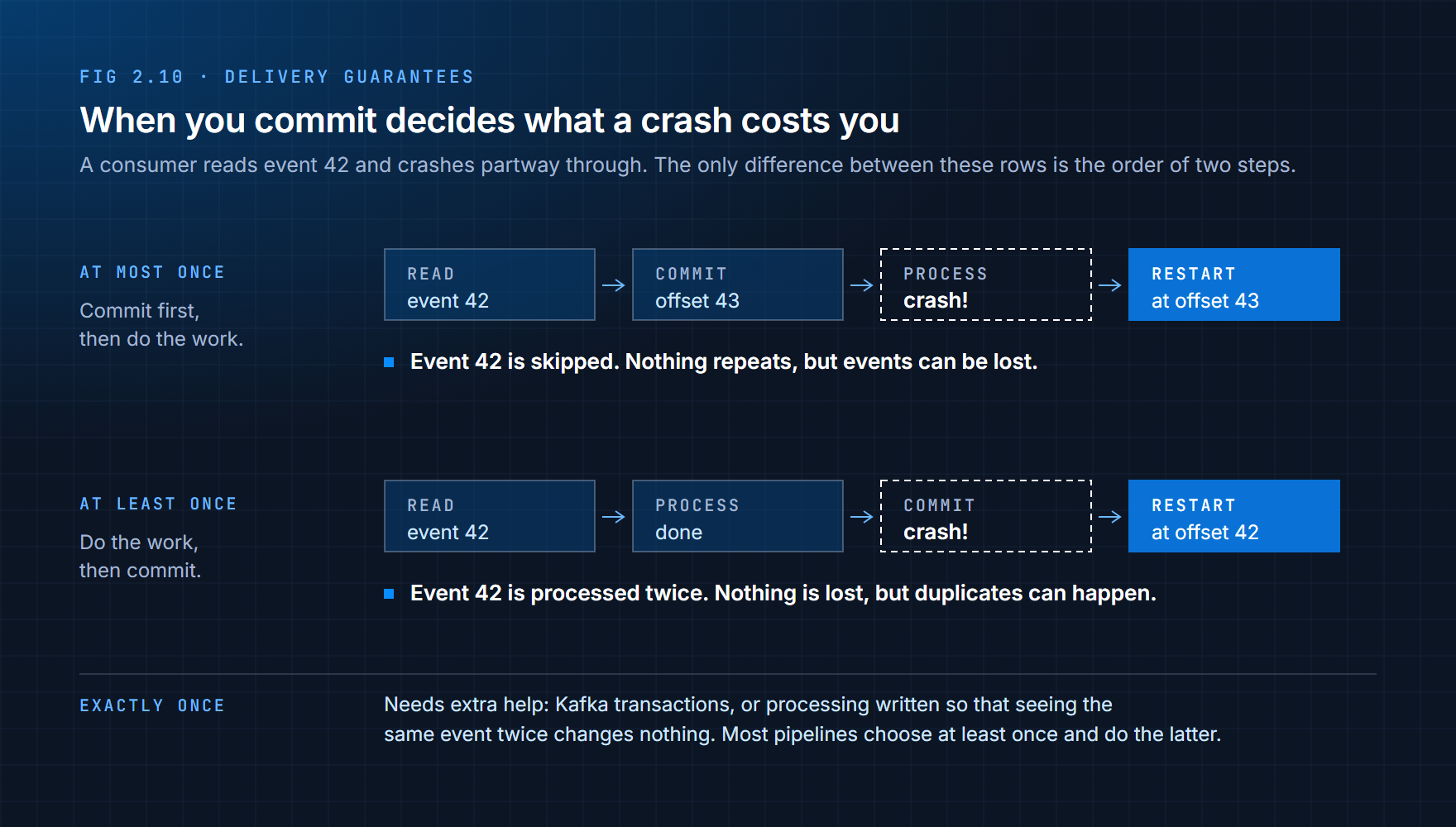
There's one question left, and it's the one that causes the most real-world bugs: if a consumer crashes, what happens to the event it was working on?
The answer depends on when the consumer commits its offset compared with when it does the work.
| Guarantee | How you get it | What a crash does | Good for |
|---|---|---|---|
| At most once | Commit first, then process | The event in progress is skipped. Nothing repeats, but events can be lost. | Data where a gap is fine, like rough usage metrics |
| At least once | Process first, then commit | The event in progress is processed again. Nothing is lost, but duplicates can happen. | Almost everything. This is the usual choice. |
| Exactly once | Kafka transactions, or processing that's safe to repeat | Every event takes effect once | Money, counts and anything where a duplicate is a real problem |
The automatic commits in your Python consumer happen on a timer, which usually behaves like at least once but can occasionally skip an event if the program crashes at a bad moment. When correctness matters, teams turn automatic commits off and commit in their own code right after processing succeeds.
Most real pipelines choose at least once and then make their processing safe to repeat. For example, instead of "add this payment to the total", they write "save payment 5831 if it isn't already saved". Seeing the same event twice then changes nothing. That habit, designing for duplicates instead of hoping they never happen, is one of the marks of an experienced data engineer.
Summary
Kafka is a distributed event log. Producers write events to it, it stores them in order for a set time, and any number of consumers read them at their own pace. Unlike a message queue, it doesn't delete an event when someone reads it, so many systems can share the same data and any of them can go back and read it again.
The pieces fit together like this:
Topics are named streams of one kind of event, each with an owner and its own settings.
Partitions split a topic into separate ordered logs. They're how Kafka scales, and order is only guaranteed inside one partition. The key decides which partition an event goes to, so events with the same key stay in order.
Offsets number every event and act as each reader's bookmark. Lag is how far a reader is behind.
Producers write events and decide how safe each write is, through acks, retries and idempotence.
Consumers pull events in a loop and commit their progress. Consumer groups split partitions between consumers to go faster; separate groups each get all the data.
Brokers store and copy partitions; each partition has one leader and several followers, and the controller picks a new leader when a broker fails.
When you commit decides whether a crash can lose events (at most once) or repeat them (at least once).
Exercises
2.1 A food delivery app has these systems: an order service, a restaurant dashboard, a driver-matching service, a billing system and a data warehouse. Sketch how they'd connect without Kafka, then with it. How many connections does each version need?
2.2 For each of these, say whether Kafka or a task queue fits better, and why: (a) sending a password-reset email, (b) recording every temperature reading from 500 sensors for several teams to analyse, (c) resizing uploaded profile photos, (d) keeping a history of every change to customer accounts.
2.3 A bank writes account transactions to a topic with 6 partitions. Deposits and withdrawals for the same account must be processed in order. What would you use as the key, and what goes wrong if you send the events with no key at all?
2.4 A topic has 4 partitions. A consumer group has 6 consumers. How many consumers are doing work, and what are the others doing? What would you change to let all 6 work?
2.5 A consumer group's lag was 200 on Monday, 5,000 on Tuesday and 40,000 on Wednesday. What's probably happening, and what are two things you could do about it?
2.6 Using your lab, reset the billing group so it reads the whole topic again. Look up the --reset-offsets, --to-earliest and --execute options of kafka-consumer-groups.sh. The consumers in the group have to be stopped first. Run python consumer.py billing afterwards to prove it worked.
2.7 Think About It: Your team's consumer adds each payment's amount to a running total in a database, and uses at-least-once delivery. One day the total is higher than the real sum of payments. Explain what probably happened, and redesign the processing so the same thing can't happen again.
What's Next
You can now produce and consume events, but so far every event came from code you wrote. Chapter 3 tackles one of the most useful real-world sources of events: the changes happening inside an existing database. Change Data Capture turns every insert, update and delete into an event in Kafka, without touching the application that made the change.