Chapter 1: Streaming vs Batch
Picture two things happening to the same bank card on the same day.
At 2:14 in the afternoon, someone in another country tries to buy a laptop with it. Before the shop's card machine has even finished beeping, the payment is declined and your phone buzzes: Was this you?
At the end of the month, a statement arrives in your inbox. Every purchase you made, sorted and totalled.
Same bank, same card, same transactions. But the first job couldn't wait one second, and the second one had no reason to hurry at all. So the bank runs them on two different kinds of system, built on two different ideas about time.
Those two ideas are batch and streaming. Kafka, the tool this whole part of the book is about, is built for one of them. Before you learn how Kafka works, it's worth understanding why that side exists at all, and just as important, when you should stay off it.
1.1 Two Ways to Handle Data
Here are the two definitions. They're short, and everything else in this chapter hangs off them.
Batch processing collects data over a period of time, stores it, and then processes all of it together in one go.
Stream processing handles data continuously, one piece at a time, as soon as each piece arrives.
If that still feels abstract, think about a city bus and a taxi.
A bus runs to a timetable. It waits at the stop until departure time, picks up everyone who has gathered there, and carries them all together. Per passenger, it's cheap and very efficient. But if you reach the stop one minute after it leaves, you wait for the next one.
A taxi leaves the moment you get in. There's no timetable and no waiting. It also costs a lot more per trip, and there has to be one available all day in case somebody needs it.
Batch is the bus. Streaming is the taxi. Neither one is "better". They're built for different journeys.
What exactly is flowing?
Streaming systems deal in events. An event is a small record saying that something happened, and when. A card payment is an event. So is a click on a "Buy now" button, a sensor reporting a temperature, or a user logging in.
Here's what one card payment might look like as an event:
{
  "event_type": "card_payment",
  "card_id": "card_58213",
  "amount": 1249.00,
  "currency": "EUR",
  "merchant": "Electronics store, Lisbon",
  "occurred_at": "2026-03-14T14:14:07Z"
}
Look at the last field. Every event carries the moment it happened. In a streaming system, time isn't something you add at the end when you build a report. It's part of the data from the very start.
The same day, handled both ways
Figure 1.1 takes one day of card payments and runs them through both approaches. Follow the payment made at 06:10.
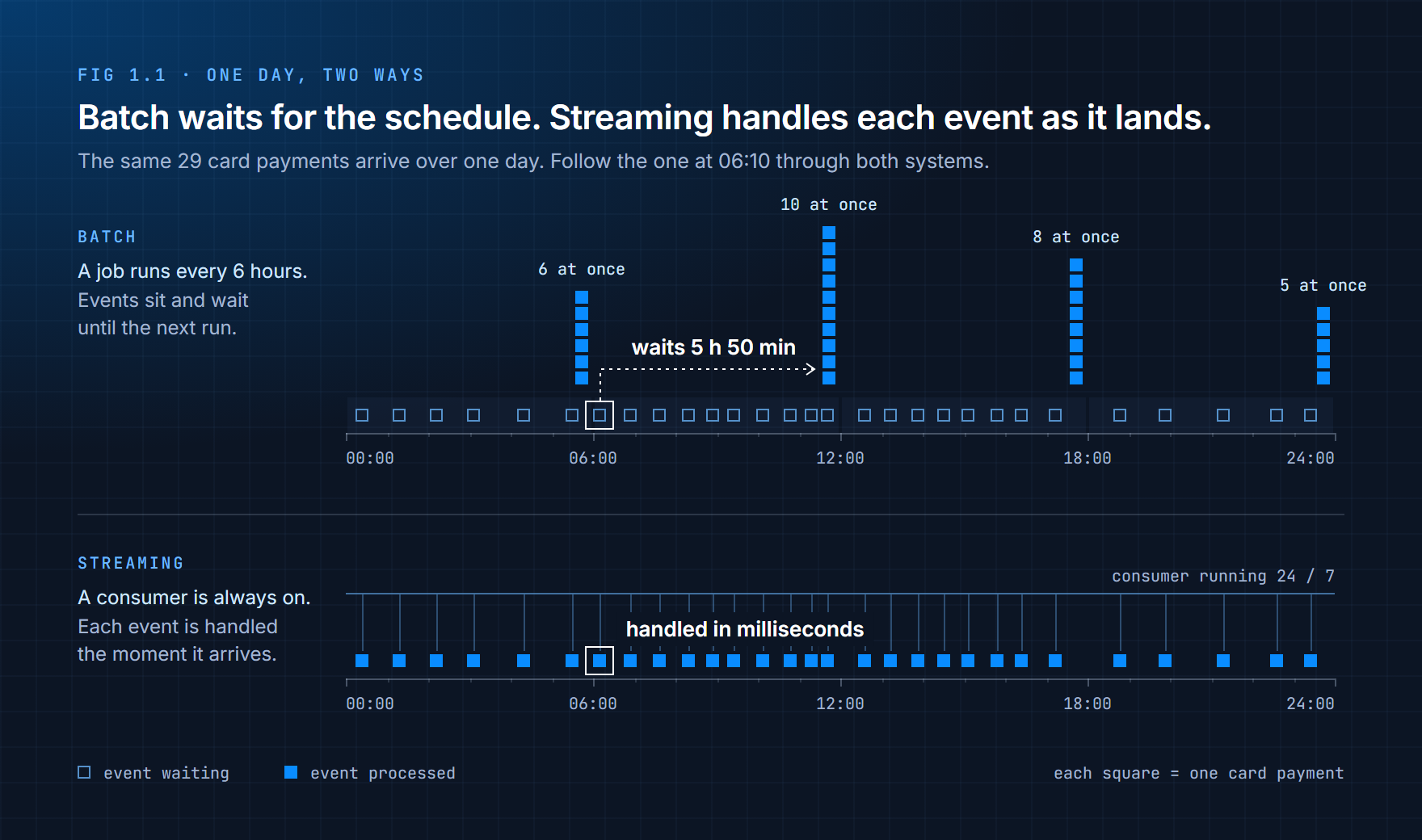
In the batch system, that payment arrives just after the 06:00 job has finished. So it sits and waits, along with nine others, until the 12:00 run picks them all up together. Nearly six hours pass before anything looks at it.
In the streaming system, a program called a consumer is running all day long. The 06:10 payment is handled the moment it lands, in milliseconds.
| Batch | Streaming | |
|---|---|---|
| How data is handled | Collected first, then processed together | Processed one event at a time |
| When processing runs | On a schedule: hourly, nightly, monthly | All the time |
| How long until there's a result | Minutes to days | Milliseconds to seconds |
| The question it answers | "What happened?" | "What is happening?" |
| Everyday comparison | A bus on a timetable | A taxi |
That fourth row is the one to remember. Batch looks back at a finished period. Streaming watches the present as it unfolds. Those are two different goals, and they lead to two very different designs.
1.2 The Real Difference Is Time
It's tempting to treat batch and streaming as two ways of doing the same thing, one slow and one fast. That misses the point. The real difference is what each one assumes about time.
A batch system assumes delay. It's built on the idea that waiting is fine, so it collects data first and deals with it later.
A streaming system assumes immediacy. It's built on the idea that every event might need a response right now.
Data that ends, and data that doesn't
There's a second way to see this, and it explains a lot of what you'll meet later in this part.
A batch always has edges. "All of yesterday's orders" has a first row and a last row. The job reads them, computes the answer, and finishes. It can honestly say: done.
A stream has no last row. Orders keep arriving tonight, tomorrow and next year. A streaming system never gets to say "done". The best it can say is "up to date as of right now".
Engineers call these bounded data (it has an end) and unbounded data (it doesn't). Most of the extra difficulty in streaming comes from this one fact. If the data never ends, when do you total it up? What do you do with an event that shows up twenty minutes late? You'll deal with those questions properly later on. For now, just notice that batch never has to ask them.
How long can the answer wait?
The time between something happening and a system acting on it is called latency. Low latency means a fast reaction; high latency means a long wait.
Every workload has a latency it can live with, and that number, more than anything else, tells you which approach to use.
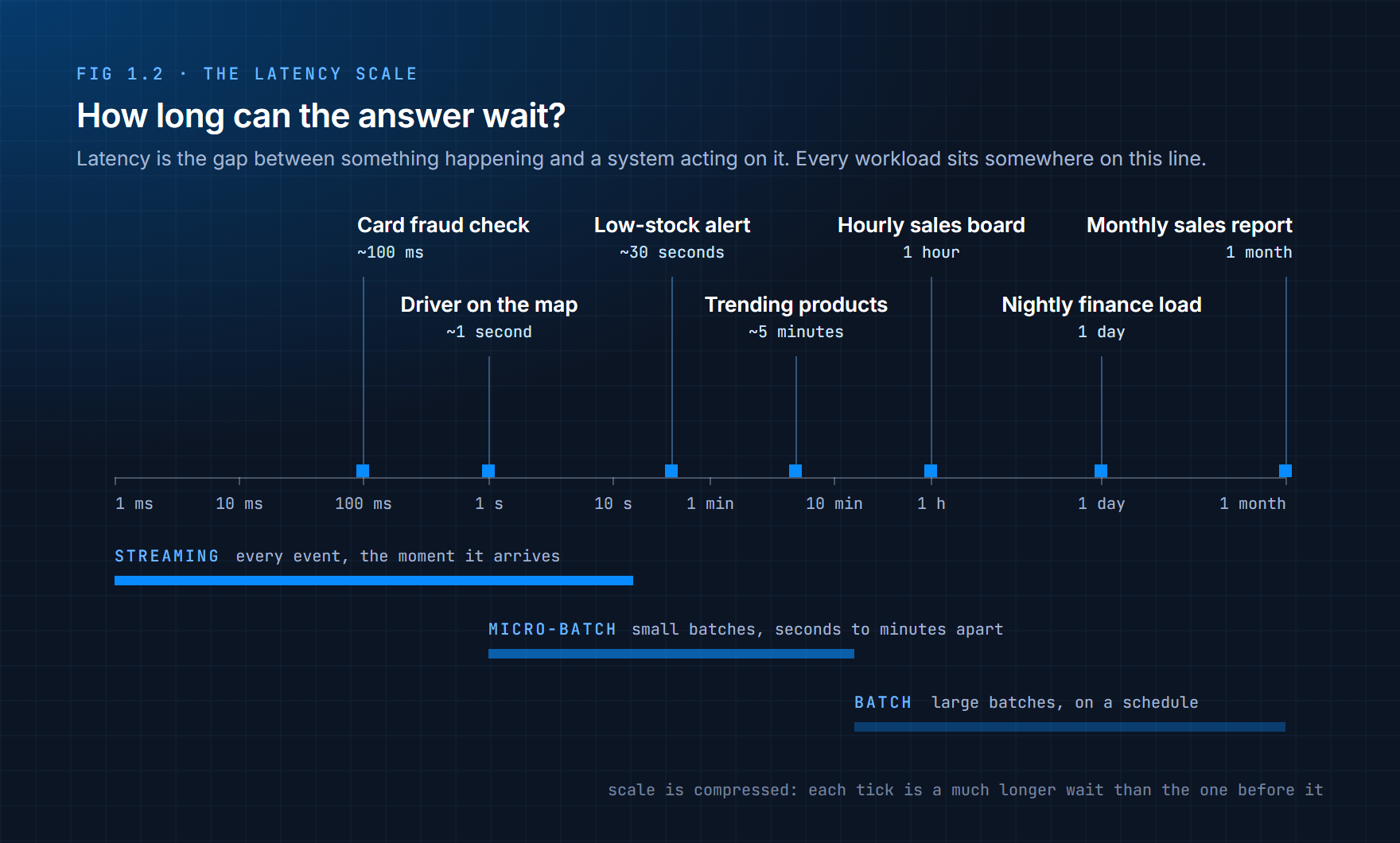
A fraud check has to finish in about a tenth of a second, before the card machine gives up. A monthly sales report can take its time, because nobody reads it before the month is over.
Notice the band in the middle of Figure 1.2. Micro-batching is a halfway approach: collect events for a few seconds, process that small group, then repeat. Some popular tools, such as Spark Structured Streaming, work this way by default. To a user it often feels like streaming, and you'll hear it called "near real-time".
1.3 Why Not Just Run the Batch More Often?
This is the first idea almost everyone has. If a nightly job is too slow, run it every hour. Still too slow? Every five minutes. Why build anything new?
It works for a while. Then it hits three walls.
You still wait for the next run. A job that runs every 5 minutes and takes 2 minutes to finish means an event can wait up to 7 minutes before it shows up anywhere. For a dashboard, that might be fine. For a fraud check that has 100 milliseconds, no schedule will ever get there.
Every run has a fixed cost. Each run has to start up, connect to the source, work out what's new, read it, and write the results. When a job runs once a night, that overhead doesn't matter. When it runs every minute, the job can spend more time getting ready than actually working.
Runs start to collide. On a busy day, a job that normally takes 3 minutes takes 6. If it's scheduled every 5 minutes, the next run starts before the last one has finished. Now two copies are fighting over the same data, and you're writing code to stop them treading on each other.
Push far enough down this road and you end up rebuilding a streaming system out of batch parts, with all of the complexity and none of the design that makes streaming work. A system designed around waiting can't be tuned into one that doesn't wait.
1.4 What Streaming Costs You
With all that in mind, it's easy to conclude that streaming is simply the modern, better option. It isn't. It's a trade, and you pay for it every day it runs.
| Batch | Streaming | |
|---|---|---|
| Infrastructure | Starts, finishes, switches off | Always on, 24 hours a day |
| Moving parts | A scheduler and a job | Servers that store events, programs that write them, programs that read them, and monitoring for all of it |
| When something breaks | Fix the bug, rerun last night's job | New events keep arriving while you fix it |
| Checking the result | The input is fixed, so a rerun gives the same answer | The input is still changing while you compute |
| Who looks after it | Someone checks it in the morning | Someone is on call |
| What you pay for | Compute while the job runs | Compute all the time |
There are also problems that only exist in streaming. An event can arrive late, because a phone lost signal in a tunnel and sent its data twenty minutes afterwards. Events can arrive out of order. The same event can arrive twice. Batch mostly avoids all three, because by the time it runs, the data has settled down.
None of this means streaming is a bad idea. It means streaming has to earn its place.
Streaming isn't an upgrade from batch. It's a commitment you take on because the business can't afford to wait.
1.5 When to Stream, and When Not To
So how do you decide? Most of the time, three questions are enough. Ask them in order.
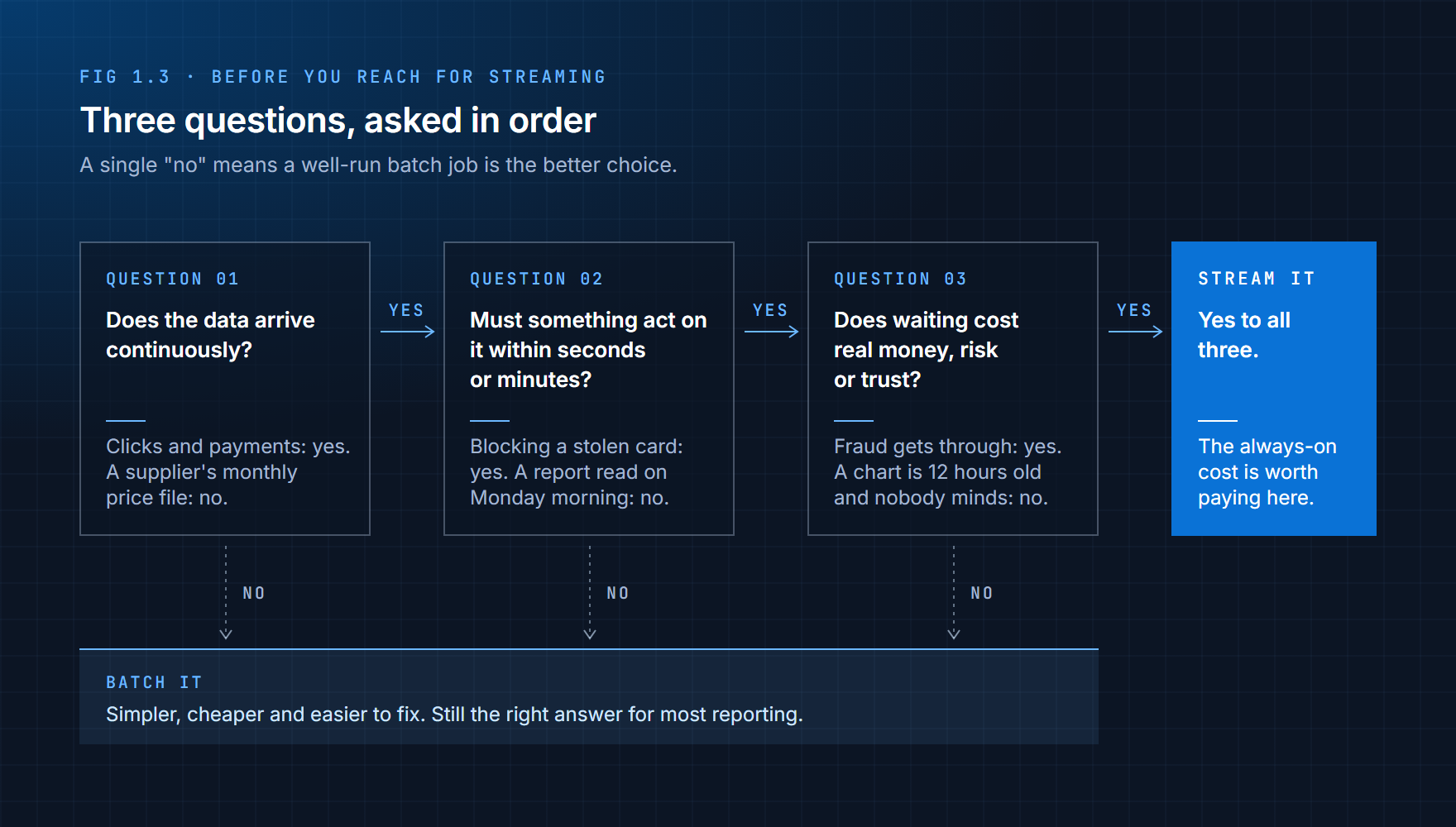
If the answer to any of them is "no", a well-run batch job is almost always the better choice. Only when all three are "yes" does the extra cost of streaming pay for itself.
Here's how that plays out on real workloads:
| Workload | Choice | Why |
|---|---|---|
| Fraud detection during a payment | Stream | The decision has to be made before the payment goes through |
| Clickstream (every click and page view on a website) | Stream | It arrives nonstop and in huge volume, and product teams want to see what users are doing now |
| Application logs and metrics | Stream | An outage you discover an hour late is an hour of lost customers |
| Live alerts and monitoring | Stream | An alert that arrives tomorrow isn't an alert |
| Monthly or quarterly sales report | Batch | The period is fixed, and nobody reads it until the period ends |
| Reference data (country codes, product categories) | Batch | It changes a few times a year |
| End-of-day totals | Batch | The question is "per day" by definition |
| Payroll | Batch | It runs on fixed dates, and being correct matters far more than being fast |
The streaming rows have something in common. The data keeps arriving, someone acts on it quickly, and a delay costs money, customers or safety. The batch rows share the opposite traits. The data changes rarely, nobody's waiting on it, or the work is periodic by nature.
Batch isn't old-fashioned, and it isn't what you use until you're ready for streaming. For the bottom half of that table, it's simply the correct tool, and it will still be the correct tool in ten years.
1.6 Most Companies Run Both
In practice you rarely pick one for the whole company. You pick one per job, and most companies end up with both running side by side, often on the same data.
Think about an online shop. When a customer places an order, that single order event is needed in two very different places. The fraud check needs it within a tenth of a second. The finance team needs it too, but not until tomorrow morning's report.
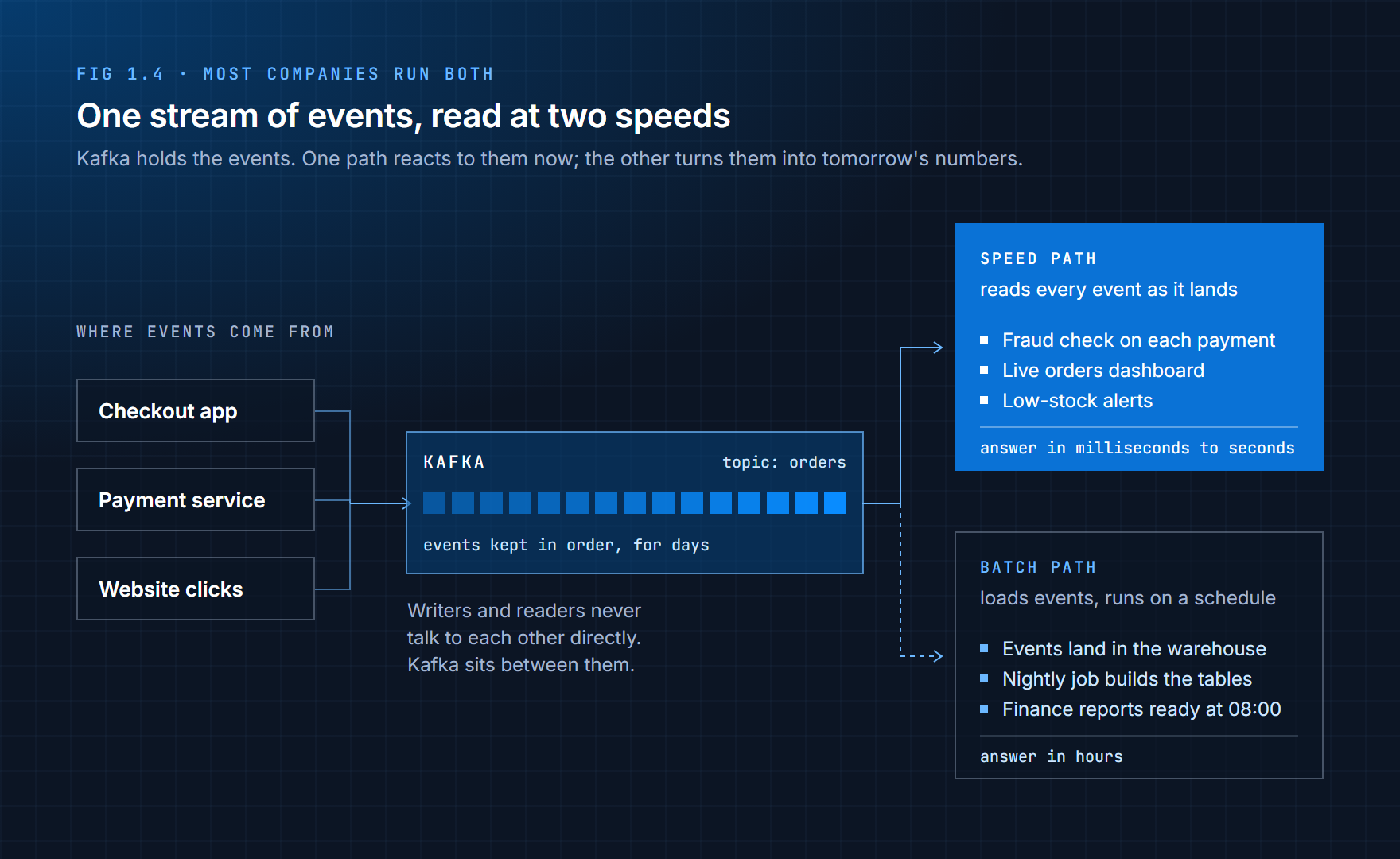
The trick is to capture every event once, in one place, and then let each system read it at whatever speed it needs. The fraud check reads events the moment they land. The warehouse loads the same events and a nightly job turns them into the finance tables.
Neither path replaces the other. They answer different questions about the same events.
1.7 Where Kafka Fits
That "one place" in the middle of Figure 1.4 is the job Kafka was built for.
Kafka is an event streaming platform. In plain terms, it's a system that applications write events into, and other applications read events out of, in order, as they arrive. Three things make it useful:
It takes events from many sources at once. Checkout, payments, website clicks and anything else can all write to Kafka at the same time, without knowing or caring who will read the events later.
It keeps the events. Kafka doesn't hand an event over and forget it. It stores events in order, on disk, for as long as you configure: hours, days or weeks. If a reader crashes or falls behind, it picks up where it left off, and nothing is lost. (Chapter 2 adds one important detail about what "in order" means.)
Many readers can use the same events. The fraud check, the live dashboard and the warehouse loader each read the same events on their own, at their own pace. One slow reader doesn't hold up the others.
That last point is why the picture in Figure 1.4 works. Kafka is built for streaming, but it doesn't replace your warehouse or your nightly jobs. It feeds them.
One thing Kafka is not, on its own, is the place where the business logic runs. Kafka moves and stores events. Deciding whether a payment looks like fraud happens in a program that reads from Kafka. You'll see exactly how those pieces connect in the next chapter.
Summary
Batch processing collects data over time and processes it together on a schedule. Stream processing handles each event as it arrives. The difference that matters is how each one treats time: batch assumes delay and answers "what happened?", while streaming assumes immediacy and answers "what is happening?"
A few ideas to carry into the rest of this part:
Batch optimizes for throughput and simplicity. It's cheaper, easier to reason about, and easy to rerun when something goes wrong.
Streaming optimizes for timeliness. It lets a system react while the reaction still matters, and it costs you always-on infrastructure, more moving parts and someone on call.
Neither one replaces the other. Most companies run both, often on the same events.
The choice is about the problem, not the tool. Ask whether data arrives continuously, whether something must act on it quickly, and whether waiting costs something real. Three yeses mean stream. One no means batch.
Kafka sits on the streaming side. It collects events from many sources, keeps them in order, and lets many systems read them at their own speed, including the batch systems that still do most of the reporting.
Exercises
1.1 For each of the following, decide whether you'd use streaming or batch, and give a one-sentence reason:
- (a) A ride-sharing app showing the driver's car moving on a map
- (b) A yearly tax summary sent to customers
- (c) Locking an account after five wrong passwords in a row
- (d) A weekly email listing the most-read articles
- (e) A temperature sensor inside a fridge that stores vaccines
1.2 Your manager says: "The sales dashboard updates overnight. Make it real-time." Before building anything, write down three questions you'd ask them. Use Figure 1.3 as a starting point.
1.3 A batch job runs every 15 minutes and takes 4 minutes to finish. What's the longest an event could wait before it appears in the results? Now suppose that on a busy day the job takes 20 minutes. What goes wrong?
1.4 Explain the difference between bounded and unbounded data to a friend who doesn't work in tech, without using the words "bounded", "unbounded" or "stream". One short paragraph is enough.
1.5 Think About It: A streaming fraud check goes down for two hours, but every payment event during that time was safely stored in Kafka. What happens when the fraud check comes back up? Compare that with a nightly batch job that failed last night. Which situation is easier to recover from, and which one caused more damage while it was broken?
What's Next
You now know what streaming is for, what it costs, and where Kafka fits. Chapter 2 gets Kafka running on your own machine and takes it apart: topics, partitions, producers, consumers, consumer groups, and the guarantees Kafka makes about delivering your events.