Chapter 6: Common Table Expressions (CTEs)
The subquery that closed Chapter 5 worked — two nested levels, a derived table inside a scalar subquery inside a WHERE clause. It was correct. It was also difficult to read. You had to trace inward to understand the outermost result. That kind of query is how bugs stay hidden: something changes in one subquery level and the developer above it assumes the old behaviour.
A Common Table Expression (CTE) gives a name to a subquery result and lets you reference it by that name as though it were a table. The logic stays identical — but it reads top to bottom, each named result building on the previous one, instead of inside-out.
6.1 CTE Syntax
WITH expression_name [(column_name [, ...])]
AS (
    CTE_definition
)
SQL_statement;
expression_name— the name you give to the temporary result setcolumn_namelist — optional, if you want to rename the CTE's columnsCTE_definition— aSELECTstatement whose result set populates the CTESQL_statement— the query that references the CTE by name
CTE Anatomy
WITH cte_sales_amounts (staff, sales, year)   ← name + optional column list
AS (
    SELECT                                     ← CTE definition (inner query)
        first_name + ' ' + last_name,
        SUM(quantity * list_price * (1 - discount)),
        YEAR(order_date)
    FROM sales.orders o
    JOIN sales.order_items i ON i.order_id = o.order_id
    JOIN sales.staffs s ON s.staff_id = o.staff_id
    GROUP BY first_name + ' ' + last_name, YEAR(order_date)
)
SELECT staff, sales                            ← outer query references CTE
FROM cte_sales_amounts
WHERE year = 2018;                             ← filter on CTE result
The CTE exists only for the duration of the single SQL statement that follows it. Once the statement finishes, the CTE is gone. It is not a permanent object in the database.
6.2 Simple CTE
This query returns total sales by staff member for 2018 using a CTE to separate the aggregation from the filtering.
WITH cte_sales_amounts (staff, sales, year) AS (
    SELECT
        first_name + ' ' + last_name,
        SUM(quantity * list_price * (1 - discount)),
        YEAR(order_date)
    FROM sales.orders o
    INNER JOIN sales.order_items i ON i.order_id = o.order_id
    INNER JOIN sales.staffs s ON s.staff_id = o.staff_id
    GROUP BY
        first_name + ' ' + last_name,
        YEAR(order_date)
)
SELECT staff, sales
FROM cte_sales_amounts
WHERE year = 2018;

The CTE definition does the heavy lifting — three joins, a GROUP BY, and a SUM. The outer query is a clean three-line SELECT ... WHERE. You read the CTE first, understand what it produces, then read the outer query to see what it does with that result.
Compare this to the equivalent subquery version:
-- Same result, harder to read
SELECT staff, sales
FROM (
    SELECT
        first_name + ' ' + last_name AS staff,
        SUM(quantity * list_price * (1 - discount)) AS sales,
        YEAR(order_date) AS year
    FROM sales.orders o
    INNER JOIN sales.order_items i ON i.order_id = o.order_id
    INNER JOIN sales.staffs s ON s.staff_id = o.staff_id
    GROUP BY first_name + ' ' + last_name, YEAR(order_date)
) AS derived
WHERE year = 2018;
The logic is identical. The CTE version names the inner result, making the intent clear at each step.
6.3 CTE for Report Averages
This example uses a CTE to calculate the average number of orders per staff in 2018. The problem — you need to AVG a COUNT, which cannot be done in a single aggregation step.
WITH cte_sales AS (
    SELECT
        staff_id,
        COUNT(*) AS order_count
    FROM sales.orders
    WHERE YEAR(order_date) = 2018
    GROUP BY staff_id
)
SELECT AVG(order_count) AS average_orders_by_staff
FROM cte_sales;
average_orders_by_staff
-----------------------
48
Why This Needs a CTE (or Subquery)
Problem: You cannot write AVG(COUNT(*)) directly

  Wrong:
  SELECT AVG(COUNT(*)) FROM sales.orders GROUP BY staff_id
  → Error: cannot nest aggregate functions

  Solution:
  Step 1 (CTE):  compute COUNT(*) per staff → one row per staff
  Step 2 (outer): compute AVG of those counts → one final number
The CTE makes the two-step logic explicit. Without it, you need a derived table — and it reads inside-out.
6.4 Multiple CTEs in One Query
You can define multiple CTEs in a single WITH clause, separated by commas. Each CTE can reference the ones defined before it.
WITH cte_category_counts (category_id, category_name, product_count) AS (
    SELECT
        c.category_id,
        c.category_name,
        COUNT(p.product_id)
    FROM production.products p
    INNER JOIN production.categories c ON c.category_id = p.category_id
    GROUP BY c.category_id, c.category_name
),
cte_category_sales (category_id, sales) AS (
    SELECT
        p.category_id,
        SUM(i.quantity * i.list_price * (1 - i.discount))
    FROM sales.order_items i
    INNER JOIN production.products p  ON p.product_id = i.product_id
    INNER JOIN sales.orders o         ON o.order_id = i.order_id
    WHERE order_status = 4
    GROUP BY p.category_id
)
SELECT
    c.category_name,
    c.product_count,
    s.sales
FROM cte_category_counts c
INNER JOIN cte_category_sales s ON s.category_id = c.category_id
ORDER BY c.category_name;

Multiple CTE Execution Flow
WITH clause defines (in order):

  cte_category_counts         cte_category_sales
  ┌────────────────────┐      ┌────────────────────┐
  │ category_id        │      │ category_id        │
  │ category_name      │      │ sales              │
  │ product_count      │      └────────────────────┘
  └────────────────────┘               │
              │                        │
              └─────────┬──────────────┘
                        ▼
              Outer query JOINs both CTEs
              and returns the final result
Each CTE is defined once, named clearly, and referenced by that name — no nested parentheses, no tracing inward to understand what each level produces.
Interview Angle "When would you use a CTE instead of a subquery?" The key points: CTEs are more readable (top-down instead of inside-out), they can be referenced multiple times in the same query without repeating the definition, and they allow chaining — one CTE can reference a previously defined CTE. Subqueries are fine for simple, one-off inline calculations; CTEs shine when the same result is needed in multiple places, or when the logic has multiple steps.
6.5 CTE vs Subquery vs Derived Table
All three can solve the same problem. The choice affects readability and maintainability, not the result.
| Derived Table | Subquery | CTE | |
|---|---|---|---|
| Where defined | Inside FROM | Inside WHERE/SELECT/FROM | Before the main query with WITH |
| Reading direction | Inside-out | Inside-out | Top-down |
| Reusable in same query | No | No | Yes |
| Can reference itself | No | No | Yes (recursive) |
| Readability on complex logic | Low | Low | High |
| Performance difference | Minimal | Minimal | Minimal |
CTEs do not automatically outperform subqueries — the query optimizer usually produces identical execution plans. The benefit is almost entirely readability and maintainability.
⚠ Common Mistake — CTE is Not a Temp Table A CTE is not materialized as a physical temporary table. It is expanded inline by the optimizer each time it is referenced. If you reference a large CTE twice in the same query, the underlying query may execute twice. If you need the result materialized once, use a temporary table (
#temp_table) instead.
6.6 Recursive CTEs
A recursive CTE references itself. It executes repeatedly, each iteration feeding into the next, until a termination condition is met. It is the standard SQL mechanism for querying hierarchical data.
Syntax
WITH expression_name (column_list)
AS (
    -- Anchor member: returns the base result set
    initial_query
    UNION ALL
    -- Recursive member: references expression_name
    recursive_query
)
SELECT * FROM expression_name;
Three required parts:
- Anchor member — runs once, returns the starting row(s)
- Recursive member — references the CTE by name, runs on the result of the previous iteration
- Termination condition — a
WHEREclause in the recursive member that eventually evaluates to false and stops the recursion
Execution Flow
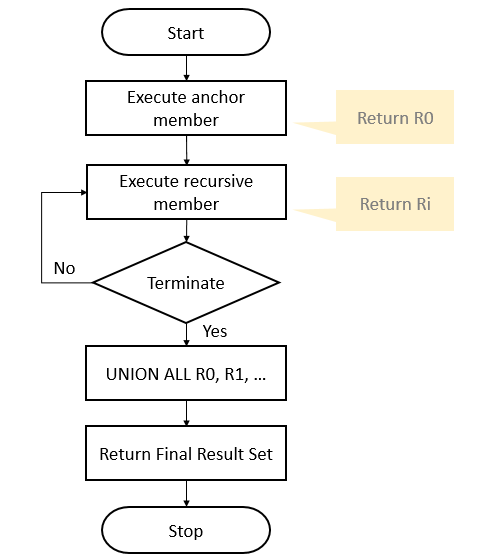
Iteration 0:   Execute anchor member  → result set R0
                                             │
Iteration 1:   Execute recursive member      │
               with R0 as input  → R1        │
                                             │
Iteration 2:   Execute recursive member      │
               with R1 as input  → R2        │
                                             ↓
...until recursive member returns empty set

Final result:  UNION ALL of R0, R1, R2, ... Rn
6.6.1 Simple Recursive CTE — Generating a Sequence
This example generates the weekday names from Monday through Saturday using recursion.
WITH cte_numbers (n, weekday) AS (
    SELECT 0, DATENAME(DW, 0)       -- anchor: starts at day 0 (Monday)
    UNION ALL
    SELECT n + 1, DATENAME(DW, n + 1)
    FROM cte_numbers
    WHERE n < 6                     -- termination: stop after Saturday
)
SELECT weekday FROM cte_numbers;
weekday
----------
Monday
Tuesday
Wednesday
Thursday
Friday
Saturday
Sunday
Each iteration increments n by 1 and generates the next weekday name. When n reaches 6, WHERE n < 6 becomes false and the recursion stops.
6.6.2 Recursive CTE — Hierarchical Data (Org Chart)
The sales.staffs table has a manager_id column that points back to staff_id in the same table — a self-referencing hierarchy. This is the classic use case for a recursive CTE.
WITH cte_org AS (
    -- Anchor: get the top manager (no manager_id)
    SELECT
        staff_id,
        first_name,
        manager_id
    FROM sales.staffs
    WHERE manager_id IS NULL

    UNION ALL

    -- Recursive: get each manager's direct reports
    SELECT
        e.staff_id,
        e.first_name,
        e.manager_id
    FROM sales.staffs e
    INNER JOIN cte_org o ON o.staff_id = e.manager_id
)
SELECT * FROM cte_org;

How the Org Chart Recursion Works
Iteration 0 (Anchor):
  WHERE manager_id IS NULL
  → Fabiola Jackson (staff_id = 1, no manager)

Iteration 1 (Recursive):
  JOIN where manager_id = 1
  → Mireya Copeland, Genna Serrano (report to Fabiola)

Iteration 2 (Recursive):
  JOIN where manager_id IN (2, 3)
  → Virgie Wiggins, Jannette David (report to Mireya/Genna)

Iteration 3 (Recursive):
  JOIN where manager_id IN (4, 5)
  → no more rows → recursion stops

Final UNION ALL:
  Fabiola + Mireya + Genna + Virgie + Jannette
⚠ Common Mistake — Infinite Recursion A recursive CTE without a proper termination condition will run forever (or until SQL Server hits its max recursion depth of 100). Always include a
WHEREclause in the recursive member that eventually becomes false. You can also addOPTION (MAXRECURSION n)at the end of your query to override the default limit.
Interview Angle "How do you query hierarchical data in SQL?" The expected answer names recursive CTEs — three parts: anchor member (base case), recursive member (references the CTE itself), and termination condition. Mentioning the self-referencing
manager_id→staff_idpattern andUNION ALL(notUNION, because de-duplication is expensive and usually wrong here) shows real understanding.
6.7 CTE With Window Functions
CTEs are especially useful when window functions produce results that need further filtering — since window functions cannot appear in WHERE or HAVING (they run in SELECT, after those clauses). The CTE wraps the window function result, and the outer query filters on it.
-- Top 2 products by revenue in each category
WITH ranked_products AS (
    SELECT
        p.product_name,
        c.category_name,
        SUM(oi.quantity * oi.list_price * (1 - oi.discount)) AS revenue,
        ROW_NUMBER() OVER (
            PARTITION BY p.category_id
            ORDER BY SUM(oi.quantity * oi.list_price * (1 - oi.discount)) DESC
        ) AS rank_in_category
    FROM production.products p
    INNER JOIN production.categories c ON p.category_id = c.category_id
    INNER JOIN sales.order_items oi ON p.product_id = oi.product_id
    GROUP BY p.product_name, p.category_id, c.category_name
)
SELECT product_name, category_name, revenue
FROM ranked_products
WHERE rank_in_category <= 2
ORDER BY category_name, revenue DESC;
product_name                    | category_name    | revenue
---------------------------------+------------------+----------
Trek Domane SLR 9 Disc            | Road Bikes       | 58419.50
Trek Domane SLR 8 Disc            | Road Bikes       | 31899.00
Trek Fuel EX 9.8 27.5 Plus        | Mountain Bikes   | 42399.92
Trek Remedy 9.8                   | Mountain Bikes   | 37099.30
WHERE rank_in_category <= 2 filters on the window function result — impossible inside a single SELECT, straightforward with a CTE.
6.8 Putting It Together
The sales director wants to compare each category's revenue against the overall average revenue — and flag categories that are either above average or below — using a clean, readable query.
WITH category_revenue AS (
    SELECT
        c.category_name,
        SUM(oi.quantity * oi.list_price * (1 - oi.discount)) AS revenue
    FROM production.categories c
    INNER JOIN production.products p  ON c.category_id = p.category_id
    INNER JOIN sales.order_items oi   ON p.product_id = oi.product_id
    INNER JOIN sales.orders o         ON oi.order_id = o.order_id
    WHERE o.order_status = 4
    GROUP BY c.category_name
),
overall_avg AS (
    SELECT AVG(revenue) AS avg_revenue
    FROM category_revenue
)
SELECT
    cr.category_name,
    ROUND(cr.revenue, 0)      AS total_revenue,
    ROUND(oa.avg_revenue, 0)  AS avg_revenue,
    CASE
        WHEN cr.revenue > oa.avg_revenue THEN 'Above Average'
        WHEN cr.revenue < oa.avg_revenue THEN 'Below Average'
        ELSE 'Average'
    END AS performance
FROM category_revenue cr
CROSS JOIN overall_avg oa
ORDER BY cr.revenue DESC;
category_name      | total_revenue | avg_revenue | performance
-------------------+---------------+-------------+---------------
Mountain Bikes      | 892450        | 281540      | Above Average
Road Bikes          | 745210        | 281540      | Above Average
Electric Bikes      | 421890        | 281540      | Above Average
Cruisers Bicycles   | 198630        | 281540      | Below Average
Children Bicycles   | 78620         | 281540      | Below Average
Two CTEs defined, one referencing the other. The outer query joins them with a CROSS JOIN (the average is one row — every category joins to it), adds a CASE label, and sorts. Each step is named and reads linearly.
Summary
A CTE (WITH expression_name AS (...)) gives a temporary name to a query result, valid for the duration of the single statement that follows it. Unlike derived tables, CTEs read top-down and can be referenced multiple times in the same query. Multiple CTEs in one WITH clause, separated by commas, can reference each other in sequence. CTEs do not automatically outperform subqueries — the difference is readability, not execution speed. A CTE is not materialized by default; referencing it twice may execute the definition twice. A recursive CTE references itself and has three parts: an anchor member (base case), a recursive member (self-referencing), and a WHERE termination condition. Recursive CTEs are the standard mechanism for querying self-referencing hierarchies and generating sequences. CTEs pair naturally with window functions when the window result needs to be filtered, since window functions cannot appear in WHERE or HAVING.
Exercises
6.1 — Rewrite this derived table query as a CTE:
SELECT AVG(order_count) AS avg_orders
FROM (
    SELECT store_id, COUNT(*) AS order_count
    FROM sales.orders
    GROUP BY store_id
) AS store_counts;
6.2 — Write a CTE called cte_high_value_products that returns products with list_price > 2000. Then query the CTE to return only Mountain Bikes from that list, joining to production.categories.
6.3 — Write two CTEs in one WITH clause: one that counts orders per customer, and one that sums revenue per customer. Join them in the outer query to return customer_id, order_count, and total_revenue side by side.
6.4 — Using a recursive CTE, generate a list of numbers from 1 to 10. Each row should have the number and its square (n * n).
6.5 — Using the recursive CTE org chart from section 9.6.2 as a starting point, modify it to also show the manager's first_name alongside each employee. Add a level column (0 for the top manager, 1 for their direct reports, 2 for the next level down).
6.6 — Think About It: A CTE is defined once but referenced twice in the same outer query. A colleague says "CTEs are faster than subqueries because the database computes the result once and reuses it." Is this claim accurate? What would you need to do if you genuinely needed the result computed only once and reused?