Chapter 12: ROLLUP, CUBE and GROUPING SETS
The BikeStores sales manager wants one report for the board: revenue for each store in each year, a subtotal for every store, and the total for the whole company at the bottom. One table, read top to bottom, the way a spreadsheet with subtotals reads.
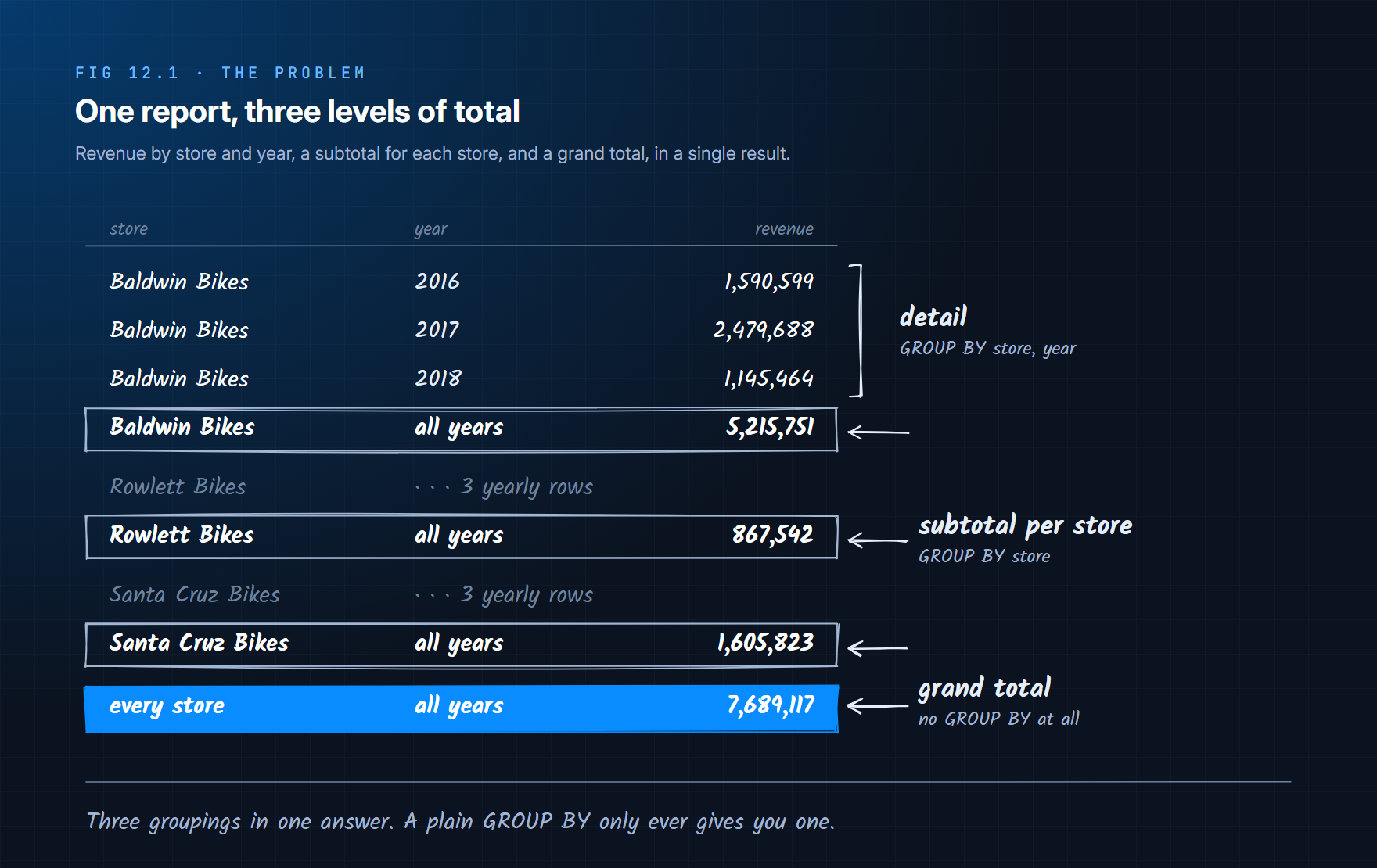
Chapter 4's GROUP BY gets you the first level:
SELECT
    s.store_name,
    YEAR(o.order_date) AS order_year,
    SUM(oi.quantity * oi.list_price * (1 - oi.discount)) AS revenue
FROM sales.orders AS o
INNER JOIN sales.order_items AS oi
    ON oi.order_id = o.order_id
INNER JOIN sales.stores AS s
    ON s.store_id = o.store_id
GROUP BY s.store_name, YEAR(o.order_date)
ORDER BY s.store_name, order_year;
store_name       | order_year | revenue
-----------------+------------+------------
Baldwin Bikes    | 2016       | 1590598.88
Baldwin Bikes    | 2017       | 2479688.40
Baldwin Bikes    | 2018       | 1145464.00
Rowlett Bikes    | 2016       | 271286.14
Rowlett Bikes    | 2017       | 404611.61
Rowlett Bikes    | 2018       | 191644.50
Santa Cruz Bikes | 2016       | 565493.51
Santa Cruz Bikes | 2017       | 562908.24
Santa Cruz Bikes | 2018       | 477421.29
Nine rows, and no totals. A GROUP BY has exactly one grouping, and this report needs three: by store and year, by store, and by nothing at all. This chapter builds up to the clause that asks for all three at once, starting with the fix most people try first.
12.1 The Obvious Fix: UNION ALL
Write each grouping as its own query and glue the results together. A level that does not group by a column returns NULL in that column's place, so the three result sets line up:
SELECT s.store_name, YEAR(o.order_date) AS order_year,
       SUM(oi.quantity * oi.list_price * (1 - oi.discount)) AS revenue
FROM sales.orders AS o
INNER JOIN sales.order_items AS oi ON oi.order_id = o.order_id
INNER JOIN sales.stores AS s ON s.store_id = o.store_id
GROUP BY s.store_name, YEAR(o.order_date)

UNION ALL

SELECT s.store_name, NULL,
       SUM(oi.quantity * oi.list_price * (1 - oi.discount))
FROM sales.orders AS o
INNER JOIN sales.order_items AS oi ON oi.order_id = o.order_id
INNER JOIN sales.stores AS s ON s.store_id = o.store_id
GROUP BY s.store_name

UNION ALL

SELECT NULL, NULL,
       SUM(oi.quantity * oi.list_price * (1 - oi.discount))
FROM sales.orders AS o
INNER JOIN sales.order_items AS oi ON oi.order_id = o.order_id
INNER JOIN sales.stores AS s ON s.store_id = o.store_id;
It returns the right 13 rows. It also has two problems that grow with the report:
| Problem | What it costs |
|---|---|
| The same joins and the same revenue formula, written three times | Change the formula in one place and forget another, and the subtotals stop adding up |
Each SELECT is a separate query | SQL Server reads the data three times. With SET STATISTICS IO ON: order_items scanned 3 times, 75 logical reads |
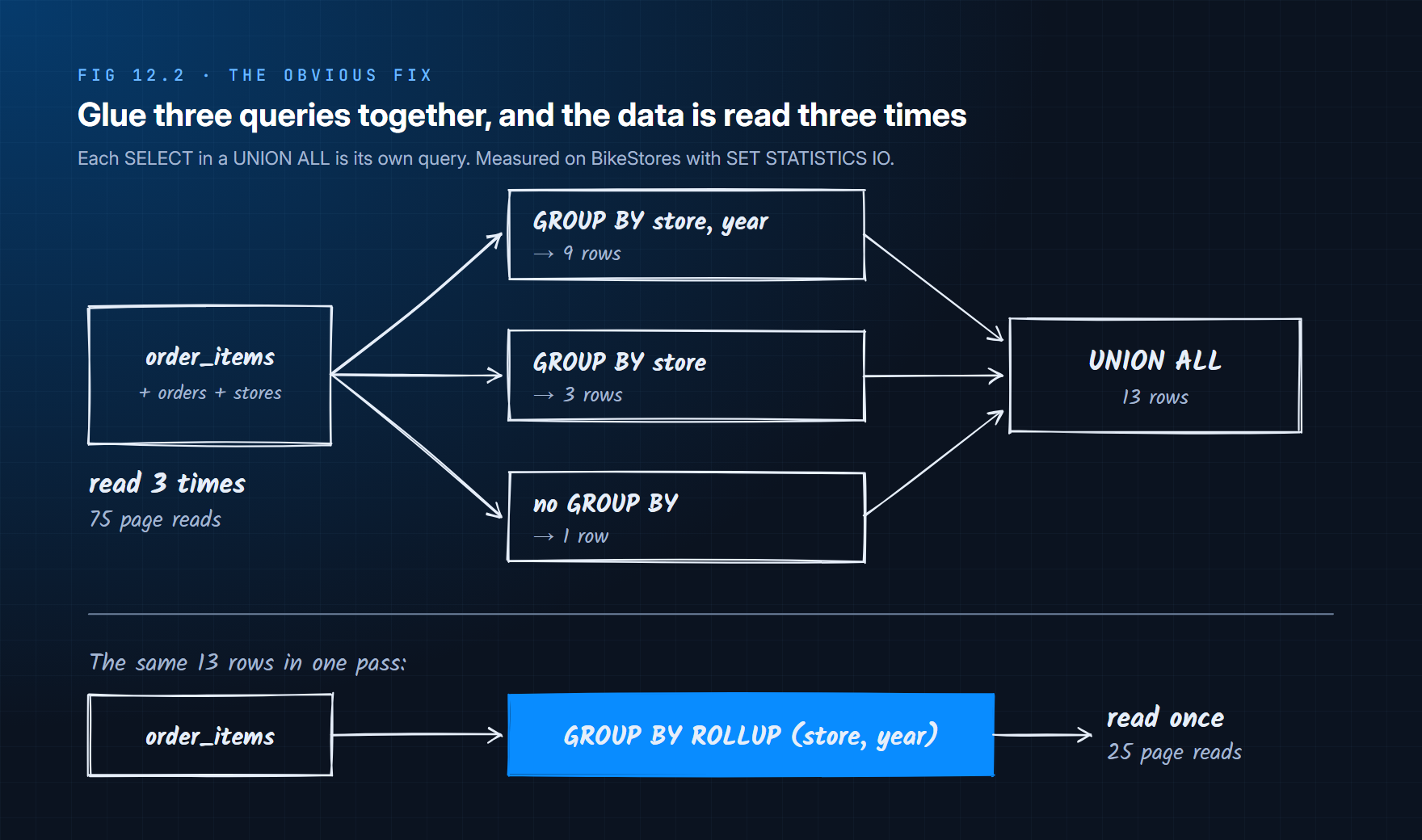
What the report really needs is a way to tell GROUP BY "these three groupings, please", once, and let SQL Server compute them in a single pass.
12.2 GROUPING SETS: Name Every Grouping You Want
GROUPING SETS does exactly that. You list the groupings in parentheses, and SQL Server runs each one and stacks the results:
SELECT
    s.store_name,
    YEAR(o.order_date) AS order_year,
    SUM(oi.quantity * oi.list_price * (1 - oi.discount)) AS revenue
FROM sales.orders AS o
INNER JOIN sales.order_items AS oi ON oi.order_id = o.order_id
INNER JOIN sales.stores AS s ON s.store_id = o.store_id
GROUP BY GROUPING SETS (
    (s.store_name, YEAR(o.order_date)),   -- detail
    (s.store_name),                       -- subtotal per store
    ()                                    -- grand total
);
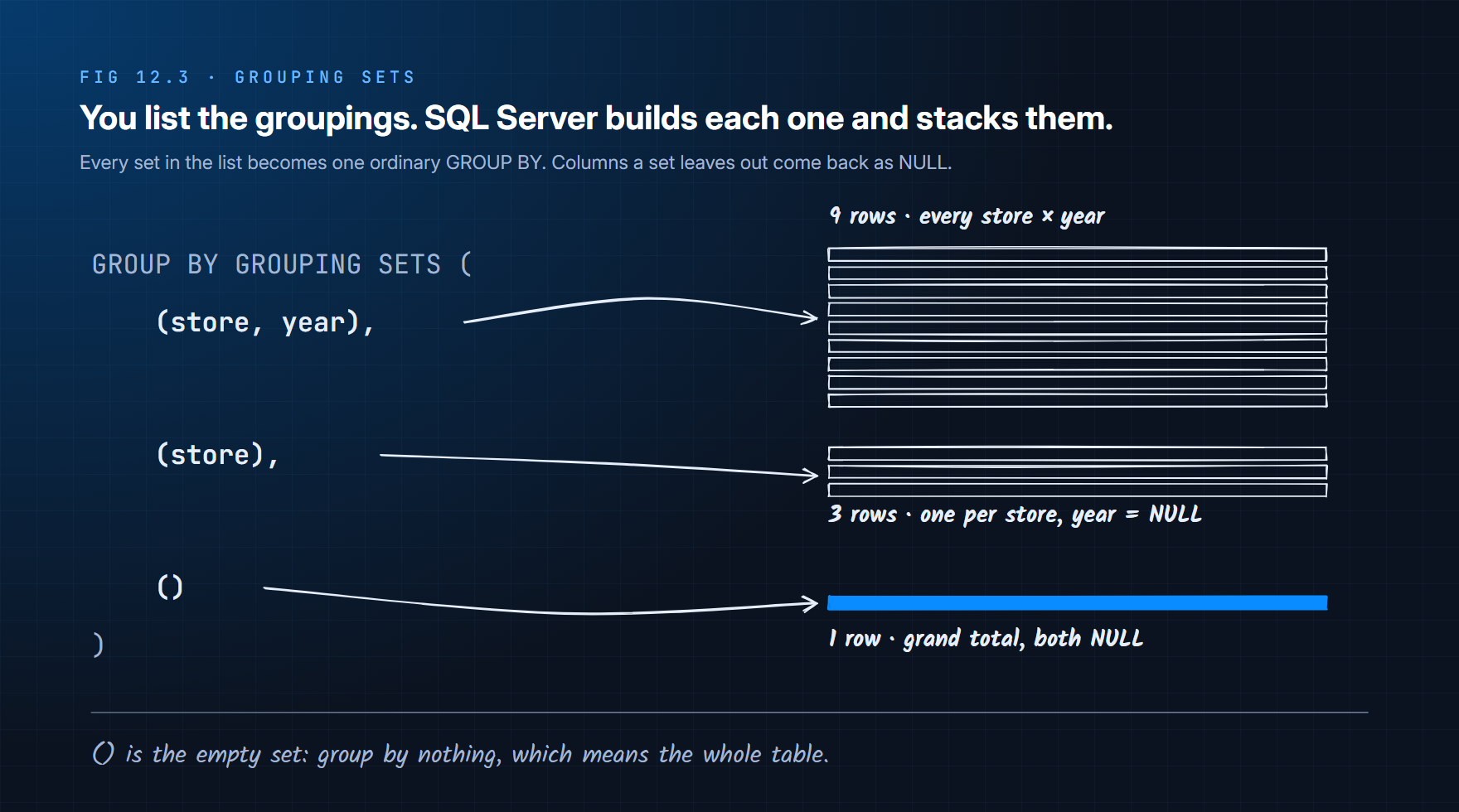
Three things to notice:
() is the empty grouping set. It groups by nothing, so the whole table is one group: the grand total.
A column a set leaves out comes back as NULL. The (s.store_name) rows have no year, so order_year is NULL there; the () row has neither.
The result has no guaranteed order. Like any GROUP BY, add an ORDER BY to put subtotals where a reader expects them (section 12.5 shows how).
store_name       | order_year | revenue
-----------------+------------+------------
Baldwin Bikes    | 2016       | 1590598.88
Baldwin Bikes    | 2017       | 2479688.40
Baldwin Bikes    | 2018       | 1145464.00
Baldwin Bikes    | NULL       | 5215751.28
Rowlett Bikes    | 2016       | 271286.14
...
Santa Cruz Bikes | NULL       | 1605823.04
NULL             | NULL       | 7689116.56
(13 rows, sorted here for reading)
Same 13 rows as the UNION ALL, one copy of the logic, and order_items is read once: 25 logical reads instead of 75.
GROUPING SETS is the general tool: any combination of groupings, in any mix. Two patterns come up so often that SQL has a shorthand for each.
12.3 ROLLUP: Subtotals Down a Hierarchy
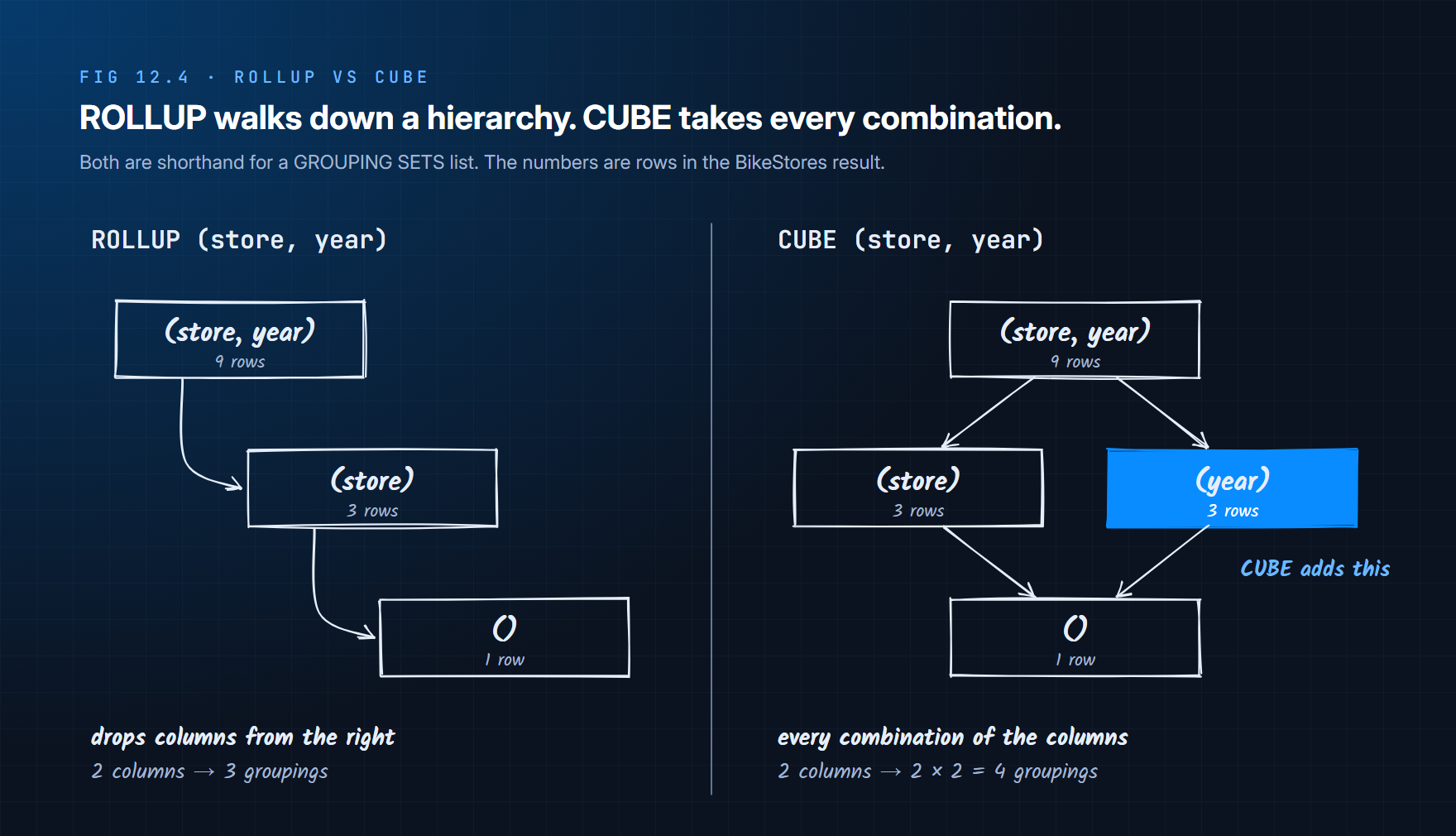
Store, then year inside the store, is a hierarchy, and subtotals for a hierarchy follow a fixed pattern: drop the last column, then the next, until nothing is left. ROLLUP writes that pattern for you:
GROUP BY ROLLUP (s.store_name, YEAR(o.order_date))

-- is exactly the same as
GROUP BY GROUPING SETS (
    (s.store_name, YEAR(o.order_date)),
    (s.store_name),
    ()
)
With n columns, ROLLUP produces n + 1 groupings. Add a third level (say ROLLUP (store, year, month)) and you get monthly detail, yearly subtotals, store subtotals and the grand total, all from one line.
Column order is the hierarchy. ROLLUP only ever drops columns from the right, so swapping them changes which subtotals you get. ROLLUP (YEAR(o.order_date), s.store_name) gives a subtotal per year instead of per store:
order_year | store_name       | revenue
-----------+------------------+------------
2016       | NULL             | 2427378.53
2017       | NULL             | 3447208.24
2018       | NULL             | 1814529.79
NULL       | NULL             | 7689116.56
(plus the 9 detail rows)
You will also meet an older spelling, GROUP BY s.store_name, YEAR(o.order_date) WITH ROLLUP. It does the same thing but is kept only for backward compatibility; use ROLLUP (...) in new code.
ROLLUP answers "store subtotals" or "year subtotals", never both. When the manager asks for both at once, you need the other shorthand.
12.4 CUBE: Every Combination
CUBE produces a subtotal for every combination of the listed columns: all of them, each one on its own, and none.
GROUP BY CUBE (s.store_name, YEAR(o.order_date))

-- is exactly the same as
GROUP BY GROUPING SETS (
    (s.store_name, YEAR(o.order_date)),
    (s.store_name),
    (YEAR(o.order_date)),
    ()
)
On BikeStores it returns 16 rows: the 13 from ROLLUP plus one total per year across all stores.
store_name       | order_year | revenue
-----------------+------------+------------
...the 9 detail rows and 3 store subtotals...
NULL             | 2016       | 2427378.53
NULL             | 2017       | 3447208.24
NULL             | 2018       | 1814529.79
NULL             | NULL       | 7689116.56
(16 rows)
| ROLLUP | CUBE | |
|---|---|---|
| Groupings from n columns | n + 1 | 2ⁿ |
| From 2 columns | 3 | 4 |
| From 3 columns | 4 | 8 |
| Does column order matter? | Yes, it is the hierarchy | No |
| Fits | Drill-down: store → year → month | Cross-tab: every slice of every dimension |
That 2ⁿ is the reason to reach for CUBE carefully. Four columns already mean 16 groupings, most of which nobody reads.
Every result so far has the same weakness: it uses NULL to mean "total", and NULL already means something else.
12.5 Labelling the Totals: GROUPING() and GROUPING_ID()
sales.orders has 170 orders that have not shipped, so their shipped_date is NULL. Roll up order counts by ship year:
SELECT
    YEAR(o.shipped_date) AS shipped_year,
    COUNT(*) AS orders,
    GROUPING(YEAR(o.shipped_date)) AS is_total
FROM sales.orders AS o
GROUP BY ROLLUP (YEAR(o.shipped_date));
shipped_year | orders | is_total
-------------+--------+---------
NULL         | 170    | 0
2016         | 620    | 0
2017         | 669    | 0
2018         | 156    | 0
NULL         | 1615   | 1
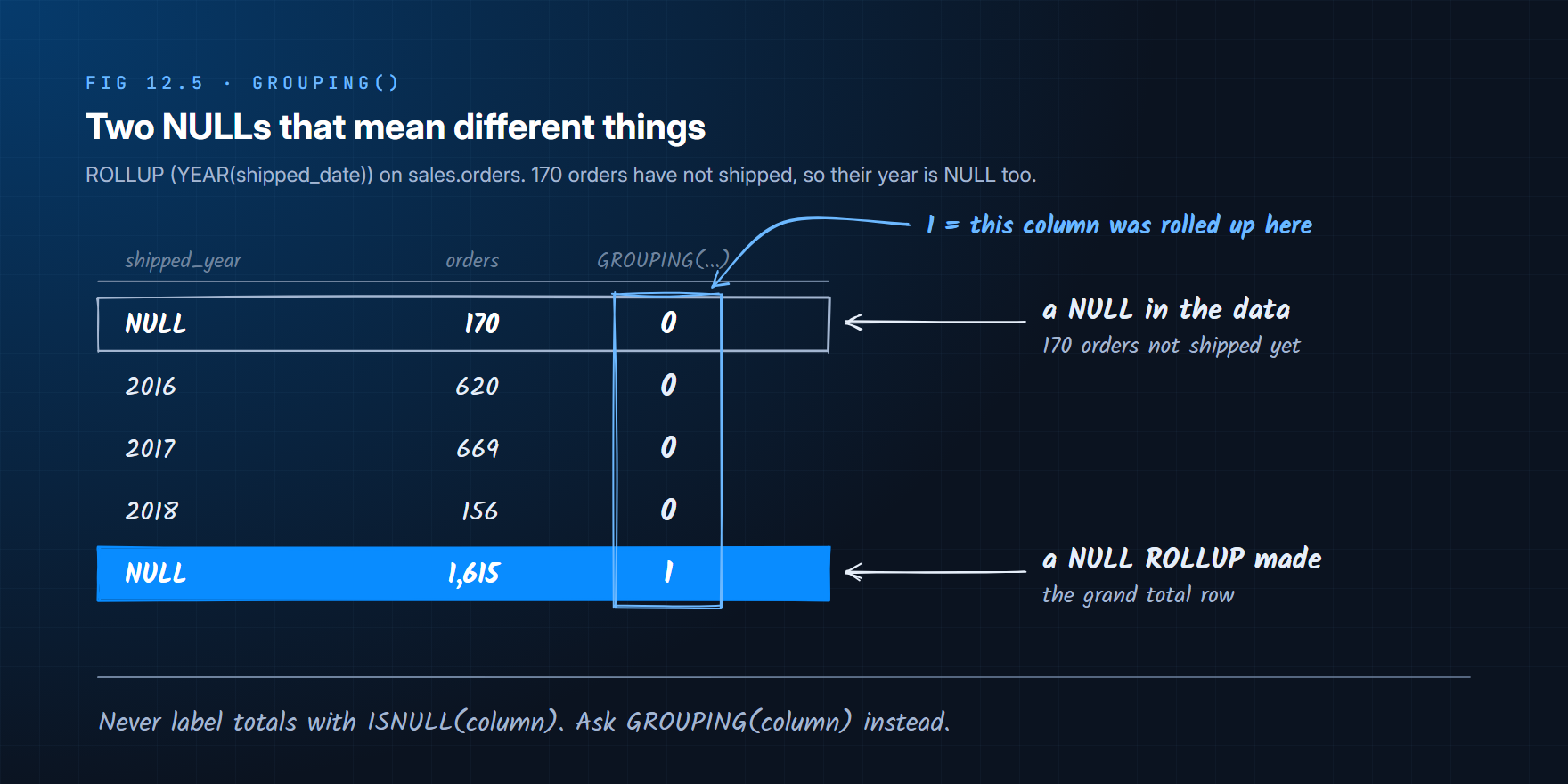
Two rows say NULL, and they mean completely different things. A label like ISNULL(shipped_year, 'Total') would call the 170 unshipped orders a total.
GROUPING(column) returns 1 when that column was rolled up in this row, 0 when it holds a real value. Use it, never the NULL, to label totals. Here is the manager's report with readable labels and subtotals in the right places:
SELECT
    CASE WHEN GROUPING(s.store_name) = 1 THEN 'All stores'
         ELSE s.store_name END AS store,
    CASE WHEN GROUPING(YEAR(o.order_date)) = 1 THEN 'All years'
         ELSE CAST(YEAR(o.order_date) AS VARCHAR(4)) END AS order_year,
    CAST(SUM(oi.quantity * oi.list_price * (1 - oi.discount)) AS DECIMAL(12, 2)) AS revenue
FROM sales.orders AS o
INNER JOIN sales.order_items AS oi ON oi.order_id = o.order_id
INNER JOIN sales.stores AS s ON s.store_id = o.store_id
GROUP BY ROLLUP (s.store_name, YEAR(o.order_date))
ORDER BY GROUPING(s.store_name), s.store_name,
         GROUPING(YEAR(o.order_date)), YEAR(o.order_date);
store            | order_year | revenue
-----------------+------------+------------
Baldwin Bikes    | 2016       | 1590598.88
Baldwin Bikes    | 2017       | 2479688.40
Baldwin Bikes    | 2018       | 1145464.00
Baldwin Bikes    | All years  | 5215751.28
Rowlett Bikes    | 2016       | 271286.14
Rowlett Bikes    | 2017       | 404611.61
Rowlett Bikes    | 2018       | 191644.50
Rowlett Bikes    | All years  | 867542.24
Santa Cruz Bikes | 2016       | 565493.51
Santa Cruz Bikes | 2017       | 562908.24
Santa Cruz Bikes | 2018       | 477421.29
Santa Cruz Bikes | All years  | 1605823.04
All stores       | All years  | 7689116.56
The ORDER BY uses GROUPING() too: sorting on it puts each subtotal after its detail rows and the grand total last.
GROUPING_ID(col1, col2, ...) packs the GROUPING() bits of several columns into one number, first column as the highest bit, so each kind of row gets one code. For CUBE (store, year):
| store rolled up | year rolled up | GROUPING_ID(store, year) | Row is |
|---|---|---|---|
| 0 | 0 | 0 | Store and year detail |
| 0 | 1 | 1 | Store subtotal |
| 1 | 0 | 2 | Year total across stores |
| 1 | 1 | 3 | Grand total |
One CASE GROUPING_ID(...) then labels every row type, which is what the next section does.
NULL is data; GROUPING() is structure. Any column that can hold a real NULL will eventually collide with a subtotal row. Label totals with GROUPING(), and the report stays right on the day the data changes.
12.6 Putting It Together
The quarter-close dashboard needs 2017 revenue two ways, by store and by product category, plus the company total. It never needs store and category together, so CUBE would build 21 store-and-category rows only to throw them away. GROUPING SETS asks for exactly what the dashboard shows:
SELECT
    CASE GROUPING_ID(s.store_name, c.category_name)
        WHEN 1 THEN 'Store'
        WHEN 2 THEN 'Category'
        WHEN 3 THEN 'All'
    END AS breakdown,
    COALESCE(s.store_name, c.category_name, 'Total 2017') AS label,
    CAST(SUM(oi.quantity * oi.list_price * (1 - oi.discount)) AS DECIMAL(12, 2)) AS revenue
FROM sales.orders AS o
INNER JOIN sales.order_items AS oi ON oi.order_id = o.order_id
INNER JOIN sales.stores AS s ON s.store_id = o.store_id
INNER JOIN production.products AS p ON p.product_id = oi.product_id
INNER JOIN production.categories AS c ON c.category_id = p.category_id
WHERE o.order_date >= '2017-01-01'
  AND o.order_date <  '2018-01-01'
GROUP BY GROUPING SETS (
    (s.store_name),
    (c.category_name),
    ()
)
ORDER BY GROUPING_ID(s.store_name, c.category_name), revenue DESC;
breakdown | label               | revenue
----------+---------------------+------------
Store     | Baldwin Bikes       | 2479688.40
Store     | Santa Cruz Bikes    | 562908.24
Store     | Rowlett Bikes       | 404611.61
Category  | Mountain Bikes      | 1120941.67
Category  | Road Bikes          | 1046078.09
Category  | Cruisers Bicycles   | 380558.33
Category  | Cyclocross Bicycles | 294834.97
Category  | Electric Bikes      | 292075.12
Category  | Comfort Bicycles    | 165814.58
Category  | Children Bicycles   | 146905.47
All       | Total 2017          | 3447208.24
COALESCE is safe here, unlike ISNULL in section 12.5, because store and category names are never NULL in BikeStores: the only NULLs in those columns are the ones GROUPING SETS created. When that is not guaranteed, label with GROUPING_ID alone.
| You need | Use |
|---|---|
| Subtotals down one hierarchy (store → year → month) | ROLLUP |
| Totals for every combination of a few dimensions | CUBE |
| A specific, hand-picked list of groupings | GROUPING SETS |
To tell a total row from a real NULL | GROUPING() / GROUPING_ID() |
Summary
A plain GROUP BY produces one level of grouping. GROUPING SETS produces several in one query and one pass over the data: each set in its list is an ordinary grouping, () is the grand total, and columns a set omits come back as NULL. ROLLUP (a, b) is shorthand for the hierarchy (a, b), (a), (), so column order matters. CUBE (a, b) is shorthand for every combination, 2ⁿ groupings. Because a rolled-up column shows as NULL, use GROUPING() (one column) or GROUPING_ID() (several, as bits) to label and sort total rows, never ISNULL on the column itself.
Check Your Understanding
Flashcards
Read the question, answer it in your head, then open the card.
01 / 08What does
GROUP BY GROUPING SETS ((a, b), (a), ())return?The results of three GROUP BYs stacked in one result: one row per(a, b), one row pera, and one grand-total row.02 / 08What does the empty grouping set
()mean?Group by nothing: the whole table becomes one group, so it produces the grand total row.03 / 08Which grouping sets does
ROLLUP (store, year)produce?(store, year),(store)and(). It drops columns from the right, one at a time.04 / 08Which grouping sets does
CUBE (store, year)produce?(store, year),(store),(year)and(): every combination of the columns.05 / 08How many grouping sets do ROLLUP and CUBE make from n columns?
ROLLUP makes n + 1. CUBE makes 2 to the power n, so three columns already give 8.06 / 08Does column order matter in ROLLUP? In CUBE?
In ROLLUP, yes: it decides which subtotals you get. In CUBE, no: every combination is produced either way.07 / 08What does
GROUPING(column)return?1 when that column was rolled up in the current row (a subtotal or total), 0 when it holds a real grouped value.08 / 08Why is
ISNULL(column, 'Total')a dangerous way to label total rows?A real NULL in the data looks identical. Onsales.orders, 170 unshipped orders would be labelled as the total.
Quiz
Pick an answer to see why each option is right or wrong; questions marked Select all that apply need every correct option ticked before you check.
Exercises
12.1 - Write a query that returns the number of orders per store and per order_status, with a subtotal per store and a grand total, using ROLLUP. Then rewrite it with GROUPING SETS.
12.2 - Change exercise 12.1 to CUBE. How many rows does it return, and which rows are new? Label every row type with GROUPING_ID.
12.3 - Report total stock (production.stocks.quantity) by store and brand, with brand subtotals inside each store and a grand total. Label the subtotal rows 'All brands' and the total row 'All stores'.
12.4 - The query below labels its totals wrongly on some rows. Explain which rows and why, and fix it:
SELECT ISNULL(CAST(YEAR(shipped_date) AS VARCHAR(4)), 'Total') AS shipped_year,
       COUNT(*) AS orders
FROM sales.orders
GROUP BY ROLLUP (YEAR(shipped_date));
12.5 - Think About It: A finance team asks for "every possible subtotal" across store, year, month, category and brand. How many grouping sets would CUBE produce? What would you ask them before writing the query, and which clause would you probably use instead?