Chapter 7: Window Functions
A window function performs a calculation across a set of rows related to the current row. Unlike aggregate functions, window functions do not collapse rows into a single result. Every row keeps its identity and receives a computed value based on its window.
function_name() OVER (
    [PARTITION BY partition_expression]
    [ORDER BY sort_expression]
    [frame_specification]
)
The OVER clause defines the window. Without it, the function is a regular aggregate.
| Window Function | Category | Purpose |
|---|---|---|
ROW_NUMBER() | Ranking | Sequential integer per row |
RANK() | Ranking | Rank with gaps on ties |
DENSE_RANK() | Ranking | Rank without gaps on ties |
NTILE(n) | Ranking | Distribute rows into n buckets |
LAG() | Value | Access a previous row value |
LEAD() | Value | Access a following row value |
FIRST_VALUE() | Value | First value in the window |
LAST_VALUE() | Value | Last value in the window |
SUM() OVER | Aggregate | Running or partitioned total |
AVG() OVER | Aggregate | Running or partitioned average |
7.1 OVER Clause
The OVER clause turns an aggregate into a window function. It defines which rows the function sees for each row it processes.
PARTITION BY  - divides rows into groups (optional)
ORDER BY      - defines row order within each group
Frame         - restricts which rows in the group are included (optional)
SELECT
    product_name,
    list_price,
    AVG(list_price) OVER () AS overall_avg
FROM production.products;
product_name              | list_price | overall_avg
----------------------------+------------+-------------
Trek 820 - 2016               | 379.99     | 1410.45
Surly Wednesday Frameset      | 999.99     | 1410.45
Trek Domane SLR 9 Disc         | 11999.99   | 1410.45
OVER() with no arguments applies the function across all rows. Each row keeps its own list_price and gets the same overall_avg. A plain AVG() without OVER would collapse all rows into one number.
7.2 ROW_NUMBER()
Assigns a sequential integer to each row. Starts at 1 for the first row in each partition.
ROW_NUMBER() OVER (
    [PARTITION BY partition_expression]
    ORDER BY sort_expression
)
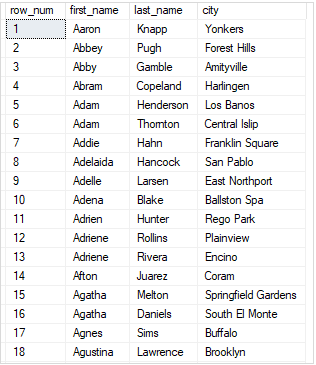
Over the Whole Result Set
SELECT
    ROW_NUMBER() OVER (ORDER BY first_name) AS row_num,
    first_name,
    last_name,
    city
FROM sales.customers;
Over Partitions
SELECT
    first_name,
    last_name,
    city,
    ROW_NUMBER() OVER (
        PARTITION BY city
        ORDER BY first_name
    ) AS row_num
FROM sales.customers
ORDER BY city;
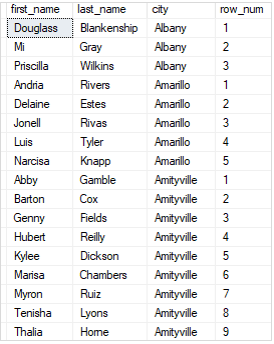
The row number resets to 1 whenever the city changes. PARTITION BY city is what causes the reset.
Pagination with ROW_NUMBER
WITH cte_customers AS (
    SELECT
        ROW_NUMBER() OVER (ORDER BY first_name, last_name) AS row_num,
        customer_id,
        first_name,
        last_name
    FROM sales.customers
)
SELECT customer_id, first_name, last_name
FROM cte_customers
WHERE row_num > 10 AND row_num <= 20;

The CTE assigns row numbers. The outer query filters to rows 11-20. This is how application-layer pagination works in SQL.
7.3 RANK() and DENSE_RANK()
Both assign a rank to each row. They differ in how they handle ties.
RANK() leaves gaps after ties. DENSE_RANK() does not.
SELECT
    product_name,
    list_price,
    RANK()       OVER (ORDER BY list_price DESC) AS rank_num,
    DENSE_RANK() OVER (ORDER BY list_price DESC) AS dense_rank_num
FROM production.products;
product_name              | list_price | rank_num | dense_rank_num
----------------------------+------------+----------+----------------
Trek Domane SLR 9 Disc       | 11999.99   | 1        | 1
Trek Powerfly 8 FS Plus      | 4999.99    | 2        | 2
Trek Powerfly 7 FS           | 4999.99    | 2        | 2
Trek Fuel EX 9.8             | 5299.99    | 4        | 3
RANK() jumps from 2 to 4 after the tie at rank 2. DENSE_RANK() goes 1, 2, 2, 3 with no gap. Use DENSE_RANK() when you need consecutive values. Use RANK() when the gap matters for position reporting.
Top N Per Group with RANK
WITH ranked AS (
    SELECT
        product_name,
        category_id,
        list_price,
        RANK() OVER (
            PARTITION BY category_id
            ORDER BY list_price DESC
        ) AS price_rank
    FROM production.products
)
SELECT product_name, category_id, list_price
FROM ranked
WHERE price_rank <= 2;
Interview Angle "What is the difference between RANK and DENSE_RANK?" RANK assigns the same rank to ties and skips the next rank value. DENSE_RANK assigns the same rank to ties but never skips values. If two products share rank 2, RANK gives the next product rank 4. DENSE_RANK gives it rank 3.
7.4 NTILE()
Divides rows into a specified number of approximately equal buckets and assigns a bucket number to each row.
SELECT
    product_name,
    list_price,
    NTILE(4) OVER (ORDER BY list_price) AS price_quartile
FROM production.products
ORDER BY list_price;
product_name          | list_price | price_quartile
------------------------+------------+----------------
Strider Classic 12      | 89.99      | 1
Trek 820 - 2016          | 379.99     | 1
Surly Wednesday          | 999.99     | 2
Heller Shagamaw Frame    | 1320.99    | 2
Trek Fuel EX 8 29        | 2899.99    | 3
Trek Domane SLR 9 Disc   | 11999.99   | 4
Quartile 1 contains the cheapest 25% of products. Quartile 4 contains the most expensive 25%. Used for percentile segmentation and data distribution analysis.
7.5 LAG() and LEAD()
LAG() accesses the value of a previous row. LEAD() accesses the value of a following row. Both are useful for period-over-period comparisons without a self-join.
LAG  (expression [, offset [, default]]) OVER (partition_clause order_clause)
LEAD (expression [, offset [, default]]) OVER (partition_clause order_clause)
offset is the number of rows back (LAG) or forward (LEAD). Default is 1. If the offset goes beyond the partition boundary, default is returned (NULL if not specified).
SELECT
    customer_id,
    order_id,
    order_date,
    LAG(order_date, 1)  OVER (PARTITION BY customer_id ORDER BY order_date) AS prev_order_date,
    LEAD(order_date, 1) OVER (PARTITION BY customer_id ORDER BY order_date) AS next_order_date
FROM sales.orders;
customer_id | order_id | order_date  | prev_order_date | next_order_date
-------------+----------+-------------+-----------------+------------------
1           | 1        | 2016-01-15  | NULL            | 2017-03-22
1           | 45       | 2017-03-22  | 2016-01-15      | 2018-11-04
1           | 312      | 2018-11-04  | 2017-03-22      | NULL
2           | 18       | 2016-02-20  | NULL            | 2017-08-10
The first order per customer has NULL for prev_order_date. The last has NULL for next_order_date. The partition resets for each customer.
7.6 FIRST_VALUE() and LAST_VALUE()
FIRST_VALUE() returns the first value in the window. LAST_VALUE() returns the last.
SELECT
    product_name,
    category_id,
    list_price,
    FIRST_VALUE(product_name) OVER (
        PARTITION BY category_id
        ORDER BY list_price
    ) AS cheapest_in_category,
    LAST_VALUE(product_name) OVER (
        PARTITION BY category_id
        ORDER BY list_price
        RANGE BETWEEN UNBOUNDED PRECEDING AND UNBOUNDED FOLLOWING
    ) AS most_expensive_in_category
FROM production.products;
product_name              | category_id | list_price | cheapest_in_category | most_expensive_in_category
----------------------------+-------------+------------+----------------------+----------------------------
Strider Classic 12           | 1           | 89.99      | Strider Classic 12   | Trek Domane SLR 9 Disc
Trek 820 - 2016               | 1           | 379.99     | Strider Classic 12   | Trek Domane SLR 9 Disc
Trek Domane SLR 9 Disc        | 1           | 11999.99   | Strider Classic 12   | Trek Domane SLR 9 Disc
LAST_VALUE()requiresRANGE BETWEEN UNBOUNDED PRECEDING AND UNBOUNDED FOLLOWINGto see all rows in the partition. Without it, the default frame stops at the current row, makingLAST_VALUE()return the current row's value instead of the partition's last.
7.7 Aggregate Window Functions
Standard aggregate functions work as window functions when paired with OVER. They compute running totals, moving averages, or partition-level summaries without collapsing rows.
Running Total
SELECT
    o.order_id,
    o.order_date,
    oi.list_price,
    SUM(list_price) OVER(
        ORDER BY order_date
        ROWS BETWEEN UNBOUNDED PRECEDING AND CURRENT ROW
    ) AS running_total
FROM sales.order_items AS oi
INNER JOIN sales.orders AS o
ON o.order_id = oi.order_id
ORDER BY o.order_date;
order_id | order_date  | list_price | running_total
---------+-------------+------------+---------------
1        | 2016-01-15  | 379.99     | 379.99
2        | 2016-01-15  | 999.99     | 1379.98
3        | 2016-02-20  | 1320.99    | 2700.97
Partition Summary (No Row Collapse)
SELECT
    product_name,
    category_id,
    list_price,
    AVG(list_price) OVER (PARTITION BY category_id) AS category_avg
FROM production.products;
Each product row keeps its own list_price and gets the average for its category. No GROUP BY, no loss of individual rows.
7.8 Window Frame
The window frame specifies which rows within the partition are included in the calculation relative to the current row.
ROWS BETWEEN UNBOUNDED PRECEDING AND CURRENT ROW  -- from first row to current
ROWS BETWEEN 1 PRECEDING AND 1 FOLLOWING           -- current row plus one on each side
RANGE BETWEEN UNBOUNDED PRECEDING AND UNBOUNDED FOLLOWING  -- entire partition
Partition rows: [1, 2, 3, 4, 5]
Current row: 3

ROWS BETWEEN UNBOUNDED PRECEDING AND CURRENT ROW  -> [1, 2, 3]
ROWS BETWEEN 1 PRECEDING AND 1 FOLLOWING          -> [2, 3, 4]
ROWS BETWEEN UNBOUNDED PRECEDING AND UNBOUNDED FOLLOWING -> [1, 2, 3, 4, 5]
ROWS operates on physical row positions. RANGE operates on logical value groups. For most running total calculations, ROWS is the correct choice.
7.9 Putting It Together
Sales report showing each order's rank within its store, the running revenue total, and the comparison to the previous order.
SELECT
    o.order_id,
    o.store_id,
    o.order_date,
    SUM(oi.quantity * oi.list_price * (1 - oi.discount)) AS order_revenue,
    RANK() OVER (
        PARTITION BY o.store_id
        ORDER BY SUM(oi.quantity * oi.list_price * (1 - oi.discount)) DESC
    ) AS revenue_rank_in_store,
    SUM(SUM(oi.quantity * oi.list_price * (1 - oi.discount))) OVER (
        ORDER BY o.order_date
        ROWS BETWEEN UNBOUNDED PRECEDING AND CURRENT ROW
    ) AS running_total
FROM sales.orders o
INNER JOIN sales.order_items oi ON o.order_id = oi.order_id
GROUP BY o.order_id, o.store_id, o.order_date
ORDER BY o.order_date;
order_id | store_id | order_date  | order_revenue | revenue_rank_in_store | running_total
---------+----------+-------------+---------------+-----------------------+--------------
1        | 1        | 2016-01-15  | 1049.99       | 3                     | 1049.99
2        | 2        | 2016-01-15  | 1899.99       | 1                     | 2949.98
3        | 1        | 2016-02-20  | 2520.99       | 1                     | 5470.97
Summary
Window functions compute values across a set of rows without collapsing them. The OVER clause defines the window. PARTITION BY divides rows into groups. ORDER BY sets the sort order within each group. ROW_NUMBER() assigns sequential integers. RANK() assigns ranks with gaps on ties. DENSE_RANK() assigns ranks without gaps. NTILE(n) distributes rows into n buckets. LAG() and LEAD() access previous and following row values. FIRST_VALUE() and LAST_VALUE() return boundary values in the window. Aggregate functions used with OVER compute running totals and partition summaries without grouping. The window frame (ROWS BETWEEN) controls which rows within the partition participate in the calculation.
Exercises
7.1 - Assign a sequential row number to each product ordered by list_price descending. Then assign a second row number partitioned by category_id, resetting within each category.
7.2 - Write a query that returns each product with its RANK() and DENSE_RANK() by list_price descending within its category. Show a product where the two rankings differ.
7.3 - Use LAG() to calculate the month-over-month revenue change for each store. Show the current month revenue, the previous month revenue, and the difference.
7.4 - Use NTILE(5) to divide all products into five price bands. Return the product name, price, and band number.
7.5 - Write a query that shows each order with a running total of revenue ordered by order_date. Use ROWS BETWEEN UNBOUNDED PRECEDING AND CURRENT ROW.
7.6 - Think About It: Why does LAST_VALUE() require RANGE BETWEEN UNBOUNDED PRECEDING AND UNBOUNDED FOLLOWING to return the actual last value in the partition, while FIRST_VALUE() works correctly with the default frame? What is the default window frame when ORDER BY is specified, and how does that explain the behavior?